• Resolved shemakeswebsites

    (@shemakeswebsites)


    I’m having a very frustrating issue with the Donor Dashboard and donation history in general. First off, I have 4 donations that I have made to the site. I am the site’s administrator. When I access my donation history [donation-history], it shows that I haven’t made any donations.

    When I try to access my Donor Dashboard, I get this message: The account you are currently logged into the site with does not have an associated donor dashboard. Donate now or contact the site administrator to associate this WordPress user with a donor dashboard.

    I have already sent and clicked on the link from the verification email several times. It just loops back to this message. Also, I am currently logged in to my admin account which also has the Give Donor capability while trying to view my Donor Dashboard. I’ve even tried to log in to my admin account from the Donor Dashboard on a private browser, and it will loop back to that message.

    On another note, when I tried to get to the Donor Dashboard with email access, I was given access that way through the link provided via email, which does properly reflect my donations. Not sure where to go with this but some help would be appreciated. Thank you.

Viewing 7 replies - 1 through 7 (of 7 total)
  • Plugin Contributor Ben Meredith

    (@benmeredithgmailcom)

    Hi @shemakeswebsites!

    Glad you reached out, here.

    We’ve had a few issues where folks are not seeing the donor dashboard correctly, and have resolved several small bugs related to it in recent releases. So the first step is to make sure that you’ve updated GiveWP to version 2.10.3.

    Next, make sure that if you are using any caching, you’ve excluded the donor dashboard page from it.

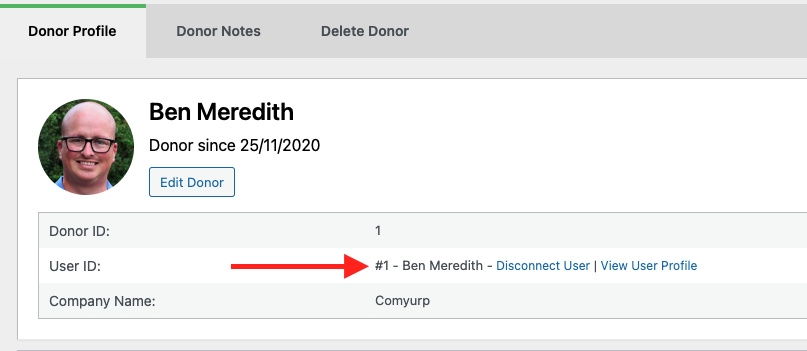
    Finally, make sure that the Donor is correctly associated with the WordPress user. To do that, navigate to Donations > Donors and click to view the donor associated with your email address. At the top, you can see whether it’s associated correctly with the user. Here’s a screenshot of that: https://givewp.com/wp-content/uploads/2021/04/Screen-Shot-2021-04-29-at-8.54.29-AM.png

    ​​Let me know if that resolves things, or if you need further assistance. ​Thanks for using GiveWP! Have a great day.

    Thread Starter shemakeswebsites

    (@shemakeswebsites)

    Hi Ben,

    Thank you.

    So for some reason my donations weren’t associated with my account even though I made then while I was logged into my account. I’ve linked them, and now my Donor Dashboard loads for me. However, my donations still don’t show up, even though they do appear on my backend profile.

    I’ve had the Donor Dashboard excluded from caching.

    So now I have just a couple of questions – why aren’t my donations appearing? And will I need to manually connect all of my past donors? I think that there should be some documentation on that donor association process, I am guessing this is what indicates that: contact the site administrator to associate this WordPress user with a donor dashboard, but there’s nothing online to describe this.

    Thank you!!

    Thread Starter shemakeswebsites

    (@shemakeswebsites)

    Another updated, I’m seeing this 403 error when I load my Donor Dashboard, probably why my history won’t load. I’ve also cleared my cache several times just to be sure.

    /wp-json/give-api/v2/donor-dashboard/donations

    Plugin Support Rick Alday

    (@mrdaro)

    @shemakeswebsites

    Is this on a multisite installation? There’s a known issue with multisite installations: https://feedback.givewp.com/bug-reports/p/donor-dashboard-should-work-on-a-subdomain-multisite

    Plugin Support Rick Alday

    (@mrdaro)

    Do you still need assistance here? Feel free to reopen this ticket if you need further assistance and we’ll happily help you.

    Thanks for using GiveWP! Have a great day.

    is that possible if when new user register he can get access to donor dashboard without any donations?? if yes please let me know how. whenever new user register and access the dashboard this message show “The account you are currently logged into the site with does not have an associated donor dashboard. Donate now or contact the site administrator to associate this WordPress user with a donor dashboard.”

    I gave the default to user as wpgive donor.

    • This reply was modified 4 years, 10 months ago by aheart037.
    Plugin Support Rick Alday

    (@mrdaro)

    Hi @aheart037,

    That’s not possible. One workaround could be to create a test donation using the donor’s name and email. Then delete that test donation. This will create a donor profile for the user and then they could access the Donor Dashboard.

    Test that procedure to see if it works.

    FYI: This support ticket had been closed for 2 months. We rarely check closed tickets so in the future, open a new support ticket so we don’t miss your questions.

    Thanks!

Viewing 7 replies - 1 through 7 (of 7 total)

The topic ‘Donor Dashboard’ is closed to new replies.