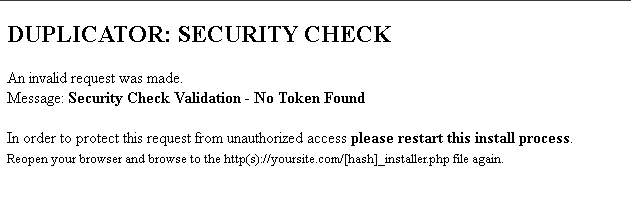
At the moment I’m working in a new wordpress website and I’m using duplicator to create backups and to migrate from localhost to a live server and vice versa. For now I didn’t faced any problems in localhost and a amazon server, the problem is right now we’re moving the website to this host: https://www.amen.pt/hosting/hosting-wordpress-gerido/ . After I launch the installer.php I got this error:
Where I can find the hash (from this image)? Is the first time I’m facing this bug and is getting frustrated… Is this related to the host? Hope to get some help to fix this problem.
For the backup restoration I use 2 files, the backup 20231227_nvp_hash_20231227165828_archive.zip (gonna censor the hash & my website for security reasons) and installer. I just put both of them on www folder on host.
Then I go to the example.com/installer.php and I get this result and I press send anyway:
If I try to use the solution on the last picture example.com/hash_installer.php (the hash I took from the backup file and renamed the installer.php) I have the same result. So what I can do in this situation? Like I said this didn’t happen before when I tested on a amazon server and on my localhost.
This reply was modified 2 years, 5 months ago by slimk.
UPDATE: From what I saw in logs, the installer.php for some reason invoke http requests (first image) and then the host tries to show the page as https. So in this case should I disable https temporarily in order to install only the backup or theres another solution?
The installer doesn’t change from https to http, it uses the protocol used in the request URL where you call the installer.php.
This might be a caching issue on your server. Please purge the server cache and retry the backup restoration.
If this doesn’t work, we will need to investigate the issue, please contact us through this form to investigate this issue: https://duplicator.com/contact/?form=1
We understand that you’re facing an issue that requires further investigation, and it may involve sharing log files containing sensitive information about your website. Unfortunately, such sharing is not allowed in ww.wp.xz.cn forums for security reasons.
To ensure your privacy and get the necessary support, kindly contact us through the form on our Contact Us page, and we’ll be more than happy to assist you promptly: