Hi,
You can edit through Admin > Appearance > Customize > Front end sections > Our focus 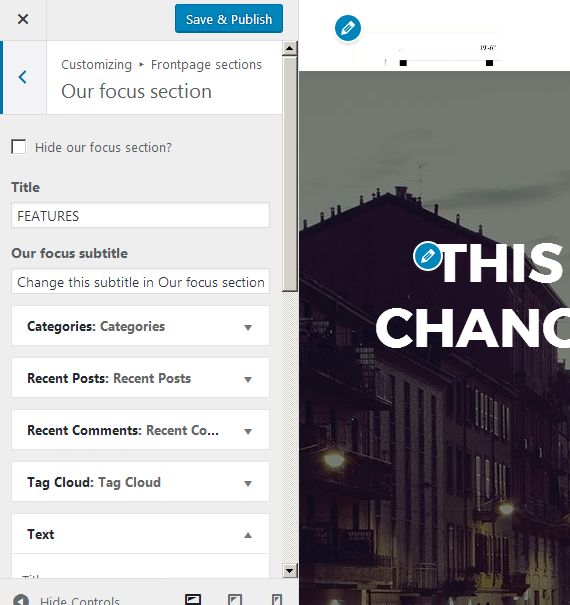 section. Refer the screenshot.
Thanks
Mohammad
Thread Starter
 JMGil
JMGil
(@jmgil)
Hi, and thanks for your reply.
That is what we do. But, then, on clicking on the little triangles to edit, we see a line stating “There are no options for this widget”.
This must be a bug of the current version, since we have done this before with no prob.
What can we do to solve this?
Cheers
João
Hi,
Please provide the screenshot for this bug.
Thanks
Mohammad
Thread Starter
JMGil
(@jmgil)
Hi,
Got your issue. make sure that you have latest wordpress, themes and plugins. Please deactivate all plugins except the Zerif’s recommended.
Thanks
Mohammad
Thread Starter
JMGil
(@jmgil)
OK, there was something new (we hadn’t seen it before) from Zerif to update, precisely dealing with the front page widget.
We had no other widgets to have conflicts with.
Done and solved. Thanks
Hi,
Glad 🙂 to know this.
Thanks
Mohammad
Hi — I’m having the same exact issue. I’ve updated WordPress to 4.7.4 and have turned off all plugins except the Zerif’s recommended plugins (ThemeIsle Companion 1.0.2, Zerif Lite Transition 1.0.0, and PirateForms (1.2.2) — yet the issue persists. All other widgets work but I can’t edit Our Focus widgets. I only get the message “There are no options for this widget.” Please advise. Thank you.


