Hi @qwack,
Thank you so much for your kind words and support — it truly means a lot to us.
The initial pause before the scroll begins can sometimes feel like a hiccup, especially when the element is positioned at the very top of the page. Ideally, the animation should kick off immediately to maintain a smooth user experience.
The current behavior you’re seeing is likely due to a built-in delay that controls when the animation starts rendering on page load. To help us assist you further, could you please share the following details?
- A link to the page where the issue is visible (if it’s not on a local environment).
- The exact widget settings you’re using for the Scrolling Image.
- Your current HappyAddons and Elementor versions.
In the meantime, as a workaround, you can try adjusting the animation delay or speed settings (if available within the widget), or using custom CSS/JS to force the scroll to begin on page load. If needed, please contact us through the website for further assistance.
Rest assured, we’re here to make sure everything works just the way you envision.
Thread Starter
 qwack
qwack
(@qwack)
Hello @saifislam01,
Thank you very much for your response.
Unfortunately, I work locally. I use the latest versions of Elementor Pro and Happy Addons.
I reproduced this quickly under : https://projet.webbih.com/wptest34/
What bothers me is that you have to wait for it to scroll a bit and then it continues without interruption.
I would really like this to scroll directly.
I quickly found a script on Google, and look for example here how it starts right away : https://projet.webbih.com/wptest34/test.htm
Do you have an idea for code to insert ?
Thank you very much for your help.
Hi @qwack,
Thanks for sharing the details!
To make the scroll start immediately without the delay, you can try adding a small tweak to your JavaScript. Here’s a quick solution you can try:
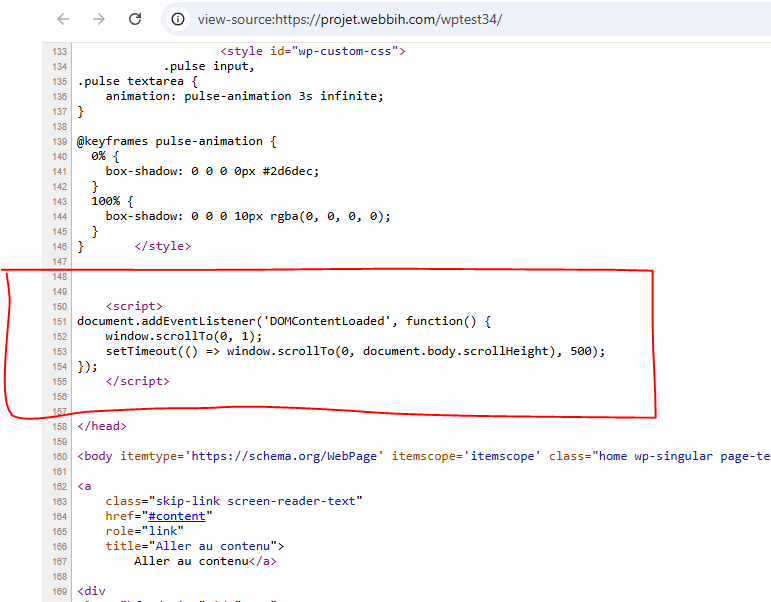
document.addEventListener('DOMContentLoaded', function() {
    window.scrollTo(0, 1);
    setTimeout(() => window.scrollTo(0, document.body.scrollHeight), 500);
});
You can add this code in the footer or the custom JS section in Elementor. It should ensure that the page starts scrolling immediately as expected.
Let me know how it goes or if you need any further assistance!
Thread Starter
qwack
(@qwack)
Hello @saifislam01,
Thank you very much for your response.
https://projet.webbih.com/wptest34/
I inserted the code as provided, but it does not work.
https://i.postimg.cc/9QbtdGq4/Capture.png
Thank you very much for your help.
Hi @qwack,
Thanks for sharing the update. Please contact us through the website for further assistance.
Hi @qwack,
Just checking in — as we haven’t heard back from you in a while, we’ll go ahead and close this thread for now.
If you still need assistance or would like to revisit this topic in the future, feel free to open a new thread or reach out to us directly through our support portal. We’re always here to help!
Thanks again for using HappyAddons and for being part of our community!