Hello @stuartlloyd
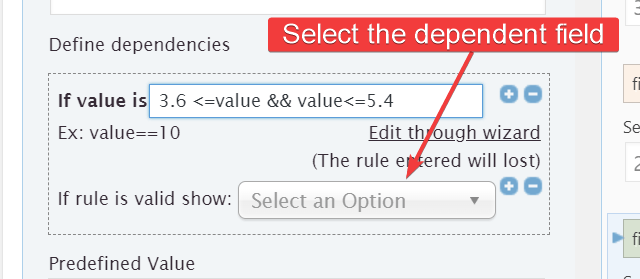
Thank you very much for using our plugin. In the calculated field settings, click on the “Edit rule manually” link, enter the validation rule manually 3.6 <=value && value<=5.4 and select the dependent field:
Best regards.
Hi @codepeople
I have another question. In the calculations how can I limit the amount of digits in a value.
Say my value is 9.674399999999999 how can I make it display say 9.67?
Many Thanks
Hello @stuartlloyd,
Please, use the PREC operation as the outermost operation in the equation.
PREC(X, Y) rounds the number X with Y decimals.
For example, if you have the equation fieldname1*fieldname2, and you want the result with two decimal places, you should edit the equation as follows: PREC(fieldname1*fieldname2, 2)
More information about rounding operations by reading the following post in the plugin’s blog:
https://cff.dwbooster.com/blog/2020/09/20/rounding-numbers
Best regards.


