After update, same problem, me too!
Plugin Contributor
 webnus
(@webnus)
Hello All,
Thank you for your reports,
We’ve fixed this issue in the latest version, v6.2.7. Please update to this version:
https://ww.wp.xz.cn/plugins/modern-events-calendar-lite/#developers
https://webnus.net/modern-events-calendar/change-log/
Best Regards
Hi,
after update, some events are duplicated (same event twice)
Best Regards
Plugin Contributor
webnus
(@webnus)
Hi @bristol06,
Please update your events one by one (just open the edit page and click on the update button – without changing anything); Your issue will be solved. Then if your issue persists again, please send your website URL (the issue link) + your server configuration details. We’ll check it asap.
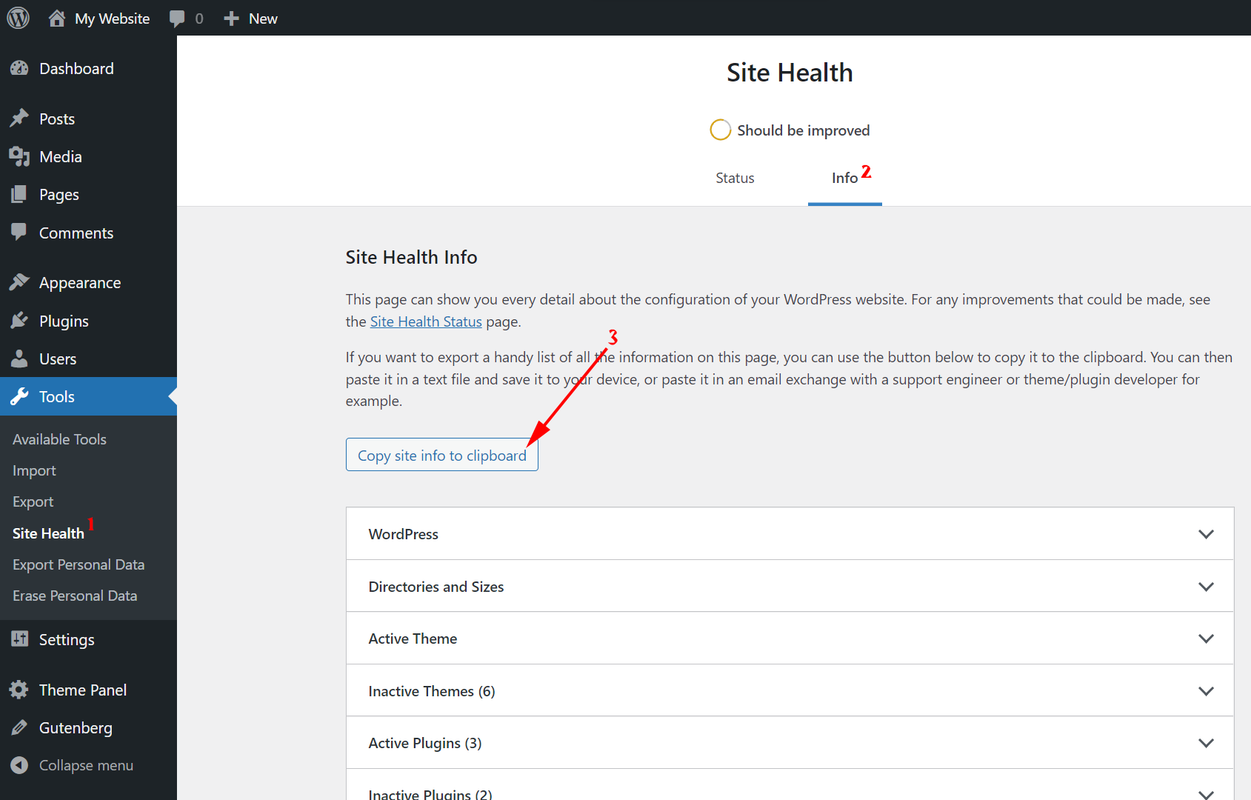
Note: to send that data, you can go to wp-dashboard > tools > site health and in the Info Tab click on “Copy site info to clipboard” to save all the required info to the clipboard: https://i.postimg.cc/TPrGsHXY/image.png then go to this link https://pastebin.com/ and paste the information URL on your email.
Best Regards
Well unfortunately after upgrading to 6.2.7 I got the error 500 again. Even after I tried to just update the event as you suggested, I got an error 500 when clicking on the event update button.
I reverted all back to 6.2.0 and it works fine.
Link is https://www.alextec.com/events/bcp-bia-workshop-english/
Plugin Contributor
webnus
(@webnus)
Hello @stratogrid2015,
It seems your server used a lot of resources. The most common reason is for page builders.
In this case, I guess your server is shared hosting, and you need to contact your host provider to increase your host resources(perhaps you will see good resources on your panel, but you should know maybe it’s shared with 10 – 100 other users- depending on the server).
For more information about the 500 error, please read this article: https://developer.mozilla.org/en-US/docs/Web/HTTP/Status/500?retiredLocale=id
and regarding the error “Allowed memory size”: https://stackoverflow.com/questions/561066/fatal-error-allowed-memory-size-of-134217728-bytes-exhausted-codeigniter-xml?rq=1
Troubleshooting on WordPress: https://ww.wp.xz.cn/support/article/faq-troubleshooting/
Best Regards
Hello,
I increased WP_MAX_MEMORY_LIMIT and WP_MAX_MEMORY_LIMIT to 512M
Updated the plug-in to 6.2.7 and got this when I was saving the event (Error 500 again).
I disabled LiteSpeed Cache altogether, the same problem.
It appears that there is a memory leak somewhere. Thank you
[15-Jan-2022 09:29:58 UTC] PHP Fatal error:  Allowed memory size of 536870912 bytes exhausted (tried to allocate 53248 bytes) in Unknown on line 0
[15-Jan-2022 09:29:58 UTC] PHP Fatal error:  Allowed memory size of 536870912 bytes exhausted (tried to allocate 663552 bytes) in /home/alextec/public_html/wp-content/plugins/litespeed-cache/src/object-cache.cls.php on line 433
[15-Jan-2022 09:29:58 UTC] PHP Fatal error:  Allowed memory size of 536870912 bytes exhausted (tried to allocate 32768 bytes) in /home/alextec/public_html/wp-content/plugins/modern-events-calendar-lite/app/skins/list/tpl.php on line 93
Plugin Contributor
webnus
(@webnus)
Hello @stratogrid2015,
Can you please export MEC settings (from MEC Settings > Import/Export > Export) and send it here.
Also, we need some screenshots from your shortcodes and single event, please send screenshot from the list below:
- Single Event > Date and time tab
- Single Event > Repeating Tab
- Shortcode > Display Settings
- Shortcode > Filter options > Expired / Ongoing tab (date options)
- MEC Settings > General Options (Timezone / date / time / Week Starts On)
- MEC Settings > Single Event
____________________
You can use an online service to upload your screenshots/files:
- https://wetransfer.com/
- https://www.dropbox.com/
- https://postimages.org/
- https://imgur.com/
- https://imgbb.com/
- And etc…
Or send them to us via this email: [email protected].
Thank you,
Best Regards
I sent it all to your support email address. Thank you.
Any update on this? I’m getting the same error even after increasing memory limit to 512m.
What I found (by trial and error) is that it crashes with 500 error if you embed a shortcode into a single event.
For example, upcoming events list on a single event.
Removing a shortcode works, but this worked in 6.2.0 just fine.