• Resolved Jorge_Molina

    (@jorge_molina)


    Good morning everybody!

    I just installed the plugin, logged in and wrote the OpenAi API Key. No other settings changed.
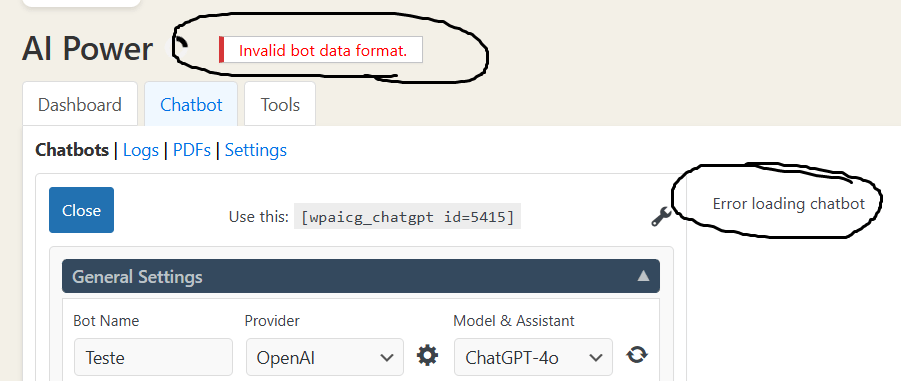
    Then, I clicked on ‘New Bot’, and without even changing anything, I get the error ‘Invalid bot data format’ and ‘Error loading chatbot”.

    Then it doesn’t matter whichever setting I change, the error will not solve, and the Bot will be inaccessible. This is happening to me every time, I am completely unable to create any ChatBot.

    Can you please share any insights? Thank you very much!

    Jorge

Viewing 5 replies - 1 through 5 (of 5 total)
  • Plugin Author senols

    (@senols)

    Hi @jorge_molina

    Sorry for late reply. Are you still having this issue?

    Thread Starter Jorge_Molina

    (@jorge_molina)

    I don’t know: I could not continue because of this issue. As I had no help, I deinstalled the plugin and wrote a custom mini-plugin to get the work done.

    Thanks for your interest,

    Jorge

    Plugin Author senols

    (@senols)

    Awesome!

    I have the same issue here. Someone could help me please?
    I already deinstalled and reinstalled the plugin (paid version) with no success.

    • This reply was modified 11 months, 2 weeks ago by eldonclayton.
    Plugin Author senols

    (@senols)

    Hi @eldonclayton,

    The root cause is MySQL’s old “utf8” character set—utf8_general_ci or utf8_unicode_ci—which cannot store 4-byte codepoints (emojis live in that space). Our plugin is trying to store chatbot greeting message with some emojis which causes the issue.

    You mentioned that you are in paid version. Per WordPress forum rules we are not allow to give support for paid users here. Could you please use “Contact Us” link in the plugin menu and raise a ticket to us. We will help you fix it.

Viewing 5 replies - 1 through 5 (of 5 total)

The topic ‘Error ‘Invalid bot data format”’ is closed to new replies.