Errors on install
-
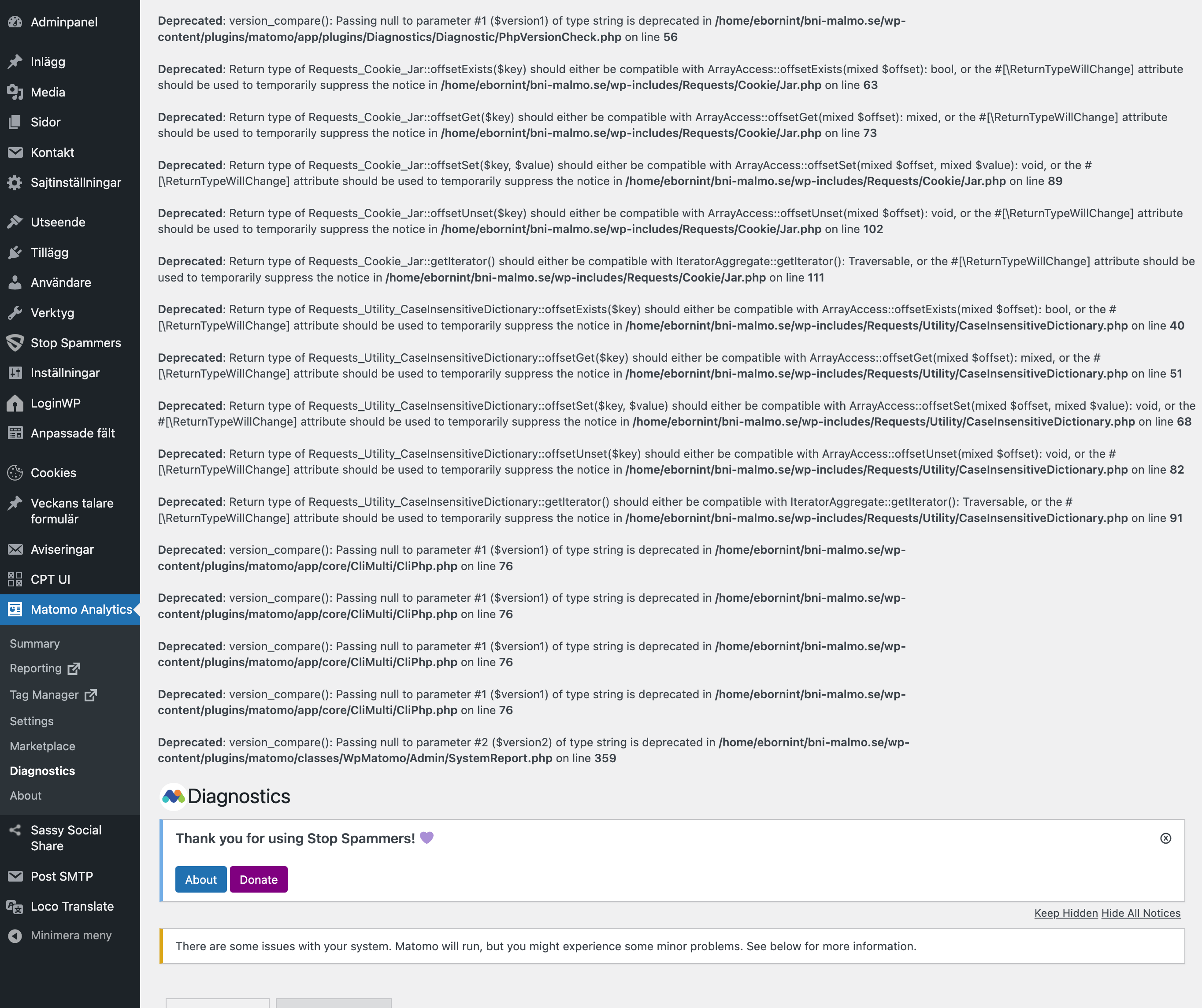
Great plugin but when I install it I get a long list of errors on the introduction page. if i reload the page the errors disappear. on many other setting pages, the same thing. initial errors that disappear on reload. but the errors on the diagnostics page remains even on reload.
As i said, the plugin seems great but this doesnt look well with these errors. The site seems to work, doesnt seem to affected by the errors but i cannot recommend nor install it on clients installations as long as theese errors appear. May it has something to do with php 8 maybe?

-
Hi @cyberduck for more insight could you please provide us a copy of your system check for review. How do I find and copy the system report in Matomo for WordPress?
@cyberduck Can I confirm if you are still having these issues?
Hi @cyberduck as it has been 4 weeks and we didn’t receive a reply from you. I’ll go ahead and tag this case as resolved. If there’s still an issue feel free to comment and we’re happy to follow up.
ok, no this is not resolved. i still have the issues. i just havnet got any notifications on your answers. i´ll get back with the diagnostics.
Matomo
- Matomo Plugin Version: 4.14.1
- Config exists and is writable.: Yes (“$abs_path/wp-content/uploads/matomo/config/config.ini.php” )
- JS Tracker exists and is writable.: Yes (“$abs_path/wp-content/uploads/matomo/matomo.js” )
- Plugin directories: Yes ([{“pluginsPathAbsolute”:”$abs_path\/wp-content\/plugins\/matomo\/plugins”,”webrootDirRelativeToMatomo”:”..\/”}])
- Tmp directory writable: Yes ($abs_path/wp-content/cache/matomo)
- Matomo Version: 4.14.1
- Matomo Blog idSite: 1
- Matomo Install Version: 4.13.0 (Install date: 2023-01-09 11:18:02)
- Upgrades outstanding: No
- Upgrade in progress: No
Endpoints
- Matomo JavaScript Tracker URL: ($site_url/wp-content/uploads/matomo/matomo.js)
- Matomo JavaScript Tracker – WP Rest API: ($site_url/wp-json/matomo/v1/hit/)
- Matomo HTTP Tracking API: ($site_url/wp-content/plugins/matomo/app/matomo.php)
- Matomo HTTP Tracking API – WP Rest API: ($site_url/wp-json/matomo/v1/hit/)
Crons
- Server time: 2023-04-05 20:24:08
- Blog time: 2023-04-05 22:24:08 (Below dates are shown in blog timezone)
- Sync users & sites: Next run: 2023-04-06 22:23:52 (23 timmar 59 min) ( Last started: 2023-04-05 22:23:55 (-13s). Last ended: 2023-04-05 22:23:55 (-13s). Interval: daily)
- Archive: Next run: 2023-04-05 23:23:52 (59 min 44s) ( Last started: 2023-04-05 22:23:55 (-13s). Last ended: 2023-04-05 22:23:56 (-12s). Interval: hourly)
- Update GeoIP DB: Next run: 2023-05-05 22:23:52 (29 dagar 23 timmar) ( Last started: 2023-04-05 22:23:56 (-12s). Last ended: 2023-04-05 22:24:00 (-8s). Interval: matomo_monthly)
Mandatory checks
- PHP version >= 7.2.5: ok
- PDO tillägg: ok
- PDO\MYSQL tillägg: ok
- MYSQLI tillägg: ok
- Övriga nödvändiga tillägg: ok
- Funktioner som krävs: ok
- Nödvändig PHP-konfiguration (php.ini): ok
- Kataloger med skrivrättighet: ok
- Kataloger med skrivrättighet för Tagghanterare: ok
Optional checks
- 64-bit PHP Binary: ok
- Spårningsstatus: ok
- Minnesbegränsning: ok
- Tidszon: ok
- Öppna URL: ok
- GD > 2.x + Fristil (grafik): ok
- Andra tillägg: ok
- Andra funktioner: ok
- Filsystem: ok
- Senaste avklarade arkiveringen: ok
- Warning Databasförmågor: warning (UTF8mb4 charset Din databas stödjer utf8mb4-teckenkodning, men dina databastabeller har inte konverterats ännu. Du kan göra detta genom att utföra kommandot
$abs_path/wp-content/plugins/matomo/app/console core:convert-to-utf8mb4eller genom att aktivera den automatiska konverteringen i Allmänna inställningar. Detta krävs för att kunna lagra 4-byte UTF8-tecken. Om inte utf8mb4 finns så kommer specialtecken, som emojis, mindre vanliga tecken på asiatiska språk, olika historiska skript eller matematiska symboler att ersättas med�. Du kan läsa mer information om detta ämne i denna FAQ. CREATE TEMPORARY TABLES Changing transaction isolation level ) - Max paketstorlek: ok
- Geolocation: ok
- Uppdatera över HTTPS: ok
- Supports Async Archiving: Yes
- Location provider ID: geoip2php
- Location provider available: Yes
- Location provider working: Yes
- Matomo URL: Yes ($site_url/wp-content/plugins/matomo/app)
Matomo Settings
- Track mode: default
- Track codeposition: footer
- Track api endpoint: default
- Track js endpoint: default
- Version history: 4.14.1, 4.13.3, 4.13.0
- Core version: 4.14.1
- Last tracking settings update: 1673339834
- Last settings update: 1673339862
- Show get started page: 0
- Track ecommerce: No
Logs
- None:
WordPress
- Home URL: $site_url
- Site URL: $site_url
- WordPress Version: 6.2
- Number of blogs: 1
- Multisite Enabled: No
- Network Enabled: No
- WP_DEBUG: No
- WP_DEBUG_DISPLAY: Yes
- WP_DEBUG_LOG: No
- DISABLE_WP_CRON: –
- FORCE_SSL_ADMIN: Yes
- WP_CACHE: No
- CONCATENATE_SCRIPTS: –
- COMPRESS_SCRIPTS: –
- COMPRESS_CSS: –
- ENFORCE_GZIP: –
- WP_LOCAL_DEV: –
- WP_CONTENT_URL: $site_url/wp-content
- WP_CONTENT_DIR: $abs_path/wp-content
- UPLOADS: –
- BLOGUPLOADDIR: –
- DIEONDBERROR: –
- WPLANG: –
- ALTERNATE_WP_CRON: –
- WP_CRON_LOCK_TIMEOUT: 60
- WP_DISABLE_FATAL_ERROR_HANDLER: –
- MATOMO_SUPPORT_ASYNC_ARCHIVING: –
- MATOMO_TRIGGER_BROWSER_ARCHIVING: –
- MATOMO_ENABLE_TAG_MANAGER: –
- MATOMO_SUPPRESS_DB_ERRORS: –
- MATOMO_ENABLE_AUTO_UPGRADE: –
- MATOMO_DEBUG: –
- MATOMO_SAFE_MODE: –
- MATOMO_GLOBAL_UPLOAD_DIR: –
- MATOMO_LOGIN_REDIRECT: –
- Permalink Structure: /%postname%/
- Possibly uses symlink: No
- Upload base url: $site_url/wp-content/uploads
- Upload base dir: $abs_path/wp-content/uploads
- Upload url: $site_url/wp-content/uploads/2023/04
- Custom upload_path:
- Custom upload_url_path:
- Compatible content directory: Yes
WordPress Plugins
- ACF to REST API: 3.3.3
- AddToAny Share Buttons: 1.8.6
- Advanced Custom Fields: Extended: 0.8.9.3
- Advanced Custom Fields: Image Aspect Ratio Crop: 6.0.2
- Advanced Custom Fields PRO: 6.1.2
- Clean Image Filenames: 1.4
- Contact Form 7: 5.7.4
- Converter for Media: 5.8.4 (Network enabled)
- Cookie Notice & Compliance for GDPR / CCPA: 2.4.8
- Custom Post Type UI: 1.13.5
- Disable Comments: 2.4.3
- Google XML Sitemaps: 4.1.8
- Gutenberg Custom Text Format: 0.5
- Imsanity: 2.8.2
- Instant Images: 5.2.0.2
- Lara’s Google Analytics – Pro: 3.3.2
- Map Block for Google Maps: 1.32
- Matomo Analytics – Ethical Stats. Powerful Insights.: 4.14.1
- Polylang: 3.3.2
- Redirection: 5.3.10
- Resizable Editor Sidebar: 1.0.1
- Shortcode in Menus: 3.5.1
- Simple Image Sizes: 3.2.2
- SVG Support: 2.5.5
- VS Meta Description: 6.9
- WFS Let It Snow: 2.0.0
- WordPress Importer: 0.8
- WP All Import – ACF Add-On: 3.3.8
- WP All Import Pro: 4.7.8
- Active Plugins: 29 (polylang acf-extended acf-image-aspect-ratio-crop acf-to-rest-api add-to-any advanced-custom-fields-pro clean-image-filenames contact-form-7 cookie-notice custom-post-type-ui disable-comments google-sitemap-generator gutenberg-cutsom-text-format imsanity instant-images lara-google-analytics-pro map-block-gutenberg matomo redirection resizable-editor-sidebar shortcode-in-menus simple-image-sizes svg-support very-simple-meta-description webp-converter-for-media wfs-let-it-snow wordpress-importer wp-all-import-pro wpai-acf-add-on)
- Theme: eborninteractive (eborninteractive)
Server
- Server Info: LiteSpeed
- PHP OS: Linux
- PHP Version: 8.1.17
- PHP SAPI: litespeed
- PHP Binary Name: /usr/local/bin/lsphp
- PHP Maxmind DB extension: Not loaded
- PHP Error Reporting: After bootstrap: 4437
- PHP Found Binary: /opt/alt/php81/usr/bin/php -q
- Timezone: UTC
- WP timezone: Europe/Stockholm
- Locale: sv_SE
- User Locale: sv_SE
- Memory Limit: 256M (At least 128MB recommended. Depending on your traffic 256MB or more may be needed.)
- WP Memory Limit: 40M
- WP Max Memory Limit: 256M
- Timezone version: 2022.7
- Time: 1680726248
- Max Execution Time: 90
- Max Post Size: 50M
- Max Upload Size: 52428800
- Max Input Vars: 3000
- Disabled PHP functions: No
- zlib.output_compression is off: Yes
- Curl Version: 7.84.0, OpenSSL/1.1.1p
- Suhosin installed: No
PHP cli
- PHP cli Version: 8.1.17
- MySQLi support: ok
Database
- MySQL Version: 10.5.19
- Mysqli Connect: Yes
- Force MySQL over Mysqli: No
- DB Prefix: ei2_wp_
- DB CHARSET: utf8
- DB COLLATE: utf8_swedish_ci
- SHOW ERRORS: No
- SUPPRESS ERRORS: No
- Uses Socket: No
- Uses IPv6: No
- Matomo tables found: 103
- DB tables exist: Yes
- Matomo users found: 2
- Matomo sites found: 1
- Required permissions: OK
Browser
- Browser: (Mozilla/5.0 (Macintosh; Intel Mac OS X 10_15_7) AppleWebKit/537.36 (KHTML, like Gecko) Chrome/111.0.0.0 Safari/537.36)
- Language: sv-se,sv,en-us,en,da,id,de,la
Server
- Server Info: LiteSpeed
- PHP OS: Linux
- PHP Version: 8.1.17
- PHP SAPI: litespeed
- PHP Binary Name: /usr/local/bin/lsphp
- PHP Maxmind DB extension: Not loaded
- PHP Error Reporting: After bootstrap: 4437
- PHP Found Binary: /opt/alt/php81/usr/bin/php -q
- Timezone: UTC
- WP timezone: Europe/Stockholm
- Locale: sv_SE
- User Locale: sv_SE
- Memory Limit: 256M (At least 128MB recommended. Depending on your traffic 256MB or more may be needed.)
- WP Memory Limit: 40M
- WP Max Memory Limit: 256M
- Timezone version: 2022.7
- Time: 1680726248
- Max Execution Time: 90
- Max Post Size: 50M
- Max Upload Size: 52428800
- Max Input Vars: 3000
- Disabled PHP functions: No
- zlib.output_compression is off: Yes
- Curl Version: 7.84.0, OpenSSL/1.1.1p
- Suhosin installed: No
PHP cli
- PHP cli Version: 8.1.17
- MySQLi support: ok
Database
- MySQL Version: 10.5.19
- Mysqli Connect: Yes
- Force MySQL over Mysqli: No
- DB Prefix: ei2_wp_
- DB CHARSET: utf8
- DB COLLATE: utf8_swedish_ci
- SHOW ERRORS: No
- SUPPRESS ERRORS: No
- Uses Socket: No
- Uses IPv6: No
- Matomo tables found: 103
- DB tables exist: Yes
- Matomo users found: 2
- Matomo sites found: 1
- Required permissions: OK
Browser
- Browser: (Mozilla/5.0 (Macintosh; Intel Mac OS X 10_15_7) AppleWebKit/537.36 (KHTML, like Gecko) Chrome/111.0.0.0 Safari/537.36)
- Language: sv-se,sv,en-us,en,da,id,de,la
Thanks for your quick response @cyberduck. Upon checking, the UTF8mb4 charset Your database supports utf8mb4 charset, but your database tables have not been converted yet. To fix this, kindly check this guide: How to convert the database to utf8mb4 charset?


The topic ‘Errors on install’ is closed to new replies.
