Featured Image not saving
-
Hello
We’re trying to change the featured image for directory and cant get it to work..
Feature image for other post types saves just fine but directory wont update the featured images and the previous image show up every time..

-
Sorry that you ran into issues here!
Can you tell me a bit more?
– What version of WP are you running here?
– What exact version of BD? (number, please)
– Have you tried a conflict test yet? Here is an article about how to test for theme and plugin conflicts with Business Directory, which may help pinpoint the issue: http://businessdirectoryplugin.com/support-forum/faq/how-to-check-for-plugin-and-theme-conflicts-with-bd/
– Can you walk me through exactly what you’re doing?
– Did you flush the cache when you were done? If you don’t flush the cache after that operation, you’ll be seeing old data on your browser.We recommend clearing the server cache, if you have one (which is found either in your hosting settings or on your plugin settings for things like WP Super Cache and W3TC if you have them installed), as well as your client browser cache.
The best way to get uncached data on your browser is to use a Private browsing window or Incognito mode (depending on your browser). That ensures you’re seeing the latest, correct data.
Please let me know.
Hello There
Im using:
WordPress Version 4.9.8
Business Directory Plugin 5.3.2.1I’ve done everything including conflict test, cache flushing, incognito mode etc but it wont work…
I’m just trying to set the featured image but it wont accept and revert back to the previous one..Featured image for other post types are working fine..
W3 total cache was flushed and then disabled but still no luck!
Any help please?
OK…
Can I get those steps from you?
It may seem “obvious” to you, but I’d like to know detailed steps you’re taking. Start with after you login to the admin dashboard. Please provide each step you follow to make this happen so we can reproduce it accurately. I’m not seeing this with my system, unfortunately.
If you can provide screenshots of each step, that would help a lot.
Please let me know.
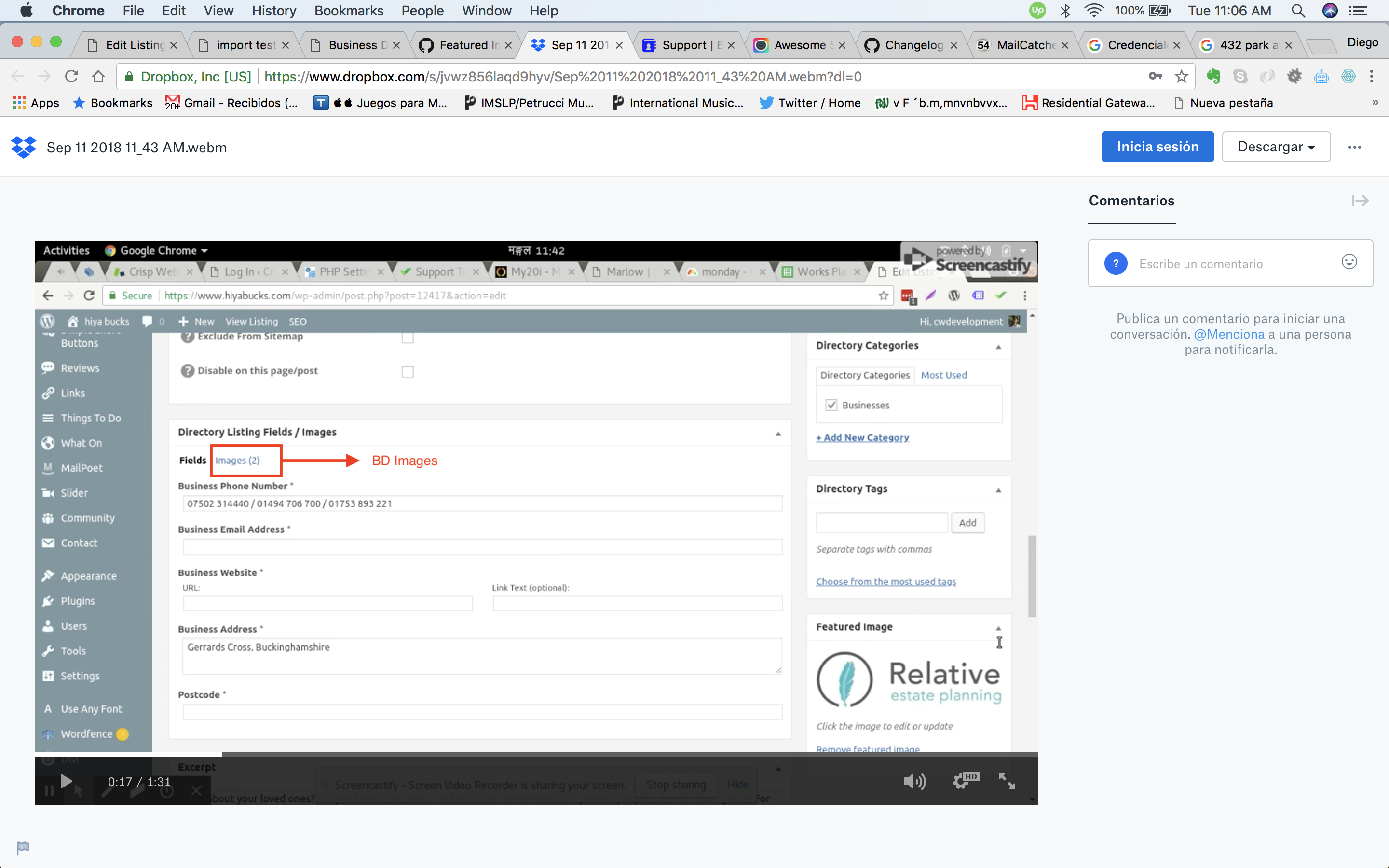
Please check the video below:
https://www.dropbox.com/s/jvwz856laqd9hyv/Sep%2011%202018%2011_43%20AM.webm?dl=0
Thanks @nabaraj-chapagain.
I’ll have my developer check into it and see what he says. I’ll report back as soon as I know more.
Hello Guys
Any news on this? I can see you’ve marked this as resolved but this is not fixed yet!!
Threads get marked as resolved because no one generally does that except me. I answer every question that comes up on here, regardless of the thread state. It’s just a housekeeping move for me. As I mentioned above, I was waiting for an answer from my developer, which I received this morning. Thanks for your patience.
Here’s what he had to say:
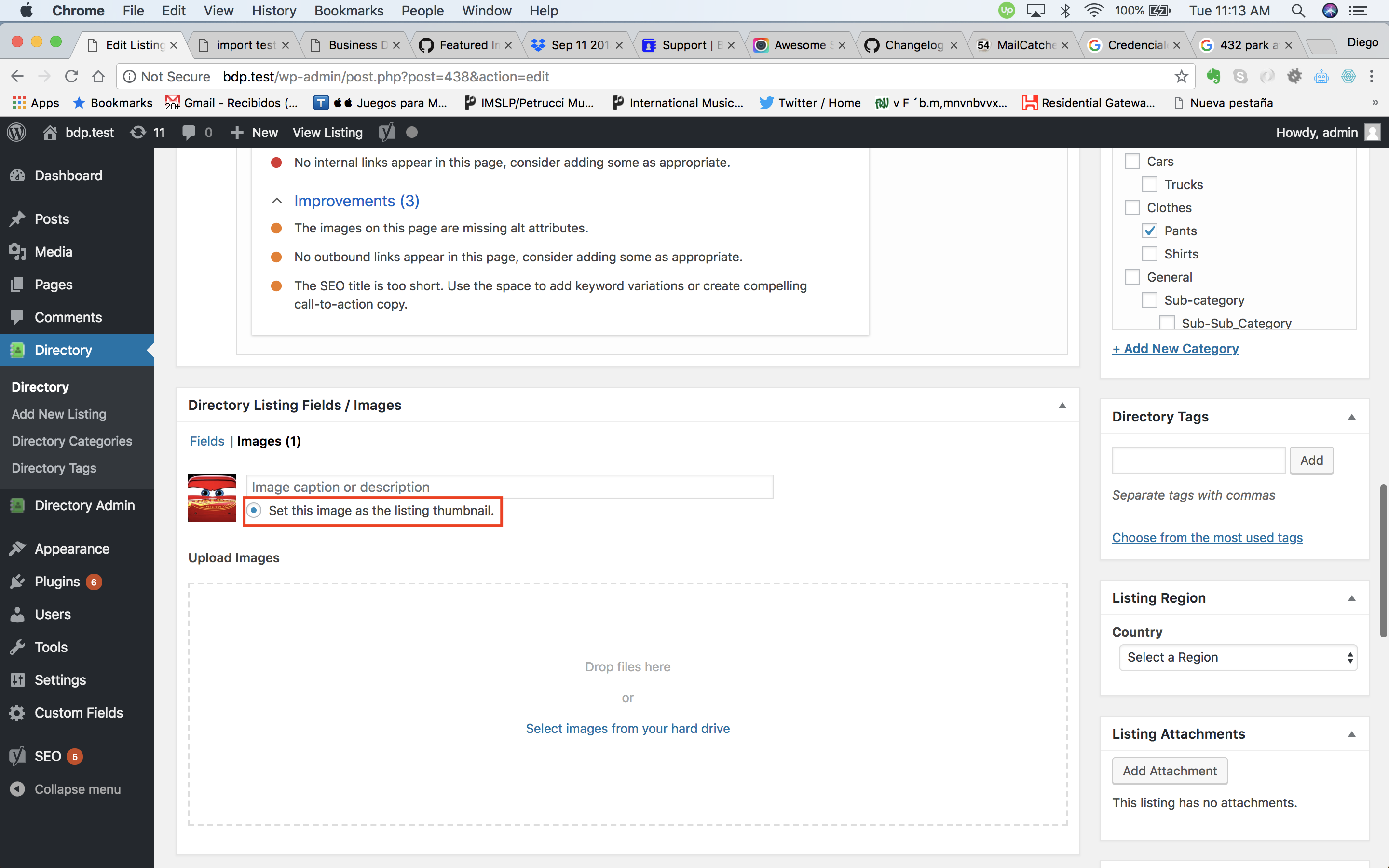
I think we have a double thumbnail assign here, the one from the post that user is trying to change, and the one from BD images, in this case BD image is set as thumbnail, this overrides the post image set as thumbnail, which is what customer is trying to change.
https://user-images.githubusercontent.com/23342393/45372566-f5f3c580-b5b2-11e8-9bcc-b52a4dc97500.png
https://user-images.githubusercontent.com/23342393/45372963-d610d180-b5b3-11e8-8ac0-2d5ce7f610a2.png
If there are no listing images, post thumbnail can be set in WP default metabox, if thumbnail was already set, customers should use BD images tab to change thumbnail.
Our listing is trying to extend the basic support you get with custom post types (a single featured image) and if you use the CPT version and BD together, BD will override it with your choice in BD’s images.
Does that make more sense?
Wonderfull!! That was the issue i couldnt track! Looks like its sorted now!
Glad it’s working.

The topic ‘Featured Image not saving’ is closed to new replies.