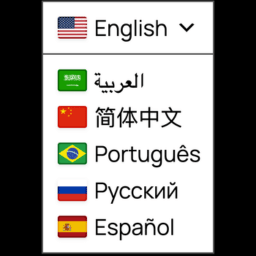
Hi Pankaj,
Could you please share a link to your website where we can see the broken drop down to investigate the issue?
Kind regards,
Juan
Hi Pankaj,
There seems to be a conflict between your theme or some of your plugins and this plugin.
We have released a new version of the plugin v1.3.3 with a solution for that problem. By updating this plugin the issue should be fixed.
Could you please confirm that this fix has solved the problem on your end?
Kind regards,
Juan
Hello,
The update didn’t fix this issue.
I checked by disabling all plugins individually and found this plugin is causing the issue: https://ww.wp.xz.cn/plugins/aws-cdn-by-wpadmin/
What do you suggest now? I can’t uninstall both (your and AWS CDN plugin)
Hi Pankaj,
I see it working now here https://tinyurl.com/ydxcrdsp
And still, I see that you are using a CDN.
Are both plugins active at the moment?
Did you try clearing the CDN cache?
Juan
For non cache pages this is showing as it is, but on cached pages I see the select language option is showing like the screenshot you shared.
But now the Select Language option is not in English, my Base Language is English.
Pankaj,
Please email me at [email protected] I’d like to set a call to debug the issue and find a solution to this.
Kind regards,
Juan
We have two different issues here.
– The first one is the broken icon. This issue has been resolved on v1.3.3.
– The second one is the translate button being displayed in a foreign language. For that I have created this separate thread.
I am closing this ticket.