Hi,
This is a fairly easy edit if you’re happy to modify the plugin files directly. Just open the /includes/therm_svg.php file and edit lines 53-55 to:
$raisedPercent = ($targetTotal > 0) ? number_format(($raisedTotal/$targetTotal * 100),2) : $raisedTotal;
$raisedValue = ($thermProperties['trailing'] == 'true') ? number_format($raisedTotal,2,'.',$thermProperties['sep']).$currency : $currency.number_format($raisedTotal,2,'.',$thermProperties['sep']);
$targetValue = ($thermProperties['trailing'] == 'true') ? number_format($targetTotal,2,'.',$thermProperties['sep']).$currency : $currency.number_format($targetTotal,2,'.',$thermProperties['sep']);
You’re basically updating the number_format function to 2 decimal places
Thread Starter
 zamaan
(@zamaan)
Thank you for the fix rhewlif. it worked. btw, i see there is a bug in the plugin.
when change the donation raised amount or the target value and save, the percentage shows 0, you have to put show percentage back to no and again back to true to get it back. just check that in ur feture versions. Thank you again for the fix.
Thread Starter
zamaan
(@zamaan)
sorry to trouble you, after replacing your code, a semi colon has started appring infront of the target amount. i tryied to find it. but no luck.
https://prnt.sc/tb0wfo
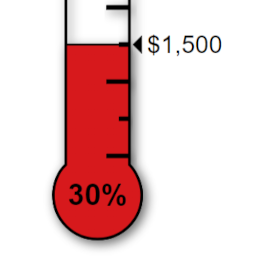
I think it’s actually the dollar sign that has been cropped. You can adjust the font size to account for the extra decimal places via the custom css tab on the Thermometer’s settings page. The class is “therm_target”.
Ok, I will check out that bug. cheers
I’m having trouble reproducing the bug you described – the percentage values seem to change ok for me, and I’ve tried with decimals too. Could you let me know the shortcode you are using for the thermometer? Are you adjusting the raised/target values from the settings page? Presumably you are using the latest version of the plugin? I can’t imagine it’s the browser but can maybe test that too.
Thread Starter
zamaan
(@zamaan)
Thanks, i managed to fix that (semicolon) problem. indeed, your correct. it is the $ sign is what made the problem. following css fixed it.
.therm_target, .therm_raised{
  font-size:13px !important;
}
and , this is the short code i am using [thermometer]
Thank You.