• Resolved dslfan

    (@dslfan)


    Hallo and congratuations for this very nice plugin….
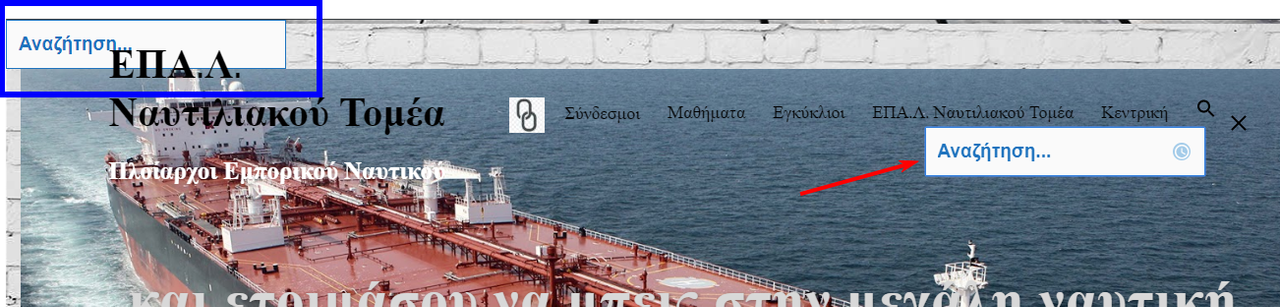
    Except one little problem that i have, plugin cause a floating problem like in the screenshot below:

    Floating is going off, when i turn off the plugin and everything comes back as before.
    But when i open the live configurator, floating comes again (i assume that something is compressing the structure of the page) and i am oblige to turn off again the plugin and things are keep going like this….

    So finally i am in deep thoughts what i can do if this cannot be fixed, cause plugin is excellent.

    Something else but not critical,
    i try to change the backgroung color of search field from white to transparent but none
    of the code change it successfully.

    Right now i have this code in Ivory Search Settings in CSS field,

    .main-navigation li.is-menu.popup {
        position: static !important;
        display: inline !important;
        background: transparent;
    }
    
    div#is-popup-wrapper {
        opacity: 0.6;
        background: transparent;
    }
    
    div#is-popup-wrapper input.search {
        width: 100%;
    }

    Please advise how can i solve this
    Many thanks
    Jim

Viewing 9 replies - 1 through 9 (of 9 total)
  • Plugin Author Vinod Dalvi

    (@vinod-dalvi)

    Could you please share your site URL where it’s happening so that I can troubleshoot it?

    Thread Starter dslfan

    (@dslfan)

    Hallo Vinod,
    here is my site url

    https://dberedimas.sites.sch.gr/

    As i said, when i am de-activating the plugin, and the next minute i activating again,
    all comes back to normal.
    In the next step, if i click from the website the live modulator, problem appears again and remains and i must start from the beggining.
    Right now i left with the problem, so you can safely inspect it.

    many thanks for your time
    Jim

    Plugin Author Vinod Dalvi

    (@vinod-dalvi)

    I visited your website but didn’t see any floating problem on it.

    Could you please describe it a bit more and also share the screenshot of the issue?

    For screenshots, you can simply provide a link to an image through Google Drive, Dropbox, screencast.com, http://imgur.com/ or other image service. πŸ™‚

    Something else but not critical,
    i try to change the backgroung color of search field from white to transparent but none
    of the code change it successfully.

    Right now i have this code in Ivory Search Settings in CSS field

    Please remove that code and instead use the below CSS code.

    .is-menu input.is-search-input {
        background: transparent;
    }
    Thread Starter dslfan

    (@dslfan)

    here is a screenshot i capture before 5 minutes…

    https://i.postimg.cc/B6GLNjdx/screenshot-53.png

    with red arrow is the field of search field which is fine,
    but on the top left side with blue box is this white box without any use…
    You cannot do nothing, e.g. write something etc

    Is this more clear now?

    Plugin Author Vinod Dalvi

    (@vinod-dalvi)

    That is a header search form that you can remove from the plugin settings as described below.

    https://ivorysearch.com/docs/display-search-form-in-site-header/

    Thread Starter dslfan

    (@dslfan)

    so you mean there is no easy way to remove this white box?

    Plugin Author Vinod Dalvi

    (@vinod-dalvi)

    I have already shared with you above the way to remove it.

    Thread Starter dslfan

    (@dslfan)

    ok thanks for your time πŸ™‚

    Plugin Author Vinod Dalvi

    (@vinod-dalvi)

    You are most welcome here πŸ™‚

Viewing 9 replies - 1 through 9 (of 9 total)

The topic ‘floating problems’ is closed to new replies.