Formula Help
-
Hi, I’m trying to build a Dosage Calculator.
My customer will be required to enter their:
1. Weight (4 different weight groups)
2. Severe Condition level (from 1-5 different level)the dosage calculation have 20 option, every option is unique.
I created 2 fieldname (weight and severe condition) with the list of values.
How I countine from here please?
– Should I create more field for the 20 opition of dosages? or should i write it in the equation?
– What should be my equation?Thank you very much.

-
Hello @dvirhamami,
Actually you don’t need any additional field, only implement the equation using conditional statements.
I’ll try to describe the process with a hypothetical example, using random fields’ names and values, however if you need that I implement your project, you can request a custom coding service from my private website:
https://cff.dwbooster.com/customization
The project:
– Assuming your form includes a DropDown field called fieldname1, with 4 choices, whose texts are the different weight groups, and their corresponding values are the numbers from 1 to 4
– Another DropDown field, called fieldname2, with 5 choices, whose texts are the condition level, and their corresponding values are the numbers from 1 to 5
Now, you simply should insert a calculated field to determine the dosage, with an equation similar to:
(function(){
	var weight = fieldname1, level = fieldname2;
	if(weight == 1 && level == 1) return 11;
	if(weight == 1 && level == 2) return 12;
	if(weight == 1 && level == 3) return 13;
	if(weight == 1 && level == 4) return 14;
	if(weight == 1 && level == 5) return 15;
	if(weight == 2 && level == 1) return 21;
	if(weight == 2 && level == 2) return 22;
	if(weight == 2 && level == 3) return 23;
	if(weight == 2 && level == 4) return 24;
	if(weight == 2 && level == 5) return 25;
	if(weight == 3 && level == 1) return 31;
	if(weight == 3 && level == 2) return 32;
	if(weight == 3 && level == 3) return 33;
	if(weight == 3 && level == 4) return 34;
	if(weight == 3 && level == 5) return 35;
	if(weight == 4 && level == 1) return 41;
	if(weight == 4 && level == 2) return 42;
	if(weight == 4 && level == 3) return 43;
	if(weight == 4 && level == 4) return 44;
	if(weight == 4 && level == 5) return 45;
})()
Even, the equation can be optimized, nesting “switch” conditional operations:
(function(){
	var weight = fieldname1, level = fieldname2;
	switch(weight)
	{
		case 1:
			switch(level)
			{
				case 1: return 11;
				case 2: return 12;
				case 3: return 13;
				case 4: return 14;
				case 5: return 15;
			}
		case 2:
			switch(level)
			{
				case 1: return 21;
				case 2: return 22;
				case 3: return 23;
				case 4: return 24;
				case 5: return 25;
			}
		case 3:
			switch(level)
			{
				case 1: return 31;
				case 2: return 32;
				case 3: return 33;
				case 4: return 34;
				case 5: return 35;
			}
		case 4:
			switch(level)
			{
				case 1: return 41;
				case 2: return 42;
				case 3: return 43;
				case 4: return 44;
				case 5: return 45;
			}
	}
})()
or much better, you can define a plain object, as database with the weight and condition levels, and use it from the equations.
Best regards.
Thank you for the quick and helpful reply.
I copy & paste your formula and it did work, but since I edit to my number it’s not showing the result (dosage).maybe it’s because of the result is not just a number?
This what I tried to do:(function(){
var weight = fieldname1, level = fieldname2;
if(weight == 1 && level == 1) return 2mg-4mg+ Of CBD;
if(weight == 1 && level == 2) return 4mg-8mg+ Of CBD;
if(weight == 1 && level == 3) return 8mg-12mg Of CBD;
if(weight == 1 && level == 4) return 12mg-18mg+ Of CBD;
if(weight == 1 && level == 5) return 18mg-30mg+ Of CBD;
if(weight == 2 && level == 1) return 4mg-6mg+ Of CBD;
if(weight == 2 && level == 2) return 6-12mg+ Of CBD;
if(weight == 2 && level == 3) return 12mg-18mg mg+ Of CBD;
if(weight == 2 && level == 4) return 18mg-24mg+ Of CBD;
if(weight == 2 && level == 5) return 24mg-40mg+ Of CBD;
if(weight == 3 && level == 1) return 6mg-8mg+ Of CBD;
if(weight == 3 && level == 2) return 8mg-18mg+ Of CBD;
if(weight == 3 && level == 3) return 18mg-24mg+ Of CBD;
if(weight == 3 && level == 4) return 24-32mg+ Of CBD;
if(weight == 3 && level == 5) return 12mg-60mg+ Of CBD;
if(weight == 4 && level == 1) return 8mg-10mg+ Of CBD;
if(weight == 4 && level == 2) return 12-20mg+ Of CBD;
if(weight == 4 && level == 3) return 22mg-30mg+ Of CBD;
if(weight == 4 && level == 4) return 32mg-40mg+ Of CBD;
if(weight == 4 && level == 5) return 42mg-60mg+ Of CBD;
})()What Im doing worng?
Thank you very muchHello @dvirhamami,
If the results are not numbers, you should return them enclosed between single or double quotes, as follows:
if(weight == 1 && level == 1) return '2mg-4mg+ Of CBD';Now you should edit all your results.
Best regards.
Its still doesn’t work( the results not showing up)
adding again the formula i edited.
(function(){
var weight = fieldname1, level = fieldname2;
if(weight == 1 && level == 1) return ‘2mg-4mg+ Of CBD’;
if(weight == 1 && level == 2) return ‘4mg-8mg+ Of CBD’;
if(weight == 1 && level == 3) return ‘8mg-12mg Of CBD’;
if(weight == 1 && level == 4) return ‘12mg-18mg+ Of CBD’;
if(weight == 1 && level == 5) return ‘18mg-30mg+ Of CBD’;
if(weight == 2 && level == 1) return ‘4mg-6mg+ Of CBD‘;
if(weight == 2 && level == 2) return ‘6-12mg+ Of CBD‘;
if(weight == 2 && level == 3) return ‘12mg-18mg mg+ Of CBD‘;
if(weight == 2 && level == 4) return ‘18mg-24mg+ Of CBD‘;
if(weight == 2 && level == 5) return ‘24mg-40mg+ Of CBD‘;
if(weight == 3 && level == 1) return ‘6mg-8mg+ Of CBD‘;
if(weight == 3 && level == 2) return ‘8mg-18mg+ Of CBD‘;
if(weight == 3 && level == 3) return ‘18mg-24mg+ Of CBD‘;
if(weight == 3 && level == 4) return ‘24-32mg+ Of CBD‘;
if(weight == 3 && level == 5) return ‘12mg-60mg+ Of CBD‘;
if(weight == 4 && level == 1) return ‘8mg-10mg+ Of CBD‘;
if(weight == 4 && level == 2) return ‘12-20mg+ Of CBD‘;
if(weight == 4 && level == 3) return ‘22mg-30mg+ Of CBD‘;
if(weight == 4 && level == 4) return ‘32mg-40mg+ Of CBD‘;
if(weight == 4 && level == 5) return ‘42mg-60mg+ Of CBD‘;
})()Did I’m doing something wrong?
Please, How I can fix it?Design question:
* How can I change colors?
* how can I make the calculator be in the center?
* it’s possible to make a frame to the contact?
* is this plugin support wpml?Hello @dvirhamami,
Please, indicate the URL to the webpage where the form has been inserted, the structure of the equation is correct, but please, be sure you are using the correct the single quote symbols
'Concerning to your other questions:
Q: How can I change colors?
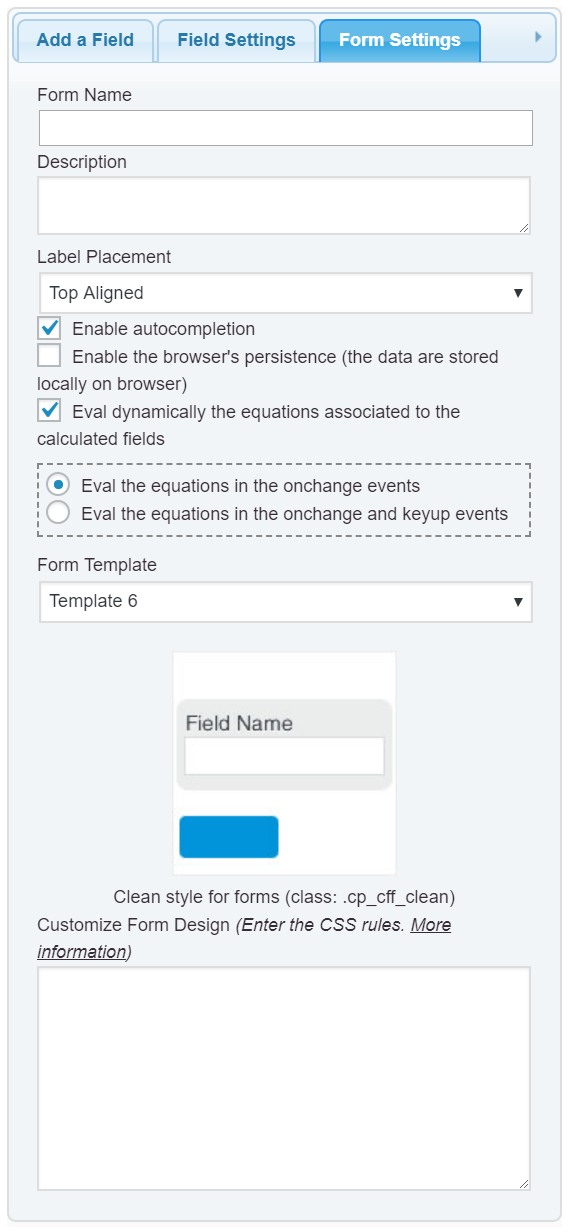
A: The answer depends of the colors you want change. From the “Form Settings” tab you can selected any of the predefined templates (https://cff.dwbooster.com/templates). However, if you want edit specific colors, you can to define your own styles through the “Customize Form Design” attribute in the “Form Settings” tag (https://cff.dwbooster.com/images/documentation/form-settings-tab.png)
The styles applied to the different elements of the form is available in the following link:
https://cff.dwbooster.com/faq#q82
You can change the appearance of a specific field, assigning to this field a custom class name (through the attribute: “Add CSS Layout Keywords”), and then, define this new style through the “Customize Form Design” attribute.
Q: how can I make the calculator be in the center?
A: If you want centering the text into the calculated field, you can assign a custom class name to the field, for example: my-field
and then enter the following style definition into the “Customize Form Design” attribute:
#fbuilder .my-field input{text-align:center !important;}Q: is this plugin support wpml?
A: If you need your form in different languages, create your first form, and then, press the corresponding “Clone” button, and edit the texts in the cloned form.
Best regards.
-
This reply was modified 7 years, 5 months ago by
codepeople.
Great is working!
thank you 🙂 you were right, had a mistake with the symbols.Have an additional question if its ok:
Design question:
* How can I change colors?
* how can I make the calculator be in the center?
* it’s possible to make a frame to the contact?
* is this plugin support wpml?(or what I can to do for the customers that use kg and not lbs)Thank you again
-
This reply was modified 7 years, 5 months ago by

The topic ‘Formula Help’ is closed to new replies.