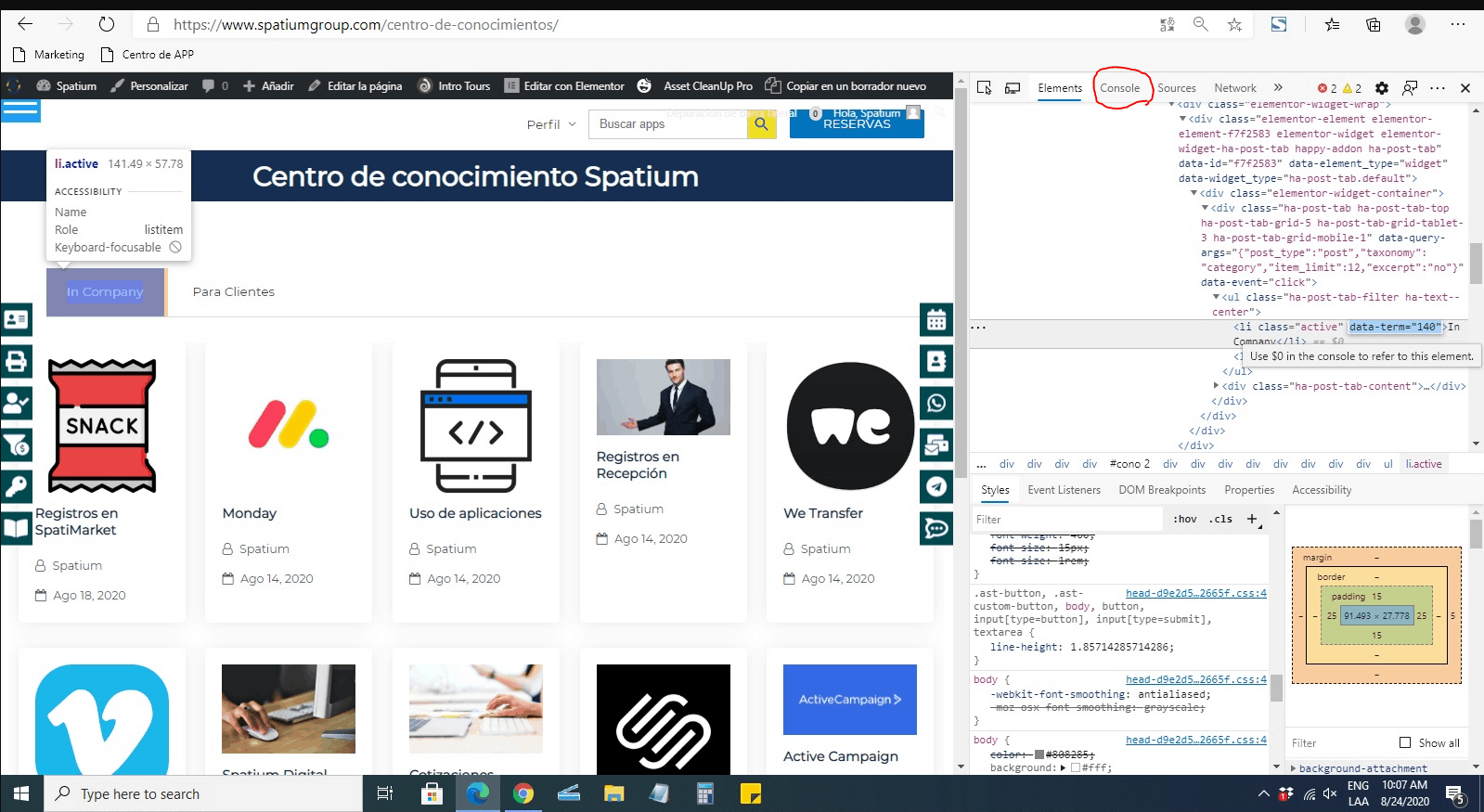
Hey there. Sorry to hear you have a troubles with plugin. We are happy to help you. Can you open dev. tools (right click and inspect element), console tab and send us screenshot please? Also can you describe what exactly doesn’t work so we can serve you better … builder is not opening at all? What browser and device are you using?
We would like still help you with frontend editor issue, but we haven’t hear from you back and we can’t replicate issue without more info from you. Let us know please if it is still actual.
hello sorry for late to response. i made a video explain it. https://www.loom.com/share/fb1e3031f51e4ed3898284b4cda28bc1
hope to be useful
Thank you for video and screenshots.
Here are further steps that we recommend
1 #data-term=”140″ is not valid selector so clear this selector please before you go for screenshot in next step.
2 Can you switch to console tab in dev tools and send screenshot after you try run frontend builder please?
https://deeppresentation.com/wp-content/uploads/2020/08/Console.png
3 Also can you try to run it after you deactivate all ‘site performance plugins’ … eg AssetCleanUp Pro etc
Hi,
Have you managed to do recommended steps?
yes its now working. im desactivated asset clean pro and begin to work. Thanks for support