GDPR / Express checkout
-
Hi guys,
we’re using Real Cookie Banner to enable GDPR compliance.
We – for sure – want to use Express checkout and advanced card processing on our page, though, if consent is given.If consent is denied, we block
ppcp-button-js-button.js
ppcp-blocks-js-checkout-block.js
ppcp-wc-gateway-js-fraudnet.jsWhich successfully stops anything from PayPal being loaded.
When consent is given, the express buttons work well on product detail pages but are not being shown (even though the scripts are being loaded) on basket and checkout page, only the pay later message is being shown.
Any idea what might hinder the buttons being rendered (without JS error) only on basket and checkout page? (or what to trigger explicitly to get them rendered?)
Thx
Markus-
This topic was modified 1 month, 3 weeks ago by
markisu72.
-
This topic was modified 1 month, 3 weeks ago by

-
Hello @markisu72
This is caused by timing. When scripts are blocked and then loaded only after consent is given, it’s already too late for WooCommerce to properly initialize PayPal on the cart and checkout pages.
On classic pages, the PayPal script waits for the page load event, but if it’s injected after that event has already fired, it never runs. On block checkout, PayPal needs to register itself before the checkout renders; if loaded later, it’s simply ignored.
The most reliable fix is to enable full page reload after consent is given in Real Cookie Banner. This ensures all PayPal scripts load in the correct order and initialize properly.
Instead of blocking PayPal plugin JS files:
- Allow plugin scripts
- Block only the PayPal SDK (
https://www.paypal.com/sdk/js)
This avoids breaking initialization logic while still staying compliant. Unfortunately, for block checkout, there is no way to “re-trigger” PayPal buttons after late script injection; a reload is required.
Kind Regards
KrystianHi Krystian,
I cannot block the PayPal SDK, because it is called directly from ppcp-blocks-js-checkout-block.js…Is there a way to conditionally disable express checkout on basket and checkout page via php?
Thx
Markus… that is: disable any script from PayPal being loaded by PHP
Hello @markisu72
You can do that by disabling Express Checkout on cart and checkout via PHP. When Express is disabled,
smartButtonsEnabledbecomes false, and the PayPal SDK will not be loaded at all.Here is the snippet:
add_filter(
    'woocommerce_paypal_payments_selected_button_locations',
    function( array $locations, string $setting_name ): array {

        if ( is_cart() || is_checkout() ) {
            // Remove Express Checkout from cart and checkout
            $locations = array_diff(
                $locations,
                array( 'checkout-block-express', 'cart', 'cart-block' )
            );
        }

        return $locations;
    },
    10,
    2
);
It disables Express Checkout on the cart and checkout pages. As a result, PayPal buttons are not initialized, and PayPal SDK script is never loaded (even though the wrapper JS file is still present)
Kind Regards
KrystianHi Krystian,
great, this brings me a huge step forward.
The only thing is, it seems to also disable the standard Paypal option where you get redirected to PayPal…
This – to my understanding – does not access http://www.paypal.com from the checkout page and should not get disabled.
Is there a way to disable advanced card processing and the express buttons independently from it?
Thx
MarkusHello @markisu72
The only thing is, it seems to also disable the standard Paypal option where you get redirected to PayPal…
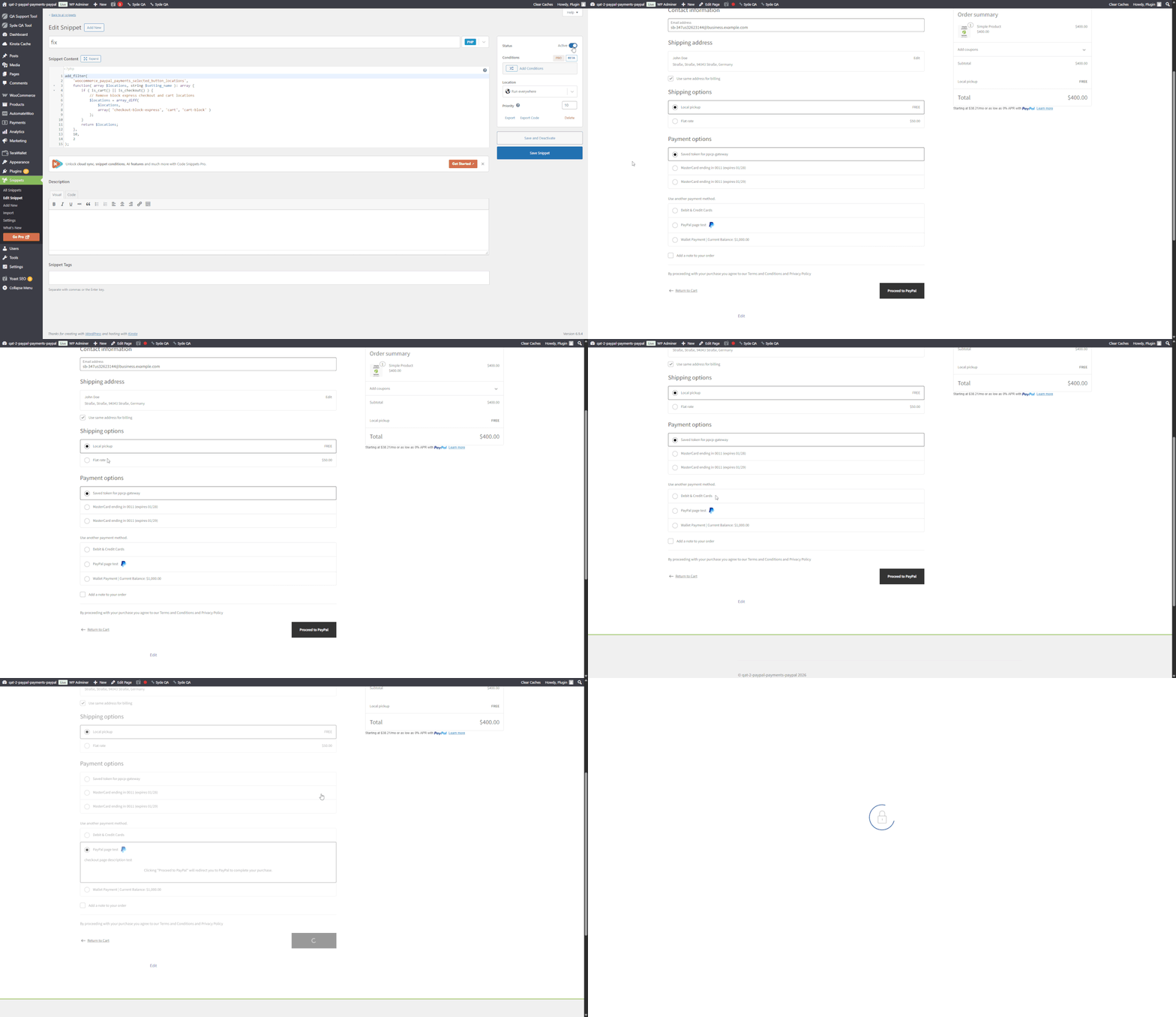
On my end, the redirect works just fine. If the standard PayPal redirect is disappearing, that’s likely a separate configuration issue, not caused by the filter snippet.
The filter snippet removes
'checkout-block-express','cart', and'cart-block'but not'checkout'. TheDisableGatewaysclass only removesPayPalGateway(ppcp-gateway) from the checkout if smart buttons are disabled for the'checkout'location AND the cart contains a subscription – verify that part on your end.To disable ACDC without touching express buttons or the standard PayPal gateway:
// Disable ACDC entirely:
add_filter( 'woocommerce_paypal_payments_card_payments_disabled', '__return_true' );

// Or just disable the card payment enabled flag:
add_filter( 'woocommerce_paypal_payments_is_card_payment_enabled', '__return_false' );
Try these filters.
Kind regards,
KrystianHey Krystian,
yes, I found the issue… can it be that just displaying the option already requires access to http://www.paypal.com?Thx
Markus
If so, ist it possible to conditionally render an option which does not access PayPal just for rendering it?
Hey @inpsydekrystian , is there a way?
Thx, Markus 🙂Hello @markisu72
When PayPal buttons are displayed, the plugin loads the PayPal SDK from paypal.com (sdk/js), just for rendering the option. Only workaround to avoid any connection to PayPal just for rendering, there is a built-in way to switch to a pure redirect flow (no SDK loaded):
add_filter( 'woocommerce_paypal_payments_use_place_order_button', '__return_true' );With this filter enabled the PayPal SDK is not loaded, but the checkout uses a standard “Place order / Proceed to PayPal” button. So effectively, this removes any PayPal dependency during page rendering and only triggers it on user action.
Kind Regards,
KrystianHey Kristian,
sounds great, will test it!
Markus
Hello @markisu72
Let us know how it goes.
If this helped and you’re happy with the support, feel free to leave a quick review on WordPress. It means a lot to us and shows that we are needed as support.
Kind regards,
KrystianGood morning, @inpsydekrystian !
add_filter( ‘woocommerce_paypal_payments_use_place_order_button’, ‘__return_true’ );
dosen’t do nothing on my side… it still renders from the SDK…
With filter enabled
And when blocking all PayPal urls, Paypal completely disappears:

Am I doing sth wrong?
Markus
PS: I found a (minor) bug regarding the settings … when disabling PayPal express completely on the checkout page without also unchecking Apple Pay and Google Pay, yes, there are no express buttons being shown, but still the empty express frame… if you uncheck Apple and Google Pay and then disable express buttons, the frame disappears
Hello @markisu72
The reason you still see the SDK being loaded is that it’s not only used by the PayPal express buttons. Other features like Apple Pay, Google Pay, or Fastlane (advanced card fields) can trigger the SDK independently. So even if you disable express buttons via the filter, the SDK may still be present because one of those features is still active.
If goal is to completely prevent the SDK from loading, we’d need to additionally disable all features that depend on it.
PS: I found a (minor) bug regarding the settings … when disabling PayPal express completely on the checkout page without also unchecking Apple Pay and Google Pay, yes, there are no express buttons being shown, but still the empty express frame… if you uncheck Apple and Google Pay and then disable express buttons, the frame disappears
Thanks for sharing, I will make an issue for this.
Kind regards,
KrystianHey @inpsydekrystian,
I checked again… I disabled advanced card processing, GPay, APay, Pay Later Messages and all express buttons.
I added
add_filter( ‘woocommerce_paypal_payments_use_place_order_button’, ‘__return_true’ );
(nothing else fiddling with PayPal)
But it still loads the sdk… :-/
Markus

You must be logged in to reply to this topic.
