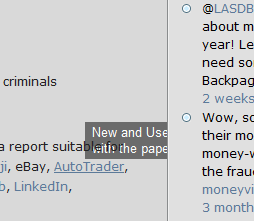
Glossary tooltip appears below text
-
Dear support,
Originally I was using the old twentyten theme and the glossary tooltips were popping up nicely. Now I’m revamping the website, switched to Arjuna X theme and unfortuntely, the tooltips are appearing below the text and below the various panels for the title and on the right-hand side. Screenshot at

Viewing 2 replies - 1 through 2 (of 2 total)

Viewing 2 replies - 1 through 2 (of 2 total)
The topic ‘Glossary tooltip appears below text’ is closed to new replies.