• maxval bircaman

    (@maxval-bircaman)


    It says in the Installation Guide: “In order to auto post to Google+, you’ll need first to create a Buffer account in MicroblogPoster”.

    However I don`t understand how to do this. I created an account at buffer.com and linked it to Google Plus.

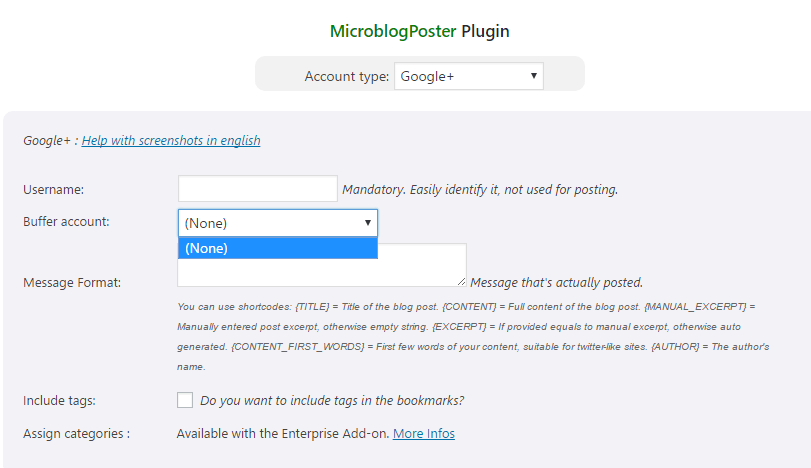
    But how to link this buffer account to MicroBlog Poster. In the plugin`s Buffer account: dropdpwn menu there is only a “None” option.

    What to do?

Viewing 8 replies - 1 through 8 (of 8 total)
  • Plugin Author Efficient Scripts

    (@cybperic)

    Hi,

    When you create buffer account in MicroblogPoster you only have to enter

    – username
    – API Key

    Once created, you have to click on “Refresh available accounts”.

    Normally, after that you’ll be able to select your “Google+ account” when creating a google+ account in MicroblogPoster. But first select the “Buffer account” in drop down!

    Thread Starter maxval bircaman

    (@maxval-bircaman)

    OK. BUt how to create a buffer account in MicroblogPoster? Where is it? I see no such option.

    Plugin Author Efficient Scripts

    (@cybperic)

    Social Networks Accounts -> Add New Account -> “Account type” = [Buffer]

    Enter username + API Key. Click Save

    Thread Starter maxval bircaman

    (@maxval-bircaman)

    Please give me a link. I don`t see such option at http://efficientscripts.com

    Thread Starter maxval bircaman

    (@maxval-bircaman)

    See here mb there is nothing to select.

    Plugin Author Efficient Scripts

    (@cybperic)

    Did you first created buffer account + clicked on “Refresh available accounts”?

    Thread Starter maxval bircaman

    (@maxval-bircaman)

    Where can I create it? Give me please a link?

    Thread Starter maxval bircaman

    (@maxval-bircaman)

    I deleted this plugin, there is no way to make it working.

Viewing 8 replies - 1 through 8 (of 8 total)
The topic ‘Googe Plus’ is closed to new replies.