Hello,
thanks for your message.
I suggest you to proceed disabling the Google Site Kit option as you said here: “At best, if I disable that option, cookies aren’t installed from the start, only if consent is given. But if consent is withdrawn after consent is given, the cookies aren’t deleted.”.
When you withdraw the consent cookies won’t be deleted from users’ browsers, they will be disabled though.
We can’t delete cookies from users’ browsers, so the behavior you saw is correct, if you were blocking cookies before consent that is the way you should follow.
I don’t agree.
If the user withdraws their consent after giving it, the cookies must be deleted. It’s their right.
In any case, if they initially reject cookies and then decide to accept them, they won’t be installed either.
In short, the user cannot change their initial cookie settings.
This is not normal. It’s not the expected behavior of a cookie plugin.
Plugin Support
 daniub
(@daniub)
Hi,
Thank you for reaching out to the Complianz Support Team and for sharing your concerns.
I understand your expectations regarding cookie behavior, and I’d like to offer some clarification on how our Cookie Solution works.
In general:
If you accept something at first, then you reject: a CMP plugin does not delete cookies;
instead, it blocks the script that generates them beforehand.
This means that you still see the cookie in your browser’s cache; however, it no longer performs its tracking function since the script is blocked.
You can verify on your browser’s console under the network tab: once cookies are rejected, on page reload, the script that generates them is blocked and does not appear in the list of the loaded scripts.
Anyway on https://mobelho.es we do not see cookies related to sitekit even if we accept the banner directly, and if I look at your site source code there is NO sitekit code even if I exclude totally our banner from your site using devtools.
This means that:
- there is a misconfiguration in your sitekit (please check with their support eventually)
- you are using a cache tool, on plugin side OR server side
- same for optimization plugins
It is really important that we can reproduce the issue you are mentioning and this is not the case.
Hope it helps!
-
This reply was modified 1 year, 2 months ago by
 daniub.
Thanks for the explanation.
Regarding the tracking code:
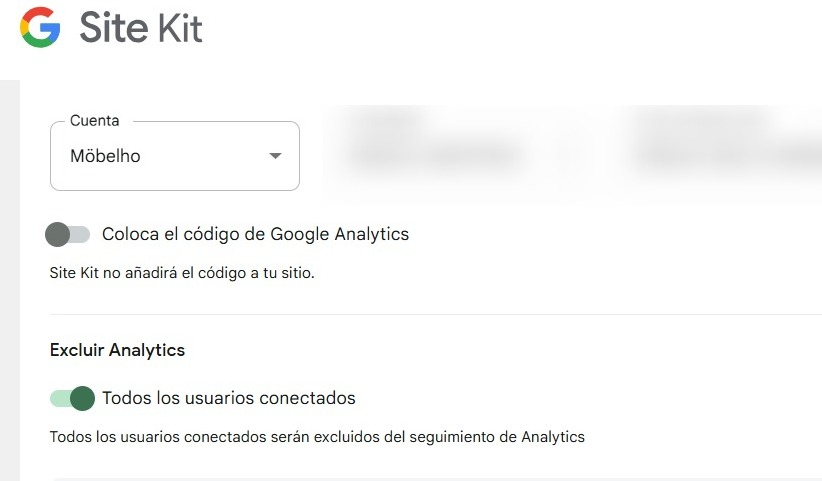
I set up Site Kit as indicated on your website, with “Place Google Analytics code” disabled: https://i.postimg.cc/Yqr20DcX/site-kit.jpg
I believe that by disabling that option, the tracking code is never added, regardless of the cookie settings.
There is no additional caching or optimization (plugin or hosting).