Having text box side by side
-
hi, i want to create 4 text box in this manner:
first: Name textbox
Second: Phone Third: Email
Fourth: Message
Buttonhow can i do it so that second and third text box can stay side by side without exceeding the width of first and fourth text box.
And i would like to aligned the button to be on the right.
Please guide/help
The page I need help with: [log in to see the link]

-
Hello,
– First, configure every field as large through their attributes: “Field Size”
– To the second and third fields assign the special class name: column2Note, the class names are assigned to the fields through their attributes: “Add CSS Layout Keywords”
For the button, insert a button field in the form and assign to it a custom class name, for example: my-button
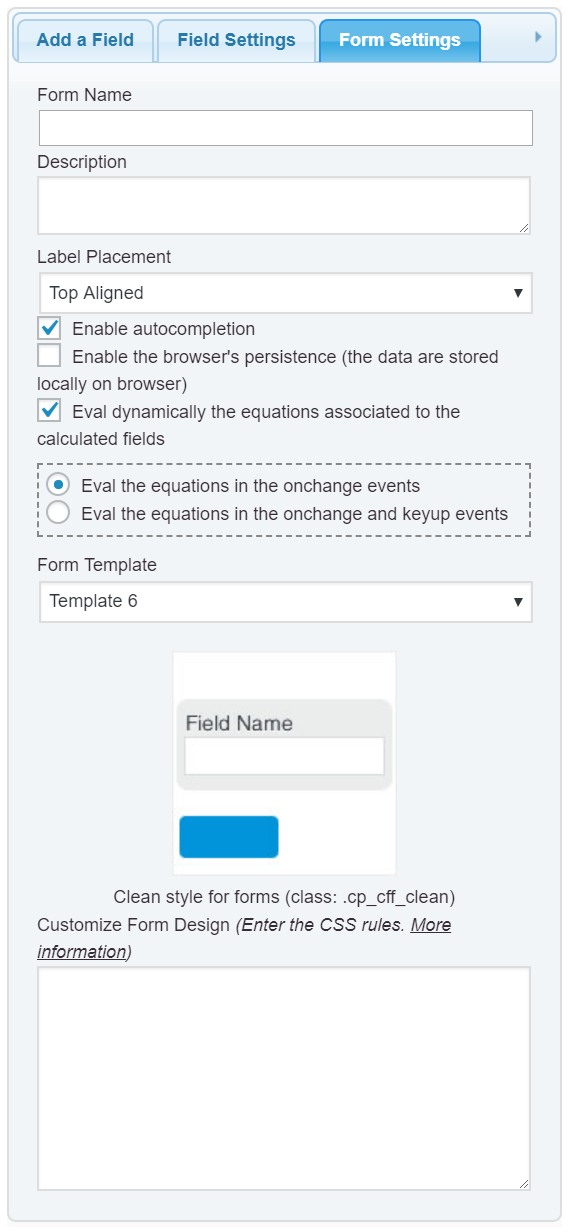
and then, define the new class into the “Customize Form Design” attribute in the “Form Settings” tab (https://cff.dwbooster.com/images/documentation/form-settings-tab.png), as follows:
#fbuilder .my-button{text-align:right;}and that’s all.
Best regards.If i were to create the button, can i make it work similar to the pre-defined submit button? as in once user click on the button, user will be redirected to a thank you page and an email of the info will be sent to admin
Hello @namazee,
The free version of the plugin does not includes the modules to process the information collected by the forms in the server side, like: to send the notification emails, replace the shortcodes in the thank you pages, integrate the forms with a payment gateway, etc (all these features are available with the commercial versions of the plugin: https://cff.dwbooster.com/download )
Does mean you cannot insert a submit button in the free version of the plugin? Not really, you can emulate a submit button with a common button’s field, entering as its onclick event the piece of code below:
jQuery(this.form).submit();However, if you are using the free version of the plugin, you should implement the server side modules by yourself.
Best regards.
HI THERE,
Im sorry i forgot to inform that the question is for another domain which is http://www.factohub.com and i’ve already purchased the plugin and registered under the domain
Hello,
The solution would be similar, enter the following piece of code as the onclick event of button:
jQuery(this.form).submit();As you are using a common button for submission, you can select the “No” option for the attribute: “Display submit button?” in the form’s settings.
Best regards.
Hi, This approach will submit the details to email. Can it also be linked to another page that will show summary of the content the user has submitted?
Hello @namazee,
Yes of course, you simply should enter the URL to the page into the “Thank you page” attribute in the form’s settings, and the shortcode for the results in the content of this page:
[CP_CALCULATED_FIELDS_RESULT]Best regards.
Hi,
After creating two boxes side by side, it seems that this both textboxes are not working (cant key in details).
Please Help
The page I need help with: http://factohub.com/
Hello @namazee,
Your website has enabled the maintenance mode and I cannot access to your web page.
Best regards.
Hi there,
I have deactivated the maintenance mode.
Please help
Thank youHello @namazee,
The issue is caused by a conflict with the styles inherited from the theme active, on your website to prevent the issue please follow the steps below:
1. Remove the special class name: column2 from the fields: Phone and Email
2. Insert a Div field just after the name field, and select the option: “2 Columns” for its “Columns” attribute.
3. Finally, drag the fields for Phone and Email into the Div.and that’s all.
Best regards.Hi there sir,
i would like to have a button underneath my form which is aligned to the right and the button color is #084274.
when i implemented the code u gave, it seems that the button span all across the width of the form. please help
http://factohub.com (the form is at the last part)Hello @namazee,
The issue is not caused by our plugin, the issue is caused by the CSS rule:
width: 100%;in the style definition:input, textarea, select { outline:none; font: inherit; width: 100%; border-radius: 2px; transition: all 300ms ease; }defined into the file: http://factohub.com/wp-content/themes/cargo/css/base.css of the theme active on your website.
An alternative would be insert the following style definition into the “Customize Form Design” attribute to overwrite the theme styles:
#fbuilder input[type="button"]{width:100px !important;}Note: if you want to apply the background color to the button, the selector would be:
#fbuilder .my-button input{}I’m sorry, but the support service does not include the implementation of the users’ projects (forms or formulas). If you need additional help customizing your form, I can offer you a custom coding service through my private website:
https://cff.dwbooster.com/customization
Best regards.
hi there,
thanks for the clarification,
im trying to make it with specific color background and button aligned to right:
is this css correct?#fbuilder input[type=”button”]{width:100px !important;}
#fbuilder .pbSubmit input{text-align: right;}Hello @namazee,
Please, I need you follow my instructions with your current form’s structure, because, if you change the form’s structure, the styles defined previously have no sense.
You are emulating the submit button with a button field in the form, with the customized class name: my-button
In whose case the style to enter would be:
#fbuilder input[type="button"]{width:100px !important;}
#fbuilder .my-button{text-align: right;}
#fbuilder .my-button input{ background:#0B60A9; border:0;}
One more time, I cannot continue implementing your project for free, if you need additional support customizing your form, you should request a custom coding service through my private website.
Best regards.

The topic ‘Having text box side by side’ is closed to new replies.