Hi there daeeatsall.
The problem is because that #E4D3A6 color is NOT in your CSS file.
I don’t know how your theme files are structured but you may find it in index.php or home.php…
You gotta find this
<style type="text/css" media="screen">
#page { border: 1px solid #959596;}
body { font-family: Verdana, Arial, Sans-Serif;}
h1 { font-family: Garamond, Serif;}
h2,h3 { font-family: Palatino Linotype, Serif;}
#sidebar { font-family: Verdana, Arial, Sans-Serif;}
#sidebar h2 { font-family: Verdana, Arial, Sans-Serif;}
body { color:#B0B0B0 ;}
h1, h1 a, h1 a:hover, h1 a:visited, .description { color:#FD5A1E ;}
.entry p a:visited { color:#FD5A1E ;}
a, h2 a:hover, h3 a:hover { color:#FD5A1E ;}
strong { color:#E4D3A6 ;}
h2, h2 a, h2 a:visited, h3, h3 a, h3 a:visited { color:#E4D3A6 ;}
</style>
Thread Starter
 Corvus
(@daeeatsall)
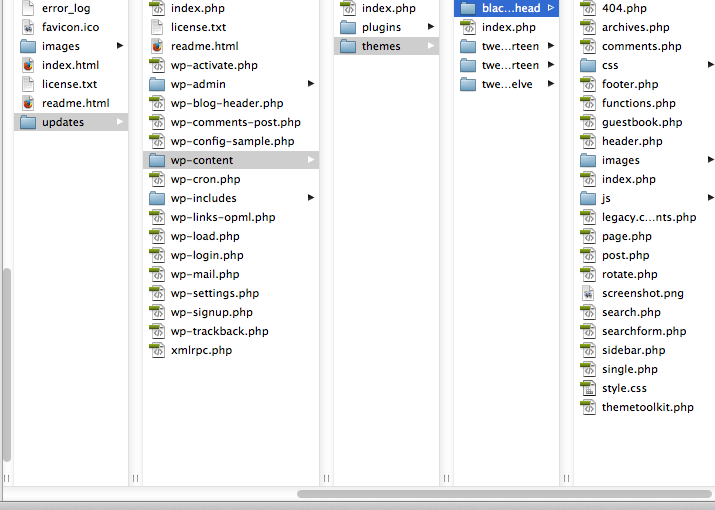
The way I have it right now is in this order
zachpensmith/updates(the wordpress is in a sub folder due to the splash page)/wp-content/themes/blackletterhead/
here is a screen shot.
Directory
I just looked at all the index files in Dreamweaver and can’t find any of that. Like I said I have used this theme for my printing company
Was able to change all the type styles and colors within the css file.
thank you for the quick response on this.
That’s weird even in your header.php?
Did you make those changes recently? Maybe it’s your web site cache…
Thread Starter
Corvus
(@daeeatsall)
It is weird.
I mean this domain is a sub domain that I host under the server I have. It might for some weird reason be interfering with the code, but I can’t see how. Like I said before I didn’t have this problem with my site, it was simple and straight forward. I reworked the style sheet and got the results I wanted.
Thank you again for taking a look. I will go over it first thing tomorrow and let you know if I come up with anything different.
•Dae