Andrew Nevins
(@anevins)
WCLDN 2018 Contributor | Volunteer support
That desktop dropdown version is actually the menu that’s meant to be triggered for keyboard users – because this way the experience for a keyboard user is more predictable.
Would you be able to show us your website to demo the issue? I haven’t been able to replicate that.
I have the same issue, I just omitted it through CSS for now…
div.main-menu-more {
display: none !important;
}
Andrew Nevins
(@anevins)
WCLDN 2018 Contributor | Volunteer support
Still would like to see the issue in the wild. Hiding the keyboard menu is going to cause problems for the people who need it.
Hello,
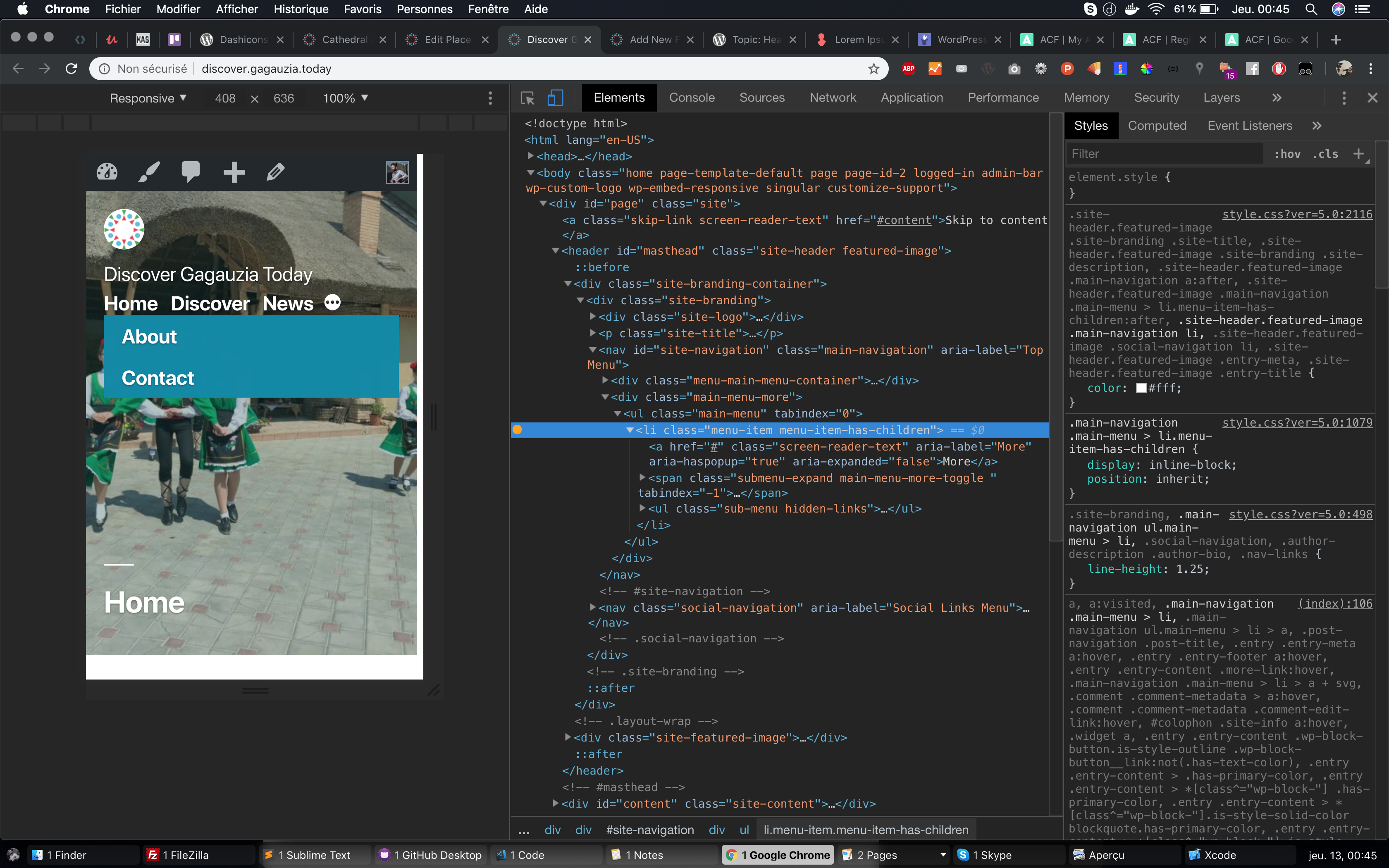
The website : http://discover.gagauzia.today
The screenshot of the desktop menu appearing on mobile :
https://denom.be/sub-menu-issue/4.jpg
It’s triggered when the user hovers the class .menu-item.menu-item-has-children
https://denom.be/sub-menu-issue/5.jpg
I think it should happen only on desktop, not on mobile.
Andrew Nevins
(@anevins)
WCLDN 2018 Contributor | Volunteer support
To clarify, what you call as the “desktop” menu isn’t a bug. It’s intentional and there for keyboard users.
Andrew Nevins
(@anevins)
WCLDN 2018 Contributor | Volunteer support
How are you triggering a hover event on mobile?
Just made a video where i spam the menu button
[video src="https://denom.be/sub-menu-issue/sub-menu.mp4" /]
Andrew Nevins
(@anevins)
WCLDN 2018 Contributor | Volunteer support
The 3 dot button is only coded for touch devices, literally the functionality that opens the submenu is bound to touch events. For other events there is the menu that you’re calling “desktop”.
Tapping, sliding, it happens quite often.
Will check on other twentynineteen websites.
Andrew Nevins
(@anevins)
WCLDN 2018 Contributor | Volunteer support
Will have to replicate what’s on your video
Andrew Nevins
(@anevins)
WCLDN 2018 Contributor | Volunteer support
Andrew Nevins
(@anevins)
WCLDN 2018 Contributor | Volunteer support
Can you help me try to replicate it in a more accurate way? Try this; when pressing the “back” button, try pressing it and then dragging it down.
Tested on this website as well
https://themes.getmotopress.com/2019/
same result :
[video src="https://denom.be/sub-menu-issue/other-website.mp4" /]
(on samsung s8)
try to maintain your finger on the 3 dots button a little moment (.5sec) before releasing it.
The back button is not the problem.
-
This reply was modified 7 years, 6 months ago by
 detering.
Andrew Nevins
(@anevins)
WCLDN 2018 Contributor | Volunteer support
How do you maintain your finger on the 3 dots button without it triggering the submenu?
When you do a perfect vertical instant tapping, the “desktop menu” shows less often.
when your tap is “slow” ( =maintain) ,”sliding” it shows 80% of time.
Would like to be more precise, but not so simple, sorry.
I tested on another device (samsung s7), same result.
will test on iPad now, and record a video with the phone.