Hi veshop,
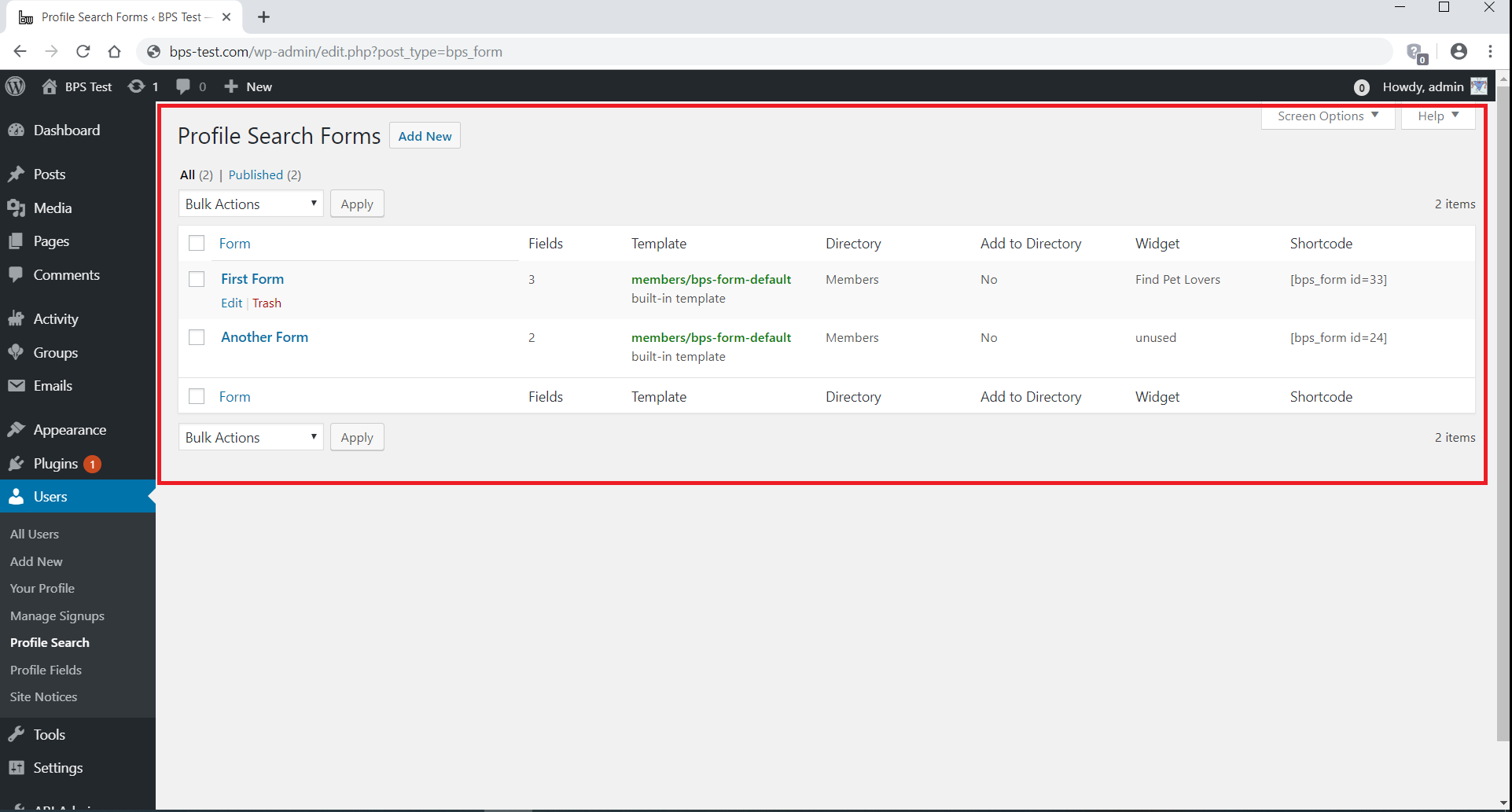
If you go to Users -> Profile Search, what do you see in the Template column?
Thread Starter
 veshop
(@veshop)
Hi there,
not sure what you’re asking me here… I see the table with the different profile search forms I created.
Could you copy and paste the content of the Template column? See this screenshot for reference:
https://ps.w.org/bp-profile-search/assets/screenshot-1.png?rev=2166683
Thread Starter
veshop
(@veshop)
I don’t get what you want. This has got nothing to do with what I am asking for!
The Template column simply tells us which form template you are using, and I need this information to answer your question.
Thread Starter
veshop
(@veshop)
I see you’ve closed this topic, so you probably already know the answer.
For other interested readers, you’re using custom form templates, most likely provided by your theme. You can modify them yourself, or request more information from your theme support.
Thread Starter
veshop
(@veshop)
Theme support pointed back to support of the plugin!
Hello veshop,
BP Profile Search always calls a form template to display a search form.
There is a built-in form template, bps-form-default.php, but themes or plugins can replace it and provide their own form templates.
In this case the search form is displayed by their code, and they should be able to answer questions about it.
Anyway, if there is any way I can help, please let me know.
Thread Starter
veshop
(@veshop)
oK, Thanks.
For me it is difficult to determine: What is BP Profile Search, what is Buddypress and what is from the theme… The sort is from Buddypress? I’d like to remove ‘Alphabetical’ order, that’s why I am asking.
And can you help me out with this?: https://gofile.io/d/SF7YWj
Thanks
To remove the alphabetical order option, see:
https://dontdream.it/support/topic/default-search-by-alphabetical-order/#post-11265
Unfortunately all the questions in the file you linked above, are related to the form template you are using. Please report them to your theme support, noting that they provide that template as demonstrated by your Users -> Profile Search page.
Thread Starter
veshop
(@veshop)
oK, Thanks again very much! But the code does not help me, I found this myself before, but unfortunately I have Legacy, not Noveau. I thought I could do the same, just in my case for Legacy, but it doesn’t add up.
Yes, Legacy has it hard-coded, the only way is to remove it manually.
Go to buddypress\bp-templates\bp-legacy\buddypress\members\index.php,
locate the lines:
  <?php if ( bp_is_active( 'xprofile' ) ) : ?>
      <option value="alphabetical"><?php _e( 'Alphabetical', 'buddypress' ); ?></option>
  <?php endif; ?>
and delete them.