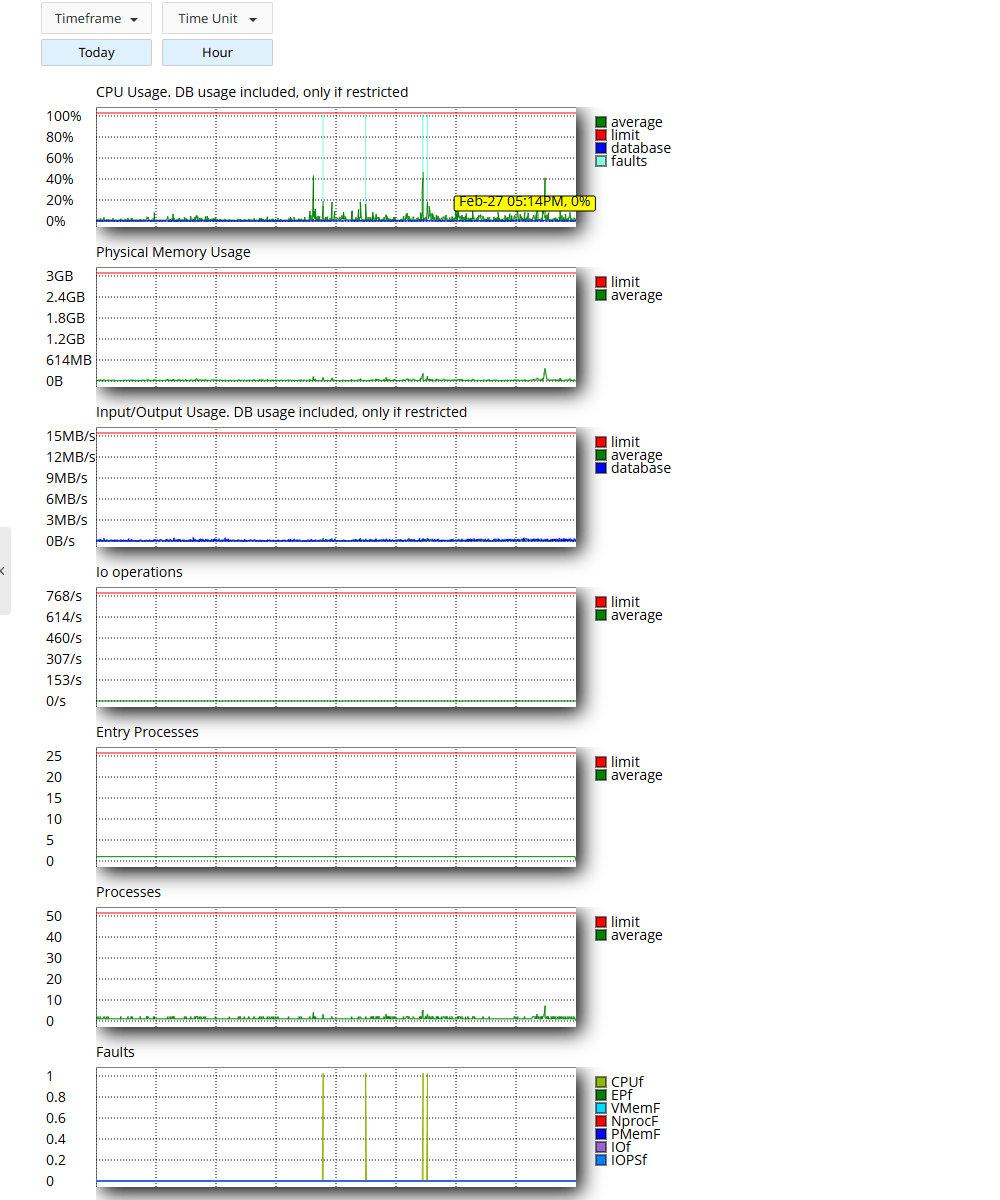
High Cpu usage by Site kit plugin
-
We are experiencing problems with excessive CPU usage due to the Google Site Kit plugin (above 100%).
We have already moved the server to a Litespeed server but even this continues to give problems causing our website to go offline. After disabling the Google Site kit the CPU usage is just normal.
Can anyone help us resolve this?
The page I need help with: [log in to see the link]

-
Thanks for reaching out @jongerius. That certainly is most unusual, but hopefully we can assist in trying to determine the cause. In order to do so, please share the following:
- Your Site Health information. You can use this form to share privately if preferred.
- When you disabled Site Kit, did you implement Google Analytics, Tag Manager and any other services on your site manually? If not, please go ahead and do so, and I can check your site once more. I’m looking at your site at present and I can see a Tag Manager snippet, with some Complianz references. Your site is performing well when I check in PageSpeed Insights, but do let me know once you connected Analytics and other Google services manually, without Site Kit, and I can check again.
Let me know if you have any questions with the above. Thank you.
Thank you James i just send the Site Health information with the form (after i enable the plugin and clear the cache).
We didn’t implement other Google services manually, we only use Complianz for cookies but we had the problem also when using Cookieyess
The prestations at Google pagespeed are good but when the CPU usage comes above the 100% the hosting provider put the website offline. Last week the website was offline for more then 6 hours
Thanks for sharing the additional information @jongerius. Having your site offline due to CPU usage certainly isn’t ideal. Note that I suspect that one of the reasons may not be your site content or plugins, but visits to your site or spikes in traffic could be contributing factors. I saw this as I don’t see any issue with your sites from the checks performed, and now it looks like that with Site Kit active your site performance is high, similar to the last check where I shared a previous screenshot. See below the latest results:
So to summarize, I don’t see anything Site Kit specific that may be impacting your CPU usage.
I’m happy to check your site once more if you wish to deactivate Site Kit and then connect Tag Manager and Google Analytics manually? At that point we can see if there is a difference. Let me know if you have any questions with the above. Thank you.
Thanks for the response only I think this problem cannot be measured with Google Page Speed Insights because it does not occur constantly but with spikes (see picture: https://jongerius.bike/wp-content/uploads/2025/02/CPU.png).
When I disable Site Kit I don’t have these spikes up to 100% and when I enable it I do. Each time it is a short period of 1 or 2 minutes for 1 hour and that would not be measurable with Google Page Speed Insights.
-
This reply was modified 1 year, 3 months ago by
jongerius.
Thank for the additional insights @jongerius. Is there a server activity feature or any error logs that you can share from your hosting provider that may help us determine what may be happening? Feel free to share this, along with any error logs using the same form previously used. If it was your hosting provided that made the decision to take your site offline for a few hours, maybe they have some details they were able to share.
Along with any server activity or error logs, if you can share the below I can discuss this with the team further:
- When you moved to a Litespeed server, was this with the same hosting provider, and were they able to share any details into this CPU usage?
- Do you have any other hosting plans where you can create a copy of your site on a separate domain and check for any issues? This would be from a different domain, however, this is only temporarily and you can ensure this isn’t indexed with a robots.txt file.
Let me know if you have any questions with the above. Thank you.
Thank you James, the same problem we had at the other (old) hosting provider and we moved to another for more speed and a higher GTMetrix score (that’s now a A grade).
I have been seen on Wordfence that i can decreace the limit of Google crawers to 120 our 240 per minute, is that maybe a good option to try for the high CPU use of Google Sitekit? Our can give that some problems for our Google rankings?
Thanks for the update @jongerius. Indeed some plugins may impact Google crawlers, however, if your CPU usage is occurring based on wp-admin related activity, where Site Kit main operates, this shouldn’t make a difference unless you do have some plugins that can impact requests to and from the Site Kit service, or the execution of some Site Kit scripts.
For testing purposes, is it feasible to temporarily deactivate Complianz, Insights from Google PageSpeed, WordFence Jetpack and Litespeed cache for a few hours to check whether the same occurs? Given you’re encountering these spikes frequently it may be useful to try and determine any conflict. I’m aware that is quiet a few plugins, so an alternative may be to create a copy of your site and check from that site with these plugins deactivated.
In addition to the above check, was your hosting provider able to give any details into traffic spikes or error logs?
Thank you James we think we solved it for the most CPU use with making a limit for bots of 120 p minute. We come back to you after managing it for a few weeks.
Glad to hear that @jongerius. If the spikes are related to bot traffic, this will be useful should others report the same. I’ll check this with the team, while you can revert here should you find any issues with Site Kit specifically or should you have any further questions or updates on this. Thank you.

The topic ‘High Cpu usage by Site kit plugin’ is closed to new replies.