Homepage Header Image
-
My initial and principal homepage Header image takes forever to download! What can I do?
Please and thank you!
The page I need help with: [log in to see the link]

-
You have a lot of very large images on your home page. It “weighs” 10.5MB. You should look at ways to reduce that — use images no larger than absolutely needed and, perhaps, a plugin like “smush” https://ww.wp.xz.cn/plugins/search/smush to create more optimized images.
Hello Steve,
THANK YOU for you prompt attention.
I had previously installed SMUSH but had never smushed each individual image. I just did so.
Granted, the images are weighty. That I knew but I am not certain as to the best way to lighten them. Can you please advise where I find my total (Homepage) weight that you read as 10.5 MB? If I go into each individual Homepage slideshow image, will scaling down each image lighten the load or . . . ? Or may I change the Homepage borders in Beaver Builder?
Thank you again.
Steven
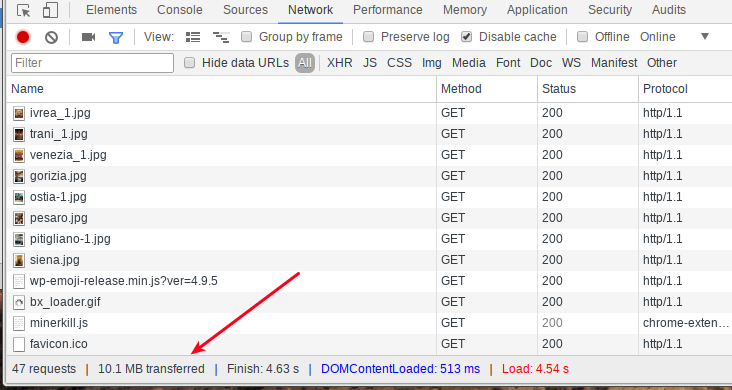
I used the “network” tab in Chrome’s inspector. When you load a page, it tells you on the bottom the total data transfer necessary to render the page.
See https://cldup.com/u_UNHwGrvVr/3RFg8P.png

I’ve never used the smush-type plugins — give them a try and see if you think the images look OK.
-
This reply was modified 8 years, 1 month ago by
Steven Stern (sterndata).
Steve,
I’ve ‘smushed’ all images but the savings is quite insignificant as you now see in your attachment. What would you suggest to cut the weight of slideshow images?
Steven
I think they are what they are. I don’t find you site slow, BTW.
Odd, Steve. When I go to my site in Safari, the homepage requires as much as 20-30 seconds to open!
Dear Steve,
Forgive my persistence, but one more question and then I will leave you in peace . . .
With this same website’s (jewishitaly.net) page, CONTACT US, the Contact Form’s field comes up yellow. Why is that and how can I change this? This is quite strange since, only yesterday following a correspondence ad infinitum first with Ninja Forms and then with Beaver Builder (a bug they just corrected with their new version), we finally got this form to appear. Whatsmore, once upon a time when the form did actually work, this yellow did not appear. And since the color is the same as that used in my website lacornucopiaitalia.com’s background, I believe the form was simply copied and pasted from that site.
Can you please advise or can we use another form with a non-colorer background? May I send you the admin details?
Thank you.
Steven
input[type="text"]:focus, input[type="email"]:focus, input[type="url"]:focus, input[type="password"]:focus, textarea[name="mn-message"]:focus, textarea:focus {
  background: #fff;
}
makes the background white when the field has focus.
To add CSS: use the “Additional CSS” option in the customizer. https://codex.ww.wp.xz.cn/CSS#Custom_CSS_in_WordPress
Learn to use the Chrome Developer Tools to help you see and test changes to your CSS.
Please create NEW TOPICS when you finish one topic and wish to start another.
Steve,
Please excuse my late response. Only a few hours ago I read your last reply. And please excuse my ignorance! Once I am into Additional CSS, where do I past the html command you have given?
Steven
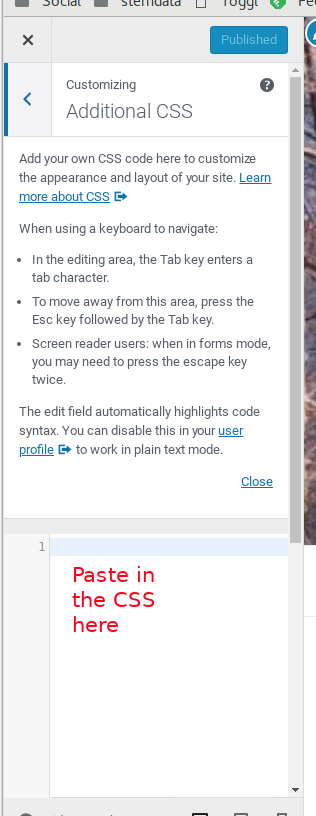
There’s only one place to paste stuff under “Addtional CSS”, so paste it in there. 🙂
I am sorry but I don’t see any one place!!😩
“Add your own CSS code here to customize the appearance and layout of your site. Learn more about CSS (opens in a new window)
When using a keyboard to navigate:
In the editing area, the Tab key enters a tab character.
To move away from this area, press the Esc key followed by the Tab key.
Screen reader users: when in forms mode, you may need to press the escape key twice.
The edit field automatically highlights code syntax. You can disable this in your user profile (opens in a new window) to work in plain text mode.Close
CSS code”Steve,
Ecco fatto! THANK YOU VERY, VERY MUCH!! I never even saw the below boxes—so bloody faint—in the Additional CSS page. An additional touch in knowing WP (even though my patience for this stuff is very thin.)
THANK YOU AGAIN. All seems to be in order now.
Steven
-
This reply was modified 8 years, 1 month ago by


The topic ‘Homepage Header Image’ is closed to new replies.