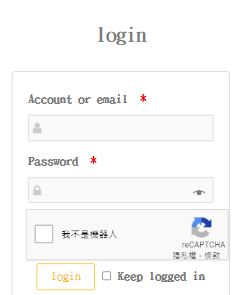
Hello @bi1012037
Thank you very much for using our plugin. I am sorry to read about your issue.
Can you please enable the setting Remove CSS in the plugin and advise if that helps?
Looking forward to hearing from you.
Thread Starter
 Leo.Lin
(@bi1012037)
Thread Starter
Leo.Lin
(@bi1012037)
In the question I originally asked, the screenshot of the pc was wrong. (The screenshot of my mobile device is repeated)
The screenshot of the pc that has not been opened to remove the css setting is here.
Setting

PC

Hello @bi1012037
Thanks for the update. Can I ask, are you using the standard wp-login form or something custom?
By default, and if your using the standard wp-login form (unless the Remove CSS option is enabled) the plugin tries to force the login box to be 350px so that it should always be wide enough to ensure the captcha field does not expand further than the inputs above it. If your using a custom form you may need additional CSS but this will only ensure your form can never be less than 350px and wont resize the captcha field.
As the captcha field is an iframe (something we cant change of course), we have no control and cant force it to match other input widths without resorting to JS hacks sadly but it is possible to enable “compact” mode however, which will ensure the field is not wider than the inputs as seen here
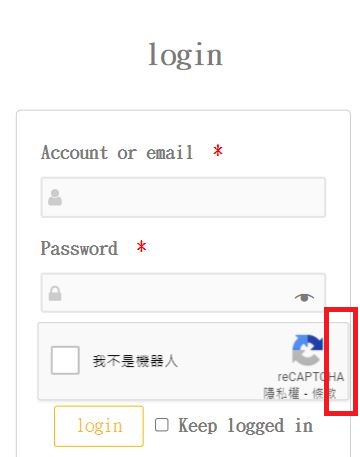
To do this, within our plugins settings set the “Size” option to “Compact”:

Which will result in the alternative style you can see here:

If there is anything else, do let me know.
Kind regards, Daniel @ WP White Security
Thread Starter
Leo.Lin
(@bi1012037)
This login field is on the woocommerce page.
I have changed to v3 so that the icon is displayed at the bottom right of the page. Thank you for your help.
I am glad to read that the issue is solved @bi1012037
Indeed, v3 is the cleanest solution and also the best CAPTCHA solution so far. Should there be anything else we can help you with, do not hesitate to ask.
Please do not forget to rate our plugin and service. These ratings really help us and the plugin.
Have a great day.