Plugin Author
 Mark-k
(@mark-k)
OK, you are right, just need to do some testing to make sure such a thing will not create security issue on a network install. How fast do you need this change?
We removed in our code esc_html() so it will works if no used Theme set the filter ‘widget_title’. And this do most Themes rather WordPress set this filter in the core files.
Here the steps you have to do:
1. Are you familair with GitHub? Because you can download the code there (https://github.com/mkrdip/category-posts-widget) and copy it to your plugin folder ([your-wp-installation]/wp-content/plugins/category-posts-widget) to your wordpress installation.
2. Remove all filters for ‘widget_title’ in your functions.php ([your-wp-installation]/wp-content/themes/[your-theme]/functions.php). To do this write to your functions.php this line of code:
remove_all_filters( 'widget_title');
Thank you!
Mark-k, sorry, I did not see your post.
Kometschuh, no, I’m not familiar to github so I will first try the second way.
When I did it, i will tell 😉
Have a nice day both!!
Sorry, I’m a real “Dummie”. If I follow your github-link I don’t see any code or single file to copy … :((
It’s this file: https://github.com/tiptoppress/category-posts-widget/blob/4.6/cat-posts.php
which you should replaces with your current version here: [your-wp-installation]/wp-content/plugins/category-posts-widget
… then it’s important to write this to your functions.php ([your-wp-installation]/wp-content/themes/[your-theme]/functions.php), e.g. on the button:
remove_all_filters( 'widget_title');
THANK YOU! Esp. for your patience!
But – orrrrrrr, no!
That wasn’t, what I wanted …
I need the br-tag in my widget-title!!!
After doing both steps that you described for me it isn’t even possible to write the tag in the dashboard form field for widget-title :(( It is removed instantly.
Now it’s different from your screenshot above, but you haven’t a carriage return for the BR?
Can you try with add_filter() if remove_all_filters() works and is written to the right place.
Write to you function.php below remove_all_filters () something like this:
function my_title_filter( $title) {
  return "test-output:".$title;
}
add_filter( 'widget-title', my_title_filter);
You should get for the title ‘test-output:[your title]’?
I don’t understand “but you haven’t a carriage return for the BR?”
Sorry for confusing you, I try again to explain (my english is not very good …):
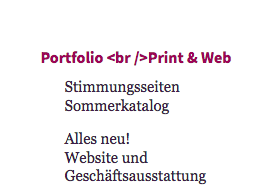
I had that br-tag until the last update. It worked. After the update it did not work anymore. Instead it was shown in my frontend as shown in the first screenshot.
In the footer, where I use widgets without plugin, everything is still alright: http://gross-im-netz.com/images//br_tag_footer.png
I don’t understand your last answer 🙁
Maybe I should just delete the plugin. I needed it formerly but I don’t need it that urgent right know because I removed a category from my menue. And it’s a lot of thinking and work for you for one single stupid user.