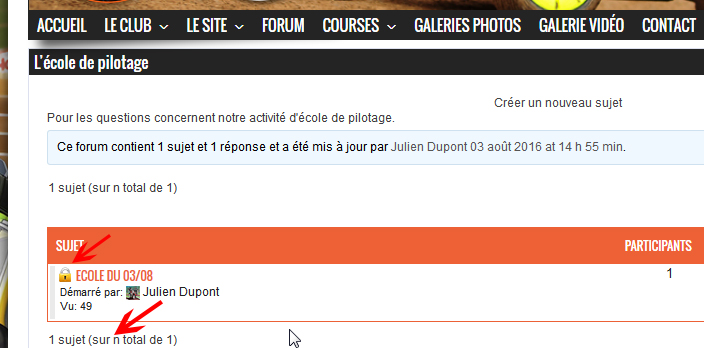
a great idea – let me look into it !
I’ve just released version 3.2.5 that has this
To set this go to the ‘Topics Index Styling’ and you’ll see a new option 14 and how it displays in the forum. You can set its size to suit your forum styling.
I’ve chosen a simple black icon as I hope this will show well on most themes. I might look at having options later on if there is demand !
The missing ‘u’ is actually in bbpress – I’ll report it to Pascal who looks after the French translation of bbpress
Let me know if I can help further
Thank you great, but the icon remains full size even if I type size.
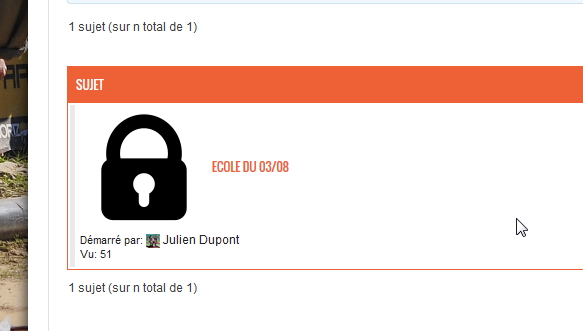
can you tell me what you have in the setting for size?
I tried with 5px empty and nothing has changed.
it needs just a number, so try 5 or 15 etc. no ‘px’ I’ll make it clearer in the next documentation
I said 5, but the icon remains large.
can you post what is in
Dashboard>settings>bbp style pack>plugin information
and let me know what is in
bsp_style_settings_ti
thanks
a:42:{s:19:”Pagination FontSize”;s:0:””;s:20:”Pagination FontColor”;s:0:””;s:19:”Pagination FontFont”;s:0:””;s:20:”Pagination FontStyle”;s:0:””;s:25:”Voice/Post Count FontSize”;s:2:”14″;s:26:”Voice/Post Count FontColor”;s:0:””;s:25:”Voice/Post Count FontFont”;s:0:””;s:26:”Voice/Post Count FontStyle”;s:0:””;s:27:”Topic Title LinksLink Color”;s:0:””;s:30:”Topic Title LinksVisited Color”;s:0:””;s:28:”Topic Title LinksHover Color”;s:0:””;s:20:”Topic Title FontSize”;s:2:”14″;s:20:”Topic Title FontFont”;s:0:””;s:21:”Topic Title FontStyle”;s:0:””;s:24:”Template Notice FontSize”;s:2:”14″;s:25:”Template Notice FontColor”;s:0:””;s:24:”Template Notice FontFont”;s:0:””;s:25:”Template Notice FontStyle”;s:0:””;s:31:”Template NoticeBackground color”;s:0:””;s:32:”Template Notice BorderLine width”;s:0:””;s:32:”Template Notice BorderLine style”;s:0:””;s:32:”Template Notice BorderLine color”;s:0:””;s:20:”Topic Started bySize”;s:2:”13″;s:21:”Topic Started byColor”;s:0:””;s:20:”Topic Started byFont”;s:0:””;s:21:”Topic Started byStyle”;s:0:””;s:49:”Sticky Topic/ReplyBackground color – sticky topic”;s:0:””;s:55:”Sticky Topic/ReplyBackground color – super sticky topic”;s:0:””;s:26:”Forum Information FontSize”;s:2:”14″;s:27:”Forum Information FontColor”;s:0:””;s:26:”Forum Information FontFont”;s:0:””;s:27:”Forum Information FontStyle”;s:0:””;s:33:”Forum InformationBackground color”;s:0:””;s:34:”Forum Information BorderLine width”;s:0:””;s:34:”Forum Information BorderLine style”;s:0:””;s:34:”Forum Information BorderLine color”;s:0:””;s:29:”Topic Index Headings FontSize”;s:0:””;s:30:”Topic Index Headings FontColor”;s:0:””;s:29:”Topic Index Headings FontFont”;s:0:””;s:30:”Topic Index Headings FontStyle”;s:0:””;s:17:”Lock IconActivate”;s:1:”1″;s:13:”Lock IconSize”;s:1:”5″;}
ok, that all looks good
I’ll need to look at your site to see what is affecting this.
If your forums are not publicly available, can you send me participant (ONLY) access via my website
http://www.rewweb.co.uk
otherwise post the url to a sample
Everything is perfect after adding in the custom css.
Thank you