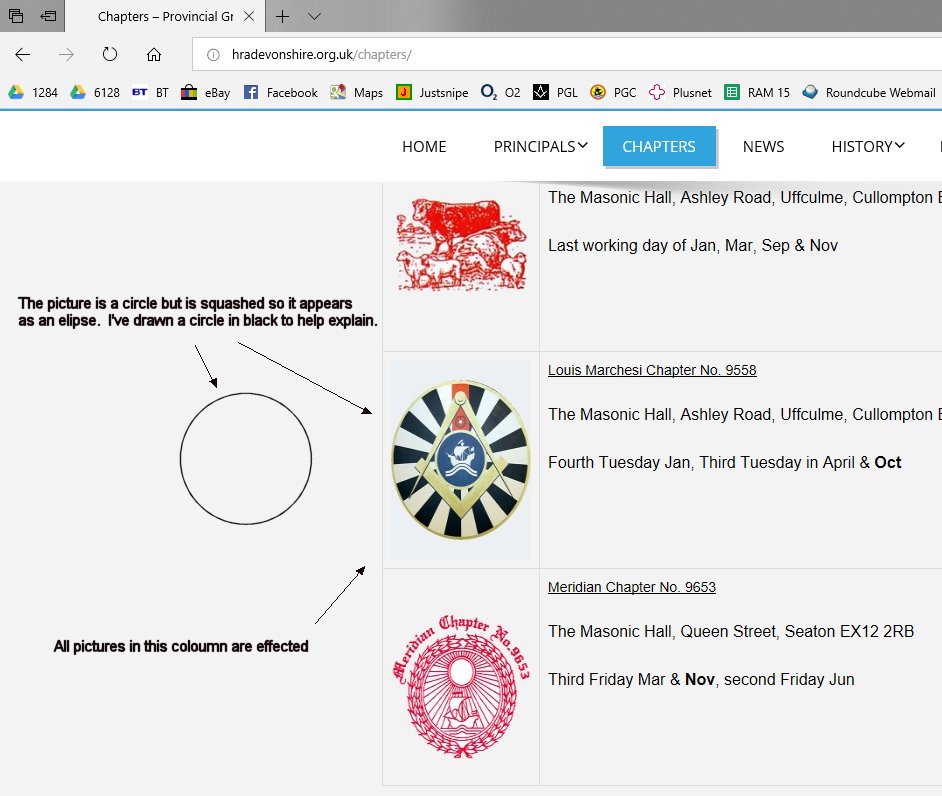
Hello,
We have tested your site in safari browser and the images look good.
Thank-you
Sorry my mistake. The images look wrong in Edge. All the ones with a circle look oval.
Hi,
Please use the below CSS code in custom CSS editor and save the changes
.page-id-22 .enigma_blog_post_content img {
    max-width: inherit !important;
    width: 140px !important;
}
Thanks.
Weblizar,
Many thanks for your time on this.
This site is my very first WordPress site so could you please tell me exactly
how and where I insert that code please.
I used to write my sites in html/Dreamweaver so I have knowledge – just not about WordPress!
Thanks again
M
Also, the image sizes are 160×200 so is the 140 in your post correct?
M
Hi,
For adding CSS Please go to admin dashboard -> Appearance -> customizer -> theme option -> theme general options, here you can see the custom CSS box paste the below CSS code here and save the changes.
.page-id-22 .enigma_blog_post_content img {
    max-width: inherit !important;
    width: 140px !important;
}
“the image sizes are 160×200 so is the 140 in your post correct?”
Yes.
Thanks for using weblizar’s theme.
Let us know for more query.
If you like our support then Don’t forget to rank and review us link
Thanks.
Hi,
Thanks for the instructions – easy to follow.
Unfortunately it didn’t work though. Using Edge to view the page images squeezed.
Interestingly, when using Edge when editing they look correct.
Weird.
Hello
Please describe your issue with a screenshot.
Thanks.
Hi,
Please go to admin dashboard -> Appearance -> customizer -> theme option -> theme general options, here you can see the custom CSS box paste the below CSS code here and save the changes.
.page-id-22 .enigma_blog_post_content img {
    max-width: inherit !important;
    width: 140px !important;
}
You can change the width as per requirement.
This will solve your issue.
Thank-you.