Hi Jakob,
If your WordPress site is on shared hosting it is possible that your provider may be disabling this ImageMagick function due to a security vulnerability.
I have opened an issue asking the plug-in author if this is the case and if there is a plan ‘B’ if this is the case.
Thread Starter
 Jakob
Jakob
(@jakobbader)
Hi there, thank you for getting involved.
Like I said, all the check marks are green (yes the site runs on a shared hosting plan)
– Imagick PHP Extension is loaded
– Imagick PHP Wrapper is supported. v.ImageMagick 6.9.0-0 Q16 x86_64 2016-05-05 http://www.imagemagick.org
– Imagick PDF Support is enabled
– GhostScript is supported
It worked fine, until it stoppend to import the PDF’s. What I do now, is to upload the files as jpg which works.
Unfortunately the “fix” that hosting companies are using is not to disable Imagick but to adjust the configuration file so that it doesn’t execute certain functions like converting pdfs to jpgs. You can see the effect in your error log…the imagick function throws an error.
Hello @jakob.
In some cases this issue could appear when users try to convert new PDFs with old versions of ImageMagick and Ghostscript libraries.
We’ve already got similar error reports. In few cases the issue was related to the old software versions.
As I wrote in the separate thread ( https://ww.wp.xz.cn/support/topic/it-doesnt-work-115#post-8585692 ) the issue could be in the old GhostScript version which wasn’t updated for a long time.
In this case you could try to import some PDF which which you’ve imported before to check if it will work for them. If it doesn’t, then the issue is not in GhostScript.
Also, @onepresstech could be right and your hosting provider could restrict all or particular server functions related to the ImageMagick because of the ImageTragick vulnerability. In this cae you could contact hosting support/admin and ask about it.
Also I don’t see GhostScript version in your requirements. Is it there?
Thread Starter
Jakob
(@jakobbader)
Hi Antongorodezkly
Thank you for getting back to me, however it’s ratter late 🙁
I switched to https://ww.wp.xz.cn/plugins/pdf-embedder/ which unfortunately doesn’t look so need but it does work and it’s supper easy to use.
Thank you for your work, I hope you get it sorted out.
Cheers
Jakob
Yes, it showed me “GhostScript is supported”, as mentioned in my previous message.
I understand. For now I’ll close this issue. If you’ll have any other questions please do not hesitate to ask here or on our support forum https://support.wp.teamlead.pw/
For those users, who will have the same issue and who will find this thread:
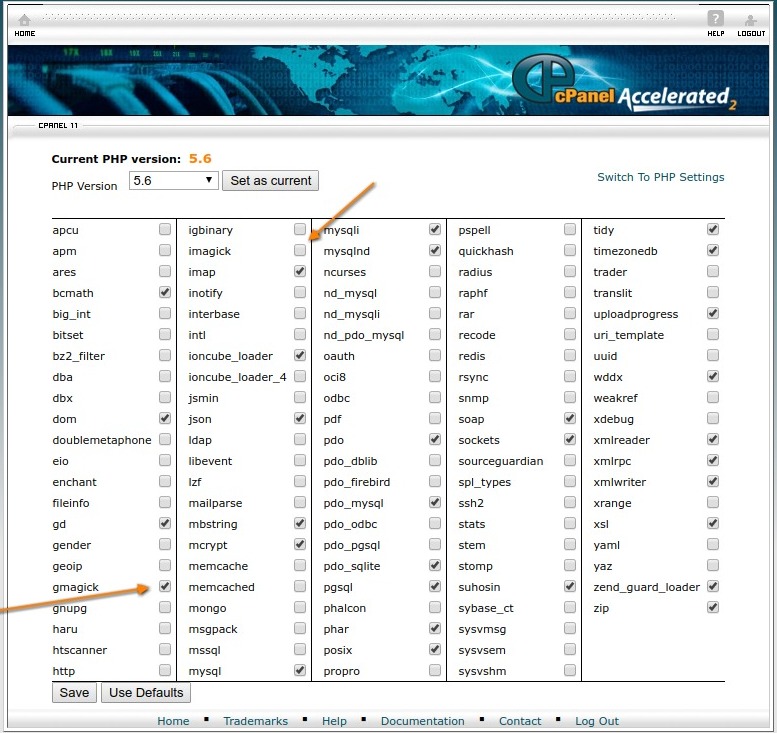
The issue not always in old Ghostscript. It could also be in old Imagick. In this case there is an alternative solution:
You can set your site to use gmagick instead of imagick:
http://support.wp.teamlead.pw/wp-content/uploads/sites/6/2016/11/cpanel-imagick-to-gmagick.jpg
After that make sure to switch libraries in the plguin’s settings:
http://pdf-light-viewer.wp.teamlead.pw/wp-content/plugins/pdf-light-viewer/documentation/index.html#setup
After that things should “just work”.