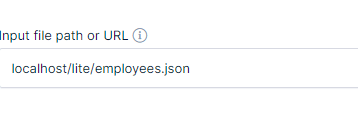
When creating a new table from source file, plugin displays “Input file path or URL” field, which is used to set file URL/path.
Unfortunately, it only accepts URLs. If I enter actual path like “/home/account/secret_dir_not_accessible_to_public/file.json“, plugin always displays error: “URL rejected: No host part in the URL“
Can someone explain me why field says “input file path or URL” if actual path is not allowed? Is it a bug, or am I missing something?
P.S. Yes, file path is valid and file is valid too. If I copy/paste the same path into TablePress, it works without problems.
Hello, As we pointed out on this Documentation about Tables linked from JSON source; The JSON should be available via an URL that wpDataTables can access.
Yes, if you wish to make any table linked from a JSON source file, inside the Input file path or URL, you have to insert the full URL path to the source file, including the domain name. For the time being, we don’t have a way to use a ‘relative path’ to a file without the domain name.
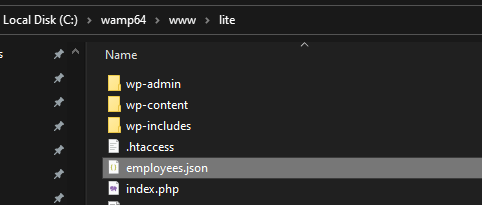
For example, if we insert a JSON file in the root folder of a website, on this test we will use a LocalHost on a computer, and if the full URL path is : http://localhost/lite/employees.json.
We can remove the https:// part and just leave the domain name followed by the path on the FTP/the site folder where the file is stored as : localhost/lite/employees.json and that will work.
But if we remove the domain name completely, at the moment, that will not work.
If you wish to see the ability to use ‘relative path’ without the need to insert the full URL to the file source including the domain name, you can make a development suggestion. Please feel free to search on our suggestions page, to see if someone may be already suggested this feature. If you can’t see it, feel free to add your suggestion there, and as more people vote, the feature will move higher on the priority list. You can certainly follow our changeLog if you’d like, where we state any changes/new features/bug fixes during updates;
and our newsletter, so you’re informed about new features, bug fixes, freebies, etc.
Regarding the way we named the ‘input file path or URL’ field in the Table back-end settings, we will pass your feedback to our management and the developers. They will do their best to update the way how we named that field and the tooltip for improved clarity for our users.
Let us know if you have any additional questions. Thank you.
Viewing 1 replies (of 1 total)
The topic ‘Import local file from path’ is closed to new replies.