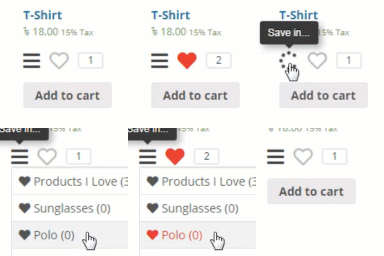
Hi @phanngocvy27,
Thanks for using our plugin.
We have that options available! You can use any Font Awesome icon in our plugin. For that, go to Wishlist Settings => Button Style.
Screenshot: https://i.imgur.com/Eu4ZrIL.png
To choose a font-awesome icon, go to this link
https://fontawesome.com/v5/icons
You can select any icon and copy the code. Please note that the icon has to be under the Free category, and the font-awesome version should be 5.
Screenshot: https://i.imgur.com/WqZljpG.png
Since you’re using an icon from font-awesome version 5, please make sure you have selected the right version on our plugin setting.
To select font awesome version go to Settings => General => Font-awesome version
Screenshot: https://i.imgur.com/tSLEJt2.png
Let us know if it helps.
Regards.
-
This reply was modified 3 years, 8 months ago by
 azizulraju.
Dear support team,
Thank you for your quick response, but what i mentioned is menu icon ( 3 bars icon) not the favourite icon
Hi, we have added this functionality and updated the plugin. Could you please install the latest version and give it a try?
Screenshot: https://i.imgur.com/hLJWxKQ.png
Let us know if you find any issues.
Regards.
Dear support team,
Thank you for your support so far,
The Inactive of menu icon that still “fa fa-bars”, i would like to inform to you for your upgrade in the future.
Now, that’s enough to me.
Thank you and hope you all the best
Sincerely,
Hi, we have fixed the inactive icon issue on version 1.0.35. Please install the latest version. If the issue is still there, it’s probably a browser cache issue. I suggest you to use a different browser for testing.
Regards.
That totally work, thank you so much
Hi @phanngocvy27, I am marking this issue as resolved.
If you’ve found our plugin helpful, please rate us on WordPress. It’ll inspire us a lot.
You can post your review and rating here:
https://ww.wp.xz.cn/support/plugin/wishlist/reviews/
Thanks.