Plugin Author
 taisho
(@taisho)
Hello,
OceanWP adds the buttons with JavaScript what is not optimal from performance and compatibility point of view.
At the moment I am not able to dequeue OceanWP’s script responsible for quantity buttons through my plugin. It doesn’t seem to be properly enqueued BUT theme authors provided an option to solve it on their own side through Ocean Extra plugin which adds “Theme Panel” on your left-hand dashboard menu.
Install and activate Ocean Extra, go to: Theme Panel > Scripts & Styles
Disable “WooCommerce Quantity Buttons” and save the settings.
I will contact with plugin support and try to get a clean way to suppress OceanWP quantity buttons out of the box in the future.
Best regards,
Ryszard
-
This reply was modified 6 years, 5 months ago by
 taisho.
-
This reply was modified 6 years, 5 months ago by taisho.
That worked, looks great, many thanks!
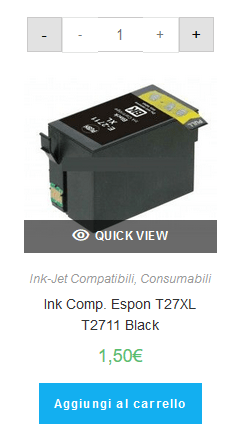
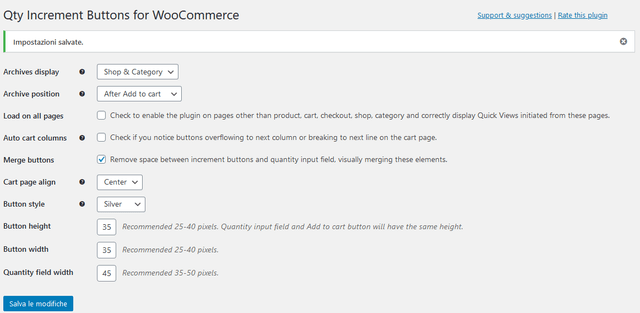
I resolve the double increment button but the position of the button not is as i setup it. I selected after add to cart but it’s always on the product like in photo.
Plugin Author
taisho
(@taisho)
Could you please provide a link to the site with this incorrect positioning?
Plugin Author
taisho
(@taisho)
I think that the best visual effect, in this case, would be with the quantity buttons above the Add to cart button.
Based on already asked question from OceanWP support forum, there is at least a hook to put the buttons after Add to cart button, but I assume that in such a case also before hook will be valid.
Could you edit the .php file of my plugin and check if the following works to position the buttons before / after Add to cart?
Replace:
if ( $args['qib_archive_after'] = "Before Add to cart" ) {
	add_action( 'woocommerce_after_shop_loop_item', 'qib_quantity_field_archive', 9 );
} else {
	add_action( 'woocommerce_after_shop_loop_item', 'qib_quantity_field_archive', 11 );
}
with:
if ( $args['qib_archive_after'] = "Before Add to cart" ) {
	add_action( 'ocean_before_archive_product_add_to_cart_inner', 'qib_quantity_field_archive' );
} else {
	add_action( 'ocean_after_archive_product_add_to_cart_inner', 'qib_quantity_field_archive' );
}
If it does indeed work, in the next release I will detect whether the used theme is OceanWp and if yes, change the hooks to dedicated OceanWp hooks, so no need to worry about preserving changes you are making to the plugin now.
-
This reply was modified 6 years, 5 months ago by taisho.
In which function is the code I have to change ?? I can not find.
Found and modified and works perfectly. The only thing if it is possible to add a space between the quantity key and the add to cart button would be perfect. Thanks so much.
Plugin Author
taisho
(@taisho)
No problem.
You can use the following for better spacing on archive pages in your child’s theme CSS / additional CSS:
.products.oceanwp-row .qib-container:not(#qib_id) {
    margin-bottom: 8px;
}
I will add this to plugin’s CSS in the next release too.
Sorry but I don’t understand where I must add the code. Thank you very much for the support and compliments for the plugin and for your availability to support.
Plugin Author
taisho
(@taisho)
In OceanWP you can easily add and maintain extra CSS without creating a child theme, like this:
https://docs.oceanwp.org/article/354-add-custom-css-and-js-to-your-website
Thank you very much it’s all perfect !
This is super helpful!! Saved my day 🙂
Thanks a lot!
 <br />caricare immagini sul web<br />


