Interfering with Other Plugins
-
We have a cloud calendar solution with a WordPress plugin component. We’ve been contacted by a couple of users recently about display problems. After looking into it, we’ve found that the issue appears when our plugin is used with the Ultimate Member plugin.
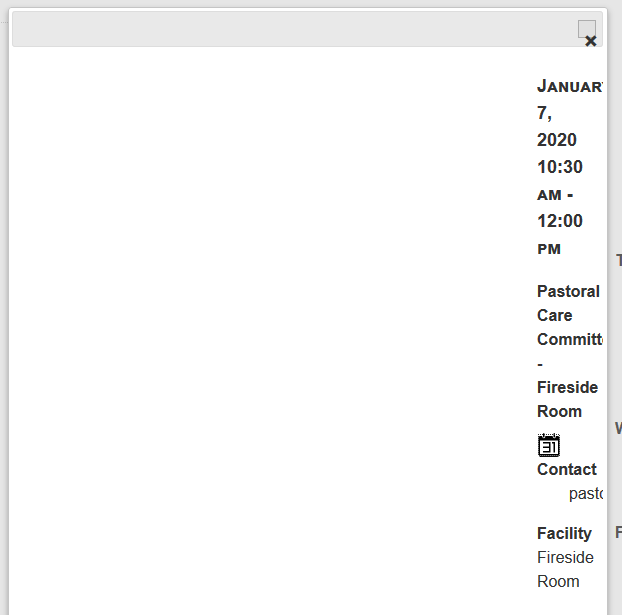
The observed behavior is that when a user clicks on a calendar event, our code opens a dialog box to show the event details. When our plugin is used with Ultimate Member, all of the content in the JQuery dialog box is squished over to the right about 90%. You can see an example image here:
https://www.mhsoftware.com/~gsexton/dialog.png
We looked at one of the affected sites and see:
/wp-content/plugins/ultimate-member/assets/css/jquery-ui.css?ver=2.1.2It appears to be caused by Ultimate Member’s use of it’s own JQuery-UI CSS files. To load the jquery dialog css, our code calls:
wp_enqueue_style("wp-jquery-ui-dialog")We think that either double-loading the CSS is causing a problem, or the versions are not compatible. As a work-around, we’ve been asking our customers to edit our plugin to disable the loading of wp-jquery-ui-dialog. That’s difficult and error prone. There’s also the fact that they’re having a bad experience. Another element we’ve considered is looking for a list of known incompatible plugins and adjusting our behavior when their presence is detected.
We’ve also considered trying to use some Javascript as a work-around so that we load the jquery css if it’s not already loaded. The problem we’re concerned about is that in bypassing the “right” way to load WordPress CSS assets, we’re opening ourselves up to future compatibility problems.
Before we go down either road, we wanted to see if you folks would consider changing your plugin’s behavior to use WordPress’s jquery css files rather than introducing your own.
Thanks for considering this.
George


The topic ‘Interfering with Other Plugins’ is closed to new replies.