Thread Starter
 Lucy
Lucy
(@kiddiestuff)
I use Woocommerce and create a new order and send it as an invoice. I tried Sliced Invoices but deleted it since it caused a problem with my other plugins.
Thread Starter
Lucy
(@kiddiestuff)
Is there any way to add “Gift Cards” or “Apply Coupon” to a new order that I send as an invoice? Right now the customer can’t redeem their gift card or a coupon.
Any help would be very appreciated.
Hi Lucy,
I was reading through the thread and you mentioned customers receiving an error when they go to pay for invoices. I don’t see what the error message says. Can you send us a copy of the error message?
Also, just to be clear, the user has to be logged into their account to see/pay for their invoice. It won’t be possible for others including admins to see their invoices on the front-end of the site.
You can add coupons to orders. When editing an order, you’ll see a button for that like this.
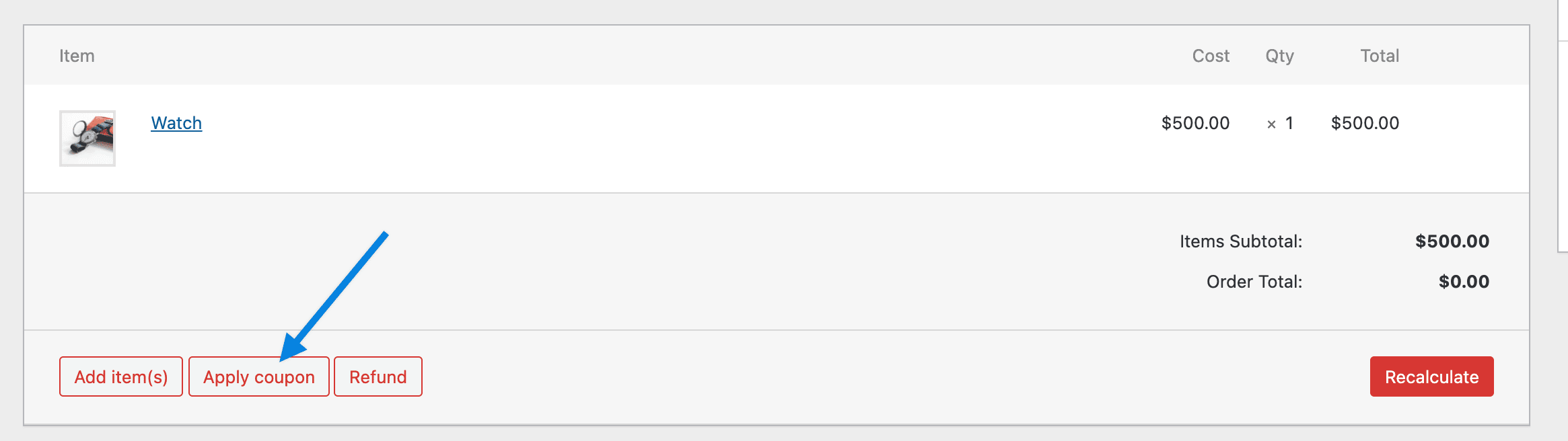
When you click that, it’ll give you an option to enter a coupon code. The code will need to already be set up for this to work.
You can also add a negative fee as a discount too.
Hi @kiddiestuff,
Since we haven’t heard from you in a while, we’re hoping that means you were able to get this resolved. I’m going to close this thread out now.
If you’re still having trouble, please open up a new topic and we’ll be happy to help out.
Stay safe!

