iPad Print not working
-
This plugin seems to work on posts I’ve created for people browsing my site to print on PC, but using the ipad and iphone, I receive errors (depending on the browser I use). I get a box saying “initializing” and then it says “Sorry, there was a problem” There was an error fetching posts.
Does the plugin support mobile devices?Additionaly, is there way to remove the url’s for the images on the print page when I choose to hide images in the settings.
And… is there a way to align the print button to the left under my posts?
Thanks in adavance for any help.The page I need help with: [log in to see the link]

-
Hello,
Thank you for contacting us.
I’m sorry that you are experiencing an issue with our plugin.
I noticed that you also sent us your debug information by email.
I replied to you a few days ago.
Did you receive my message?
I visited your website on PC and mobile and experienced the issue on both platforms. The console showed an issue accessing the REST API, so I believe your issue is caused by one of your other plugins blocking the WordPress REST API.
Could you check your settings for these plugins to see if there are any restrictions or settings affecting the WordPress REST API?:
-iThemes Security
-Really Simple Security
-Wordfence Security
Question 2: is there way to remove the url’s for the images on the print page when I choose to hide images in the settings.
Do you mean on the Quick Print settings page you have “Image Size” set to “None (hide images)” but a URL for the images is displaying instead of the images? Is that correct?
Question 3: Is there a way to align the print button to the left under my posts?
Yes, you can do that with a Custom CSS Rule.
Follow these instructions: https://printmy.blog/user-guide/getting-started/12-faqs-common-problems-using-print-my-blog-pro/#how-do-i-change-the-style-of-the-quick-print-buttons
But use this CSS rule instead of the rule from the guide:
.pmb-print-this-page.wp-block-button {
justify-content: flex-start;
}Thank you for the reply.
Yes, I found the culprit. The api setting in the plug-in “Solid Security Basic” by SolidWP under API Access was set to “restricted access”. All is fine with that now.
Per your 2nd question, I was able to find the “hide url” option.
As for the custom CSS code to left align the print button, this worked perfectly.
Thanks for all your help on that.
I am now having another issue where when we print something from any mobile device, it just prints out a bunch of lines and dots.Hello,
I’m glad we were able to solve those three problems! Thank you for confirming that.
I tested your website on iPhone and I experienced the following behavior:
With Cookies Blocked: The Print Page did not load in Safari.
With Cookies Unblocked: The Print Page loaded properly in Safari.
I’m guessing that the behavior you experienced was because Cookies were blocked on your mobile device.
Could you check that please and let me know the results?
Thank you for your patience.Thanks for the quick response Ryan.
I checked on both the ipad and iphone and we are not blocking cookies on either of those devices.Since you made some changes to your WordPress plugins, could you try this please:
- Close your Safari app
- Goto your Safari settings and click “Clear History and Website Data”
- Reopen Safari and refresh your home
- Press the print button to open up the Print Page again
Please let me know if that fixes the issue or if it persists.
Thank you.
Ryan,
Thanks for the steps.
I tried the steps provided, but am getting the same results as before.I took a look at your website on iPhone and tried the print button that you have.
For me, the Print Page loaded properly, but on your articles you only include the Print Ready button, you don’t include the Digital PDF print button. The Print Ready option is optimized for printing to physical printers, so from the Print Page users are directed to the Printer Selection screen when they push the print button. For mobile users this might not be ideal because most mobile devices are not connected to printers. That could be why it wasn’t printing properly for you on mobile.
So, you might want to turn the Digital PDF print button on.
Could you try navigating to the WordPress Backend > Print My Blog > Settings > Customize Buttons > Print Formats and make sure that the “PDF” format is selected. Then, press save if you make a change.
This should add the PDF Print Button to your articles where you use the Print Button Shortcode.
Please let me know the results or if you have any trouble.Ryan,
Thank you for your continued support on this.
My wife uses her ipad frequently to print the articles from her blog on a physical printer.
I know you say that your plugin is not “optimized” to print to physical printers from a mobile device. Does that mean it is not supported with your plugin?Hello,
I’m sorry for the confusion.
There are several different print buttons as shown in the settings in this screenshot:
Print: This button optimizes content for printing to a physical printer.
PDF: This button optimizes content for printing to a digital pdf.
eBook: This button optimizes content for printing to an ePub file.
Currently, I believe you only have the Print button activated, which only supports users who want to print to a physical printer, which sounds like that is what you want to do.
Could you please also activate the PDF button for me, so that I can Print to PDF and see if I can replicate the issue you described?: (i.e. “it just prints out a bunch of lines and dots.”)
Also, could you please try printing a different document (something not from your website) from your wife’s phone just to make sure that this isn’t an issue with your printer or the print function of her phone? It sounds like it might be an issue with your printer head.
I changed the settings to add PDF print format.
I also tried from my Samsung Galaxy and PC and am having no issues printing to my printer or saving as a pdf.
Also tried printing other sites pages from my iphone to the same printer and having no issues there.
I then tried from both her iphone and my iphone and when I save the PDF to my files via Safari, I get the following: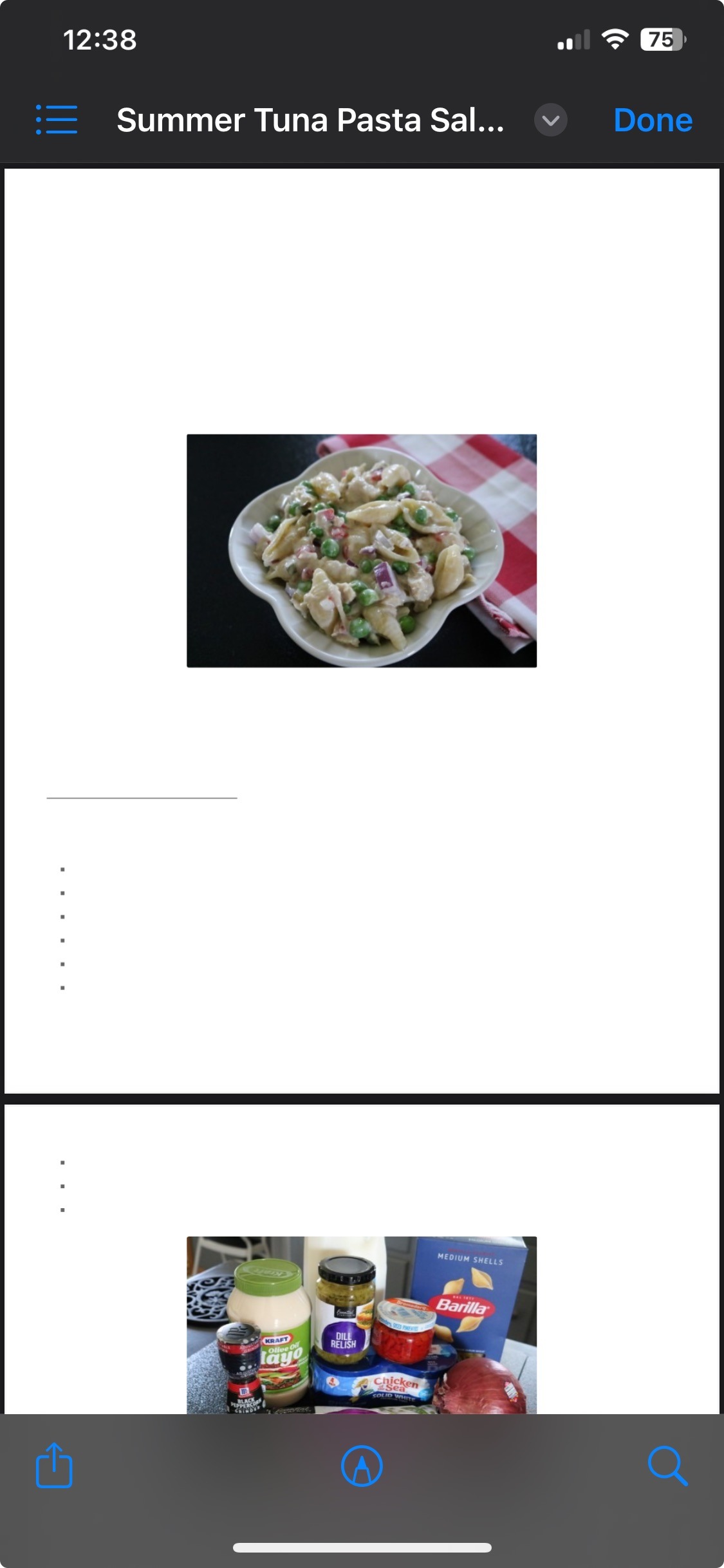
Yes, I just tried printing to PDF from your website and it worked on Desktop but I experienced the same issue as you when I tried to print to PDF from iPhone.
Printing to PDF on iPhone from our dev site worked properly on my device though. So, I think the issue must be related to a setting or possibly a plugin on your website.
Could you try navigating to the Quick Print Settings page and adjusting the “Post Rendering Wait-Time” under “Troubleshooting Options”. If it is currently 200ms, could you try increasing it to 1000ms?
Also, could you tell me if the “Include Inline Javascript” option is checked or not?I disabled all of the plugins on the site except for PMB and still had the same issue.
I then changed the Post Rendering Wait-Time setting from 200ms to 1000ms and it ended up loading the entire blog (333 pages). I don’t see a way to permanently change that setting, so I don’t really know what this is accomplishing.
The Inline Javascript option was not checked.Thank you testing with all of your plugins disabled. That tells us that it is not a plugin issue.
Thank you also for checking the Post Rendering Wait-Time and Inline JavaScript options. I was also able to test those settings from my device.
Since PMB hosted on other websites is working fine on iOS Safari, could I ask you to do one more test for me please?
If possible, could you try it with a different WordPress Theme activated, just in case there is some kind of conflict with the Theme?It’s the Theme.
I enabled the 2025 theme and all looks fine.What’s strange is that if I select the contents (when using the current theme) – in the print preview for both pages (for post https://www.hotdishhomemaker.com/summer-tuna-pasta-salad/) and copy the contents, the text that’s in those pages (which have white text, with the exception of some bullets and a line) – here’s what we get:
PAGE 1:

H H H HH HH H HH H H H H H H H H

w w w ww w w w ww w w w w w w w w w w ww w w ww w ww w w w ww w ww w w w w w ww w www w w w ww w ww w ww w ww w ww w ww ww w

S S S S S S SS S S S SS S S S S SS S SS S

H HH H H H H HH H H H H H H HH H HH H H H H HH H HH H HH H H HH H H

w w w w w w www ww w w w w w w ww w w wwww w w www w w w w w ww w w ww ww w w w ww w w ww w w www ww w w w w ww w ww w www ww w w w ww w ww w w w w w w ww w w w ww w w

w w w w ww w w w w w ww w wwww w w ww w w w w ww w w w w ww w ww w w ww w w ww w w w w w w w w

H H H H H H HH H H H HH H H H H HH H H H H

HH H H H H HH H H H H

w www ww w wwww w w w ww w www ww w ww w ww w w w ww w ww w w w www ww w w w w

w ww w w w w ww w w ww w ww w w www ww w w w w

w ww w w w ww w w w w w ww w w w w ww w w ww w ww w w w www w w w w w

w ww w w ww w w ww w ww w www ww w w

w www ww w wwwww w ww ww w w ww ww w w w w w

w ww w w w ww w w w

w w w ww w w ww www

w www ww w wwwww w ww wwwww w www w

w w w ww w w ww w w w w w ww ww w w ww w w w w w

H HH H H H HH H H H

H Hww w w ww ww w w ww w w w ww w w ww ww w w www www ww www w w w ww ww ww w ww w w wwww w ww w ww ww w w w www ww w w ww w w ww w w w ww w ww w w ww w w ww ww w w w

w w w ww ww ww w w w w w w

H Hww w w ww w w ww ww w w ww w ww w www w w w ww w w ww ww w w w w w www w w ww w w ww w w w ww w w wwww w w ww w ww w w

H Hww w w w w w w ww w w ww w w w w ww w w w w w ww w ww w ww w w ww ww w w w ww w w ww w w ww www w w w w ww w w w w www w www ww w w ww w w w w www ww w w w ww w www w w w


PAGE 2

https://www.hotdishhomemaker.com/?print-my-blog=1&post-typ1&show
title=1&show
_
content=1&pmb_f=print&pmb-post=9330 8/20/25, 3:20 AM Page 1 of 2w w w ww w w w w ww w w w w ww w wwww ww ww w w ww w ww w w www w ww w ww w w w w w w w ww w w ww w w w www www ww w w ww w w w w w www w ww www ww w w ww www w w www w www w w ww w ww w w H Hww w w w ww w w ww w w w w www ww w w w www w w w ww w w ww w w w w www w w ww ww w ww w w w w ww w w ww ww w w ww w w w w ww w ww ww w w w w ww w ww w w w ww w w w w w w ww w ww w w w w w w www w w w ww w w w w w w w ww ww w w ww ww w w ww w w w w w H Hww w w w w w w ww w w w w ww ww w w ww w ww w w ww w w w w ww w www ww ww w w w w w w w ww w w w w ww w w www w w ww w w ww w w ww w w ww w w w w ww w w ww w w w w w w ww ww w ww w w w w ww w ww w ww w w ww w w www ww w ww w w ww w w w ww w w ww w w w ww w www w w w ww ww w ww ww w w w w w w ww w ww w w w w w w w www w w w w ww w w w w w w w w ww w www ww w w w w w ww ww w ww w w ww w w w w ww w www w w w w ww w w ww w w w ww w w w w w ww w w ww w w w w ww w w ww w www w w w ww w ww w w w ww w ww www w w w w ww ww w w w w ww w ww w w w w ww w w ww w w ww w w ww w w w w ww w ww w wwwwww w ww ww w w w ww w w ww www w w ww w ww w ww w ww w w w ww w www w w ww w w w w ww w w w w w w w w w ww w ww w w w ww w ww w w ww w w w w ww w ww w ww w ww www ww w w wwww w w w w w w ww ww w w ww w ww w w ww w w w w ww w ww w www ww w w ww w ww w w w w www w w w w ww w ww w ww w w w ww w www ww w w ww w w www w w ww w w w ww w w w ww w w w w ww w wwww ww w w w ww w w w w ww w w w w www w w ww ww w ww w w w w ww w w w ww w w w w ww w www w w w w w ww w w ww w w w w ww w ww w w ww w w www w w w w w w w ww w w ww w w ww w w w www w w w w ww w w ww w w ww w w w ww w w www www ww ww w ww w ww w w www www www w w w w w w w ww w w w www w w w w w w ww w w w ww w w w w ww w ww w www ww ww w ww w w ww w w w w w w w w w ww w ww w www w w ww ww w ww w w w w w w w w https://www.hotdishhomemaker.com/?print-my-blog=1&post-typ1&show title=1&show
_content=1&pmb_f=print&pmb-po-
This reply was modified 10 months ago by
mncompgeek.
Yes, it appears to be your theme.
When your home page is printed on iOS without the use of PMB it has the same issue:https://dev.printmy.blog/wp-content/uploads/2025/08/image0.png
So, this is not something we can fix on our end. You will need to edit your theme directly or contact your Theme Developer. If you are editing your Theme’s styles.css file directly, you can look for rules with the “@media print” tag. These are rules that will only affect printed pages.
I believe this resolves this issue, so I am going to close this thread. Please create a new thread if there is a new issue we can assist you with and we will be happy to do so.

The topic ‘iPad Print not working’ is closed to new replies.