@slash018
You still have all UM Pages cached:
<!--
Performance optimized by W3 Total Cache. Learn more: https://www.boldgrid.com/w3-total-cache/
Served from: openlib.io @ 2022-10-16 18:05:56 by W3 Total Cache
-->
Disable caching for pages Login, Register, Password Reset, Account, User, Members.
https://docs.ultimatemember.com/article/1595-caching-problems
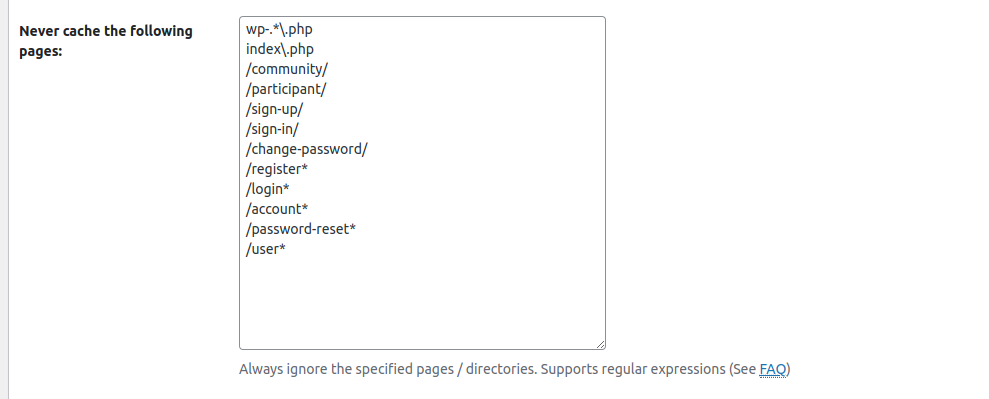
Hai @missveronicatv , I’ve already disabled the Caching for those suggests pages in my W3 Total Cache settings, But still i’m facing the same issue.
Screenshot: https://i.ibb.co/VvvpCLc/Cache-Settings.png
Can you please help me on this.?
Regards,
@slash018
I’ve already disabled the Caching for those suggests pages in my W3 Total Cache settings,
No, you have not disabled the caching.
https://imgur.com/a/vpUgv9v
@slash018
Try to deactivate the “W3 Total Cache” plugin for your testing of the menus.
Hai @missveronicatv , Thanks for your reply.
I’ve already added the pages to disable the cache, anyways i’ll try to deactivate the W3 cache plugin and check on this right now.
Will update you on this status soon. Thanks!
Regards,
Hello @missveronicatv, Even after disabling the W3 Total Cache plugin i’m still facing the same issue.
Few times the conditional menu works, but most of the time it has no effect.
After disabling i’m facing few other error like this “An error has been encountered. Probably page was cached. Please try again.” when i try to login. and even after loggin in it don’t recognise me as a logged in user.
Error Pic – https://ibb.co/SKwbPTj
Please help me on this, This has blocked me to continue further.
Regards,
-
This reply was modified 3 years, 7 months ago by
 slash018.
@slash018
Ask your Web Hosting support if they have any active caching for your UM Pages.
If they use caching then ask them to disable caching for pages Login, Register, Password Reset, Account, User, Members.
Hello @missveronicatv, Thanks for your reply.
Let me check with my hosting support team on this and will keep you posted.
Regards,
Hello @missveronicatv, I just reached out to my hosting support team. And i was suggested by them to use W3 Total Cache plugin and disable the pages there by adding the URL, Which i’d already tried earlier and found no luck so right now i’ve disabled the W3 Cache Plugin.
Can you please share me what other pre-requisites do i need to consider to fix this issue?
Regards,
@slash018
Post your Install Info from UM Settings into the Forum.
Try to make a Theme/Plugin conflict test:
https://docs.ultimatemember.com/article/96-how-to-do-a-plugin-theme-conflict-test
@slash018
Here you can see how Cloudflare is caching your pages.
This example is from my visit at your “Password Reset” Page.
First screencopy when there were no valid pages in the cache
which gave a cache MISS at 05.48.21
which resulted in a page request by Cloudflare to your web hosting server
which I got to my screen.
My next visit on second screencopy at 05.49.35
now Cloudflare had the “Password Reset” page in the cache
which gave a cache HIT at the time of my visit.
The page age was 75 seconds old (from my first visit)
well below the Cloudflare cache saved time limit of 28800 seconds
and I got the cached page to my screen.
https://imgur.com/a/p9fBXWa
-
This reply was modified 3 years, 7 months ago by
 missveronica.
-
This reply was modified 3 years, 7 months ago by missveronica.
-
This reply was modified 3 years, 7 months ago by missveronica.
-
This reply was modified 3 years, 7 months ago by missveronica.
Hi @missveronicatv, Thanks for your reply.
Here is the “Install Info” below.. Please let me know if you find any issues here:
### Begin Install Info ###

## Please include this information when posting support requests ##

--- Site Info ---

Site URL:					https://openlib.io
Home URL:					https://openlib.io
Multisite:					No

--- Hosting Provider ---

Host:						DBH: localhost, SRV: openlib.io

--- User Browser ---

Platform:                 Apple
Browser Name:             Chrome
Browser Version:          107.0.0.0
User Agent String:        Mozilla/5.0 (Macintosh; Intel Ma
			  c OS X 10_15_7) AppleWebKit/537.
                          36 (KHTML, like Gecko) Chrome/10
                          7.0.0.0 Safari/537.36

---- Current User Details --

Role: administrator

--- WordPress Configurations ---

Version:						6.0.3
Language:					en_US
Permalink Structure:			/%postname%/
Active Theme:				Squareread 1.5.1
Show On Front:				posts/static
ABSPATH:					/home1/xdvcunmy/public_html/
All Posts/Pages:				2
WP Remote Post:           		wp_remote_post() works
WP_DEBUG:                 			Disabled
WP Table Prefix:          			Length: 4, Status: Acceptable
Memory Limit:   				40MB

--- UM Configurations ---

Version:						2.5.1
Upgraded From:            		2.5.0
Current URL Method:
Cache User Profile:			Yes
Generate Slugs on Directories:	Yes
Force UTF-8 Encoding: 		No
JS/CSS Compression: 			No
Port Forwarding in URL: 		No
Exclude CSS/JS on Home: 		No

--- UM Pages Configuration ---

User:						https://openlib.io/user/
Account:						https://openlib.io/account/
Members:					https://openlib.io/members/
Register:						https://openlib.io/register/
Login:						https://openlib.io/login/
Logout:						https://openlib.io/logout/
Password Reset:				https://openlib.io/password-reset/

--- UM Users Configuration ---

Default New User Role: 		0
Profile Permalink Base:		user_login
User Display Name:			full_name
Redirect author to profile: 		Yes
Enable Members Directory:	Yes
Use Gravatars: 				No
Require a strong password: 	Off

--- UM Access Configuration ---

Panic Key:
Global Site Access:						Site accessible to Everyone
Backend Login Screen for Guests:			No
Redirect to alternative login page:
Backend Register Screen for Guests:		No
Redirect to alternative register page:
Access Control widget for Admins only: 		No
Enable the Reset Password Limit:			Yes
Reset Password Limit: 3Disable Reset Password Limit for Admins: No
Blacklist Words: 							5

--- UM Email Configurations ---

Mail appears from:  			OpenLib.IO
Mail appears from address:  	[email protected]
Use HTML for E-mails:   		Yes
Account Welcome Email:  		Yes
Account Activation Email:   	No
Pending Review Email:   		No
Account Approved Email: 		No
Account Rejected Email: 		No
Account Deactivated Email:  	Yes
Account Deleted Email:  		Yes
Password Reset Email:   		Yes
Password Changed Email: 		Yes

--- UM Total Users ---

				All Users(3)
administrator(1)
subscriber(2)
none(0)

--- UM Roles ---

				Administrator (administrator)
Editor (editor)
Author (author)
Contributor (contributor)
Subscriber (subscriber)
SEO Manager (wpseo_manager)
SEO Editor (wpseo_editor)

--- UM Custom Templates ---

				N/A

--- UM Email HTML Templates ---

				N/A

--- Web Server Configurations ---

PHP Version:              			7.4.28
MySQL Version:            			5.7.23
Web Server Info:          			Apache

--- PHP Configurations ---

PHP Memory Limit:         			512M
PHP Upload Max Size:      			512M
PHP Post Max Size:        			516M
PHP Upload Max Filesize:  			512M
PHP Time Limit:           			60
PHP Max Input Vars:       			1000
PHP Arg Separator:        			&
PHP Allow URL File Open:  			Yes

--- Web Server Extensions/Modules ---

DISPLAY ERRORS:           			N/A
FSOCKOPEN:                			Your server supports fsockopen.
cURL:                     			Your server supports cURL.
SOAP Client:              			Your server has the SOAP Client enabled.
SUHOSIN:                  			Your server does not have SUHOSIN installed.
GD Library:               			PHP GD library is installed on your web server.
Mail:                     			PHP mail function exist on your web server.
Exif:				          PHP Exif library is installed on your web server.

--- Session Configurations ---

Session:                  			Disabled
Session Name:             			PHPSESSID
Cookie Path:              			/
Save Path:                			/var/cpanel/php/sessions/ea-php74
Use Cookies:              			On
Use Only Cookies:         			On

--- WordPress Active Plugins ---

				Akismet Anti-Spam: 5.0.1
Alx Extensions: 1.1.3
Bluehost: 2.12.10
Creative Mail by Constant Contact: 1.6.1
Google Analytics for WordPress by MonsterInsights: 8.9.1
Jetpack: 11.4
Meta Box: 5.6.7
OptinMonster: 2.10.0
Regenerate Thumbnails: 3.1.5
Ultimate Member: 2.5.1
Ultimate Member - reCAPTCHA: 2.3.1
Ultimate Member - Terms & Conditions: 2.1.3
WP-PageNavi: 2.94.0
WPForms Lite: 1.7.7.2
wpForo: 2.0.9
Yoast SEO: 19.9

### End Install Info ###
Hello @missveronicatv, Can you please let me know how can i resolve the cloudflare cache issue?
Can you please help me on this? It would be really grateful if you can help me or fix the issue..
Regards,
@slash018
https://ww.wp.xz.cn/plugins/jetpack/ :
Image CDN for images and static files, like CSS and JavaScript, served from our servers, not yours, which saves you money and bandwidth.
This explains your CDN caching.
Turn off the Jetpack caching.
Hai @missveronicatv, Thanks for your prompt responses.
I’ve now disabled Jetpack plugin. Will this fix the cache issue?
Is there anything else i would be required to do?
Regards,