• Hi, I have an issue with embedding js code in an event page. I use js composer for page edits but the moment I add a javascript code to my event page, the page breaks. I have tried a different theme and disabling all plugins but the problem persists. Is there any settings that I can turn on to enable js scripts to work?

Viewing 6 replies - 1 through 6 (of 6 total)
  • Plugin Support ArtemSupport

    (@artemsupport)

    Hello,

    Could you send us a link the page with the issue, so we can take a look at any errors.

    Plugin Author Ashan Perera

    (@ashanjay)

    Or give us an example of the js code you are trying to embed so we can also replicate this issue and see if we can find a solution for this 🙂

    Plugin Author Ashan Perera

    (@ashanjay)

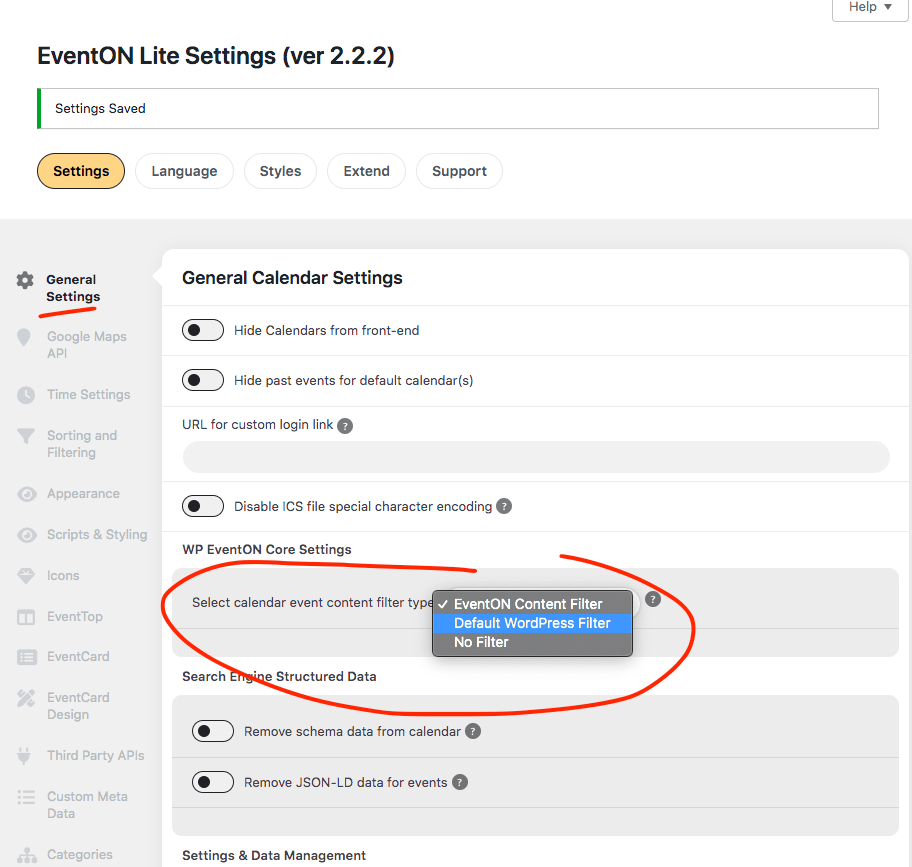
    You could also try changing the content processing method via eventON settings.

    I also added a simple script into event details as a HTML block and it works fine. with version 2.2.2

    Thread Starter grossindel

    (@grossindel)

    Thanks for the quick response, am using js composer plugin for page editing and haven’t tested with the default WordPress editor.

    I don’t see WP Eventon core settings in mine, I wonder why

    https://imageupload.io/eZGXl0C38sIbk4F

    • This reply was modified 2 years, 7 months ago by grossindel.
    Plugin Support ArtemSupport

    (@artemsupport)

    Since you are using the full version of the plugin, please go to https://helpdesk.ashanjay.com/ and create a new ticket with included login info, so we can take a look.

    In order to find “Select calendar event content filter type”, please go to EventON Settings > Advanced.

    Plugin Author Ashan Perera

    (@ashanjay)

    As artem mentioned those settings are moved under advance tab on the full version 🙂

Viewing 6 replies - 1 through 6 (of 6 total)

The topic ‘Issue with embedding js script’ is closed to new replies.