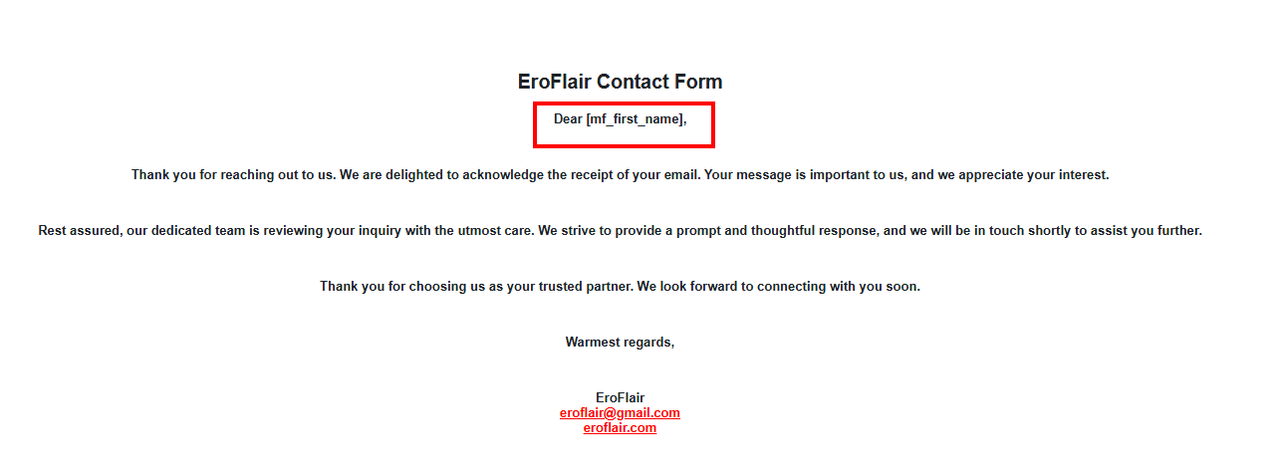
I followed your tutorial and used the shortcode for the First Name, but instead of receiving the person’s actual first name, I only get [mf_first_name].
Could you please assist me in resolving this issue?
Thank you for reaching out to us. I understand your concern.
The First Name and Last Name fields have default widget field names (screenshot). Please ensure you are using the correct shortcode [mf-listing-fname] in your confirmation message. This should resolve the issue.
Thanks a lot for your answer! I checked, and my setup is exactly the same as yours. However, when the email arrives, it still shows ‘Dear [mf_first_name]’ instead of the actual name. Please take a look at the attached files.
If you write the confirmation email without HTML tags, it should work. Could you please provide a screenshot of your confirmation email? Additionally, if possible, share your form link so we can take a closer look. This will help us provide a more accurate solution.
I tried with and without HTML , the result is same, here are the HTML version
<p>Dear <strong>[mf-listing-fname]</strong>,</p> <p>Thank you for reaching out to us. We are delighted to acknowledge the receipt of your email. Your message is important to us, and we appreciate your interest.</p> <p>Rest assured, our dedicated team is reviewing your inquiry with the utmost care. We strive to provide a prompt and thoughtful response, and we will be in touch shortly to assist you further.</p> <p>Thank you for choosing us as your trusted partner. We look forward to connecting with you soon.</p> <p>Warmest regards,</p> <p>EroFlair<br /><span style=”color: #ff0000;”><a style=”color: #ff0000;” href=”mailto:[email protected]” target=”_blank”>[email protected]</a></span><br /><span style=”color: #ff0000;”><strong><a style=”color: #ff0000;” href=”https://eroflair.com/” target=”_blank”>eroflair.com</a></strong></span></p>
I hope you’re doing well. For the confirmation email, please ensure that you are using it without any HTML tags to avoid any shortcode functionality issues.
Additionally, I noticed that your field name is set as’mf-first-name’.You should use‘mf-first-name’ exactly as it is for the user name field. This should resolve the issue and work as expected.
Regards.
Viewing 7 replies - 1 through 7 (of 7 total)
The topic ‘Issue with Metform Shortcode for First Name’ is closed to new replies.