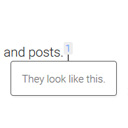
Hi @smilkova ,
Does the footnote appear when you click on the footnote link? The plugin is only set up to show footnotes when you click on the link and doesn’t show them on hover. If the footnote is not showing on click, could you look in the “Step 3: Diagnosis” section from https://ww.wp.xz.cn/support/article/using-your-browser-to-diagnose-javascript-errors/#step-3-diagnosis and see if you are getting any JavaScript errors?
Best,
Sean
Thanks, Sean. The footnote does not show when I click on it. When I click on it it opens a black browser page. I’ll look at the “Step 3 Diagnosis” link you sent.
So this is what I get and I have no idea how it relates to modern footnotes and how to fix it.
A cookie associated with a cross-site resource at <URL> was set without the SameSite attribute. A future release of Chrome will only deliver cookies with cross-site requests if they are set with SameSite=None and Secure. You can review cookies in developer tools under Application>Storage>Cookies and see more details at <URL> and <URL>.
I might just give up on using modern footnotes.
Thanks for posting the link. It looks like there is another plugin interfering with the Modern Footnotes link. There is some plugin for endnotes that is trying to set up a footnote on the same “1” link as Modern Footnotes is, and the combo of that is changing the footnotes so it won’t work. You’ll have to remove the code for the endnote plugin that’s around the Modern Footnotes code. Or, if you are trying to use both in combination with each other, if you let me know the name of the other plugin I can take a look to see if it’s possible to use them in tandem.
Thank you! I am not trying to use another endnote plugin and ideally I would like to use only modern footnotes.
What you said helped me a lot — I realized that the page was doing automatic endnotes that I have to delete entirely and re-insert the footnotes. I just tried it and it worked. THANK YOU.
Fantastic, glad you got it working!!