Hi there,
I am able to see the Publicize connections for your site here:
https://wordpress.com/marketing/connections/sandboxwp2.ninjatraderecosystem.com
I currently see connections for Google Photos, Mailchimp, and Instagram. Are those the only connections that you have?
Hello,
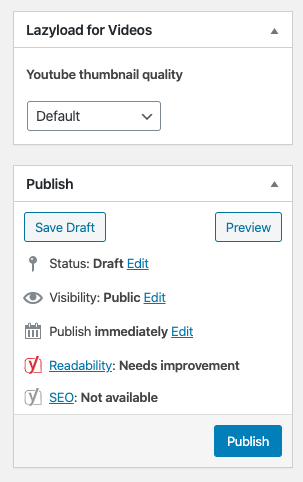
that is our sandbox site you are referencing. The correct url is https://ninjatraderecosystem.com so your link would be https://wordpress.com/marketing/connections/ninjatraderecosystem.com where you will see it shows Facebook and Twitter running. Here is an image of our admin side, you will see there is no Publicize option -> https://ninjatraderecosystem.com/Publicize.png
Hi there,
So just to confirm, you’re seeing the connections if you go to WordPress.com settings, but you don’t see them in the editor itself, correct?
Can you please confirm which version of the Classic Editor plugin you have installed?
On a site with v 1.5 of the Classic Editor plugin running, I can still see Publicize options in the Publish module of the editor screen, so this could be a conflict with another plugin on your site.
Please attempt to disable all plugins except Jetpack and Classic Editor, and switch to the default Twenty Nineteen theme. If the problem goes away, enable them one by one to identify the source of the problem.
If you are able to install plugins, install Health Check. On the troubleshooting tab, you can click the button to disable all plugins and change the theme for you, while you’re still logged in, without affecting normal visitors to your site.
I see the settings in Jetpack -> Settings -> Sharing -> Connect your social media accounts – it shows FB and Twitter as being connected. Same on wordpress.com – and again this just stopped working it was fine and working as expected. As this image shows, the functionality is gone from the Publish module on the admin screen. https://ninjatraderecosystem.com/Publicize.png
Figured this out, and wanted to post here in case anyone else has the same issue. I had to add support for the ‘publicize’ function in my site specific plugin, yours may be in functions.php. Where I created the custom post type I have to add ‘publicize’ in the ‘supports’ array.
Plugin Support
 Velda
Velda
(@supernovia)
Ah, this was just with a CPT? Glad you were able to get it. We’d recommend adding it through a functionality plugin so the change doesn’t get lost when you run updates.
https://jetpack.com/support/adding-code-snippets/
Thanks again for sharing the solution.