Same here, also getting jQuery errors. I’m also experiencing problems with the mobile friendly test by Google which mentions jQuery errors on my product pages.
Hello @fluiditystudio
You’re using a premium plugin which isn’t supported here. Write to the site of the author of this plugin – https://pluginus.net/support/forum/woof-woocommerce-products-filter/
Hello @benlinders
Drop me exact link to the issue
We are not using the premium version. We are on the free version.
Hello @fluiditystudio
We are not using the premium version. – It is not, I see which version you are using
In this case, write to support where you downloaded it
Hello @benlinders
I checked your site, but I do not see any JS errors
They seem to be gone indeed. Probably one of the recent updates has solved.
I don’t understand what you are getting at. I installed it directly from here (WordPress). This is why I’m messaging you.
I’m getting console warnings for WOOF.
jquery.min.js:2 Uncaught TypeError: Cannot use 'in' operator to search for 'length' in {"swoof":"1","product_tag":"engine-controls-sensors-wiring-misc","really_curr_tax":"17-product_cat"}
    at p (jquery.min.js:2)
    at Function.each (jquery.min.js:2)
    at woof_draw_products_top_panel (front.js:667)
    at HTMLDocument.<anonymous> (front.js:231)
    at e (jquery.min.js:2)
    at t (jquery.min.js:2)
Also this,
jquery.min.js:2 jQuery.Deferred exception: Cannot use 'in' operator to search for 'length' in {"swoof":"1","product_tag":"engine-controls-sensors-wiring-misc","really_curr_tax":"17-product_cat"} TypeError: Cannot use 'in' operator to search for 'length' in {"swoof":"1","product_tag":"engine-controls-sensors-wiring-misc","really_curr_tax":"17-product_cat"}
    at p (https://oregonfuelinjection.com/wp/wp-includes/js/jquery/jquery.min.js:2:1077)
    at Function.each (https://oregonfuelinjection.com/wp/wp-includes/js/jquery/jquery.min.js:2:2937)
    at woof_draw_products_top_panel (https://oregonfuelinjection.com/content/plugins/woocommerce-products-filter/js/front.js:667:9)
    at HTMLDocument.<anonymous> (https://oregonfuelinjection.com/content/plugins/woocommerce-products-filter/js/front.js:231:5)
    at e (https://oregonfuelinjection.com/wp/wp-includes/js/jquery/jquery.min.js:2:30005)
    at t (https://oregonfuelinjection.com/wp/wp-includes/js/jquery/jquery.min.js:2:30307) undefined
Hello @fluiditystudio
I installed it directly from here (WordPress) – I saw which version you are using. This version of the plugin cannot be downloaded from ww.wp.xz.cn
We do not support plugins downloaded from third-party resources
I have deactivated and removed the one I was using, then installed this one directly from WordPress. The problem is still occurring as it was before.
I have moved some JavaScript code around and managed to get the console errors to go away. However, on a woof product filter link, our mobile navigation doesn’t work. When I click to expand the mobile navigation, I get a console error each time that says:
{swoof: "1", product_tag: "engine-controls-sensors-wiring-misc", really_curr_tax: "17-product_cat"}
product_tag: "engine-controls-sensors-wiring-misc"
really_curr_tax: "17-product_cat"
swoof: "1"
__proto__: Object
Hello @fluiditystudio
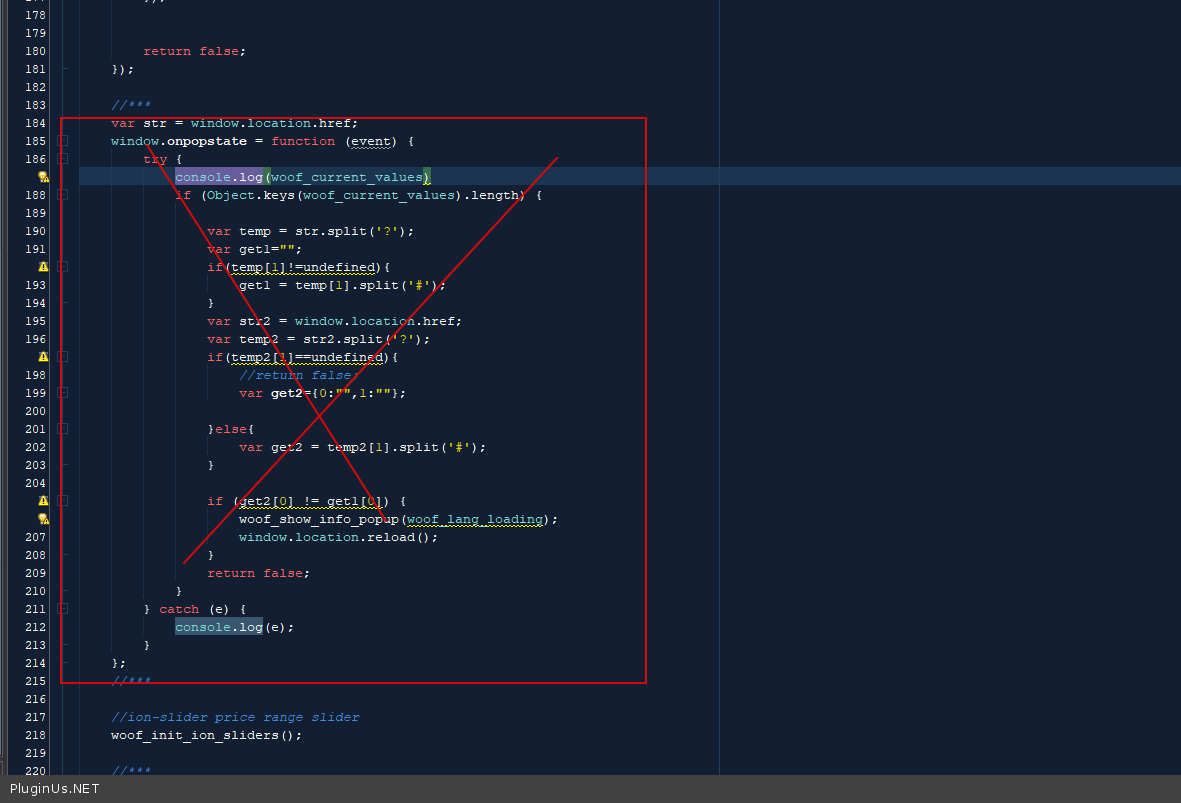
Ok! in file -\wp-content\plugins\woocommerce-products-filter\js\front.js – delete this code – https://c2n.me/4b1jp4v.png
I commented out that part of the code you stated. However, it just makes the warning not show up in the console anymore. The mobile navigation still won’t expand. If I uncheck the one filter and the link no longer has the “?swoof=1&product_tag=engine-controls-sensors-wiring-misc&really_curr_tax=17-product_ca” after it, then the mobile navigation works again.
This is strange why it has a conflict when the “?woof=” filter is added.
I then added a jQuery.noConflict(); around my script for the mobile navigation expand/toggle. Then it started working again on that filter page.
Thank you!
Hello
The mobile navigation still won’t expand. – This is most likely a cache
Welcome;)