keyboard_arrow_down 44 ERROR: Invalid or missing required attribute
-
save, I installed your plugin, created the feeds and loaded into merchants, but resonates with the errors “keyboard_arrow_down
44 ERROR: Invalid or missing required attribute:’. What is the reason for this and how can it be solved? ThanksThe page I need help with: [log in to see the link]

-
Hey @wilky76,
Apparently, there is a missing attribute that is required by Google.
I am sure Google gives more information as you are displaying here. Let me know what attribute is missing.Auke.
Line Nr.
6
26
48
61
89This is the primary feed, visible here
https://www.ristoaffari.it/wp-content/uploads/wppfm-feeds/Freezers.xml
graces
@wilky76, that is insufficient information. I need to know what your Merchant center is telling you. what exact attributes are missing? I would advise you to talk to the helpdesk from Google to find out what attributes are missing.
When ik look at your feed i can see that there should be way more attribute fields. For instance the “gtin” number is missing.
Make sure you have data in all required fields in the feed manager. Fill them all!
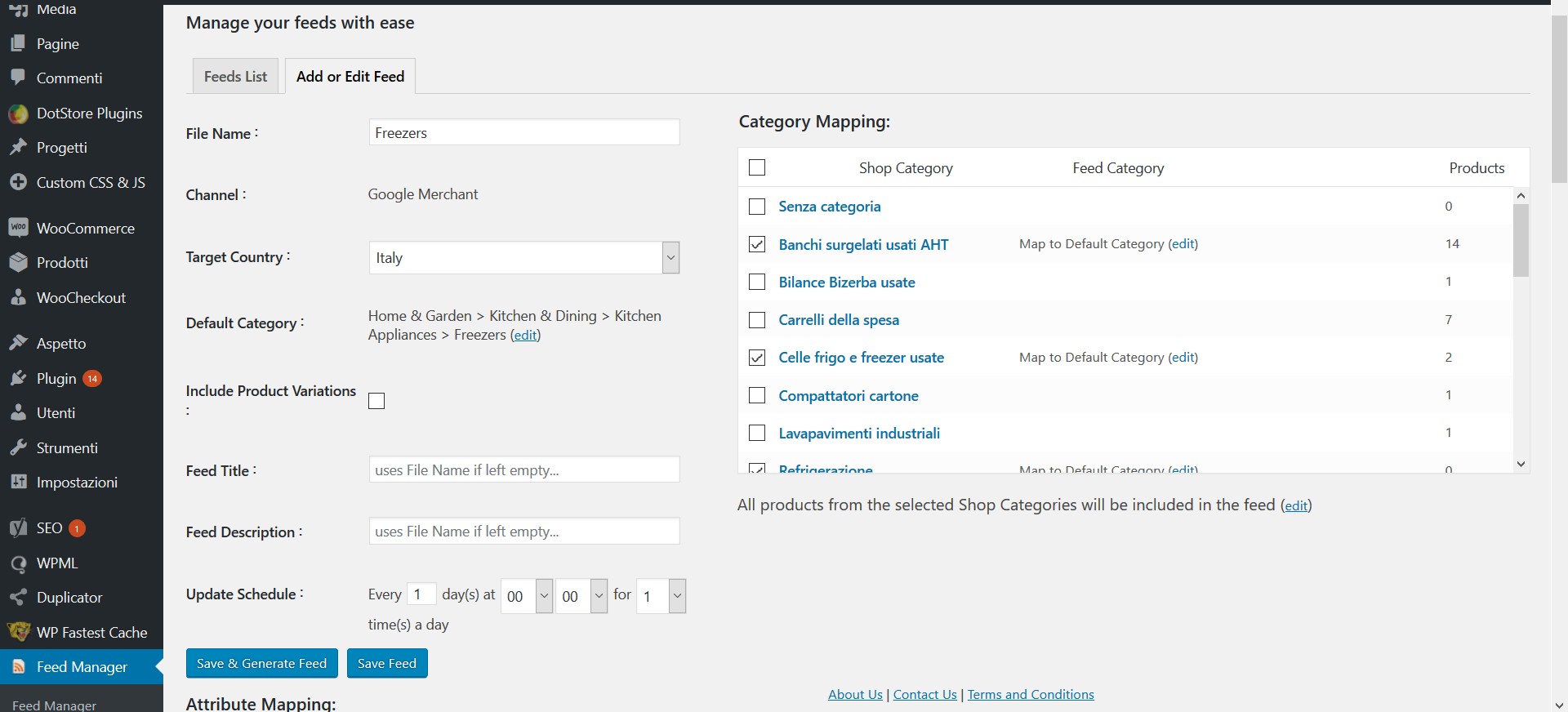
hello, I have set so the feed manager, the part above: below I have not changed anything.
https://www.ristoaffari.it/wp-content/uploads/2018/06/Senza-titolo-1.jpg
What else should I do?
ThanksThat is not enouhg.
Check out the documentation here: https://www.wpmarketingrobot.com/support/documentation/create-product-feed/by google they replied like this:
————————
Unfortunately in the loading you have omitted to indicate the Id of the products, as indicated and explained in detail in the following article (CLICK).
Once you have made the necessary changes, reload the feed, wait a few hours and then everything should be in place.
Once you have made the necessary changes, reload the feed, wait a few hours and then everything should be in place.
————————
how can I solve it?
ThanksAha, yes i think i see what the issue is.
In the feed manager set the ID field to the POST_ID source.So in the dropdown next to ID it say’s SKU(edit)
Klick the edit link and in the dropdown select post IDsave and create feed and you are good to go.
hello, from still error, and google tells me:
—————————-
At the last check of the Technical Consultant, his feed merchant is still missing the following information, as present in the specifications of his 86 errors (click on it):[gtin], [marca] or [brand] and [mpn] are missing for a number of goods reported;
In addition, shipping information is missing for several goods.—————————-
how can I solve it? gracesYou need a GTIN number and/or other unique identifiers.
IF products do not have gtin numbers you should set “identiefier_exists” to “no”Shipping information is best set in the Merchant center itself.
dat weet ik dat is ook niet het probleem, het probleem is dat de feeder die we nu hebben de mogelijkheid niet geeft om bepaalde data weg te laten. Ook hier heb ik inmiddels contact over gehad met google.
Onze producten hebben een gewicht van 1000 tot 1800 kg. Wij hebben hier apparte afspraken over gemaakt met onze leverancier. Echter google merchant blokkeerd automatisch artikelen als ze zwaarder zijn dan 1000 kg.
Maar mijn vraag is, Kan ik jullie plugin ook op een andere manier aanschaffen?
Hi, this is an English support forum and therefore we will communicate in English.
I am sure you will love our plugin because of the many way’s you can manipulate the product feed. You can manipulate the feed in the feed manager but also by using WordPress filters.
We are a Dutch company so payment would not be a problem.
Again, please leave a message via our support page so we can pick it up.hello, I set “identiefier_exists” to “no”.
However, I searched first in the product list to see if there was a field where to enter these codes, but I did not find it. If the customer gave me these codes, where should I enter them?
better to insert them or not?
gracesAccording to Google guidelines you should enter a GTIN number if the product has one. Only in certain situaties like handmade products you could use the identifier_exists = no.
But it will work.
So if you have GTIN numbers i would recommend you te enter them. It is even beter in google shopping because google knows what product you are selling via the GTIN number and can show your product to relevant searches and customers.Hello,
ok, I tried to ask the customer. If you had them, where do I have to enter them?
Thank youciao, scusa ma non ho ancora risolto.
ora mi dice:keyboard_arrow_down
43 ERRORE: identificatori di prodotto insufficienti: mancano due attributi su tre [GTIN, marca, mpn].
keyboard_arrow_down
43 ERRORE: informazioni sulla spedizione mancanti.cosa devo fare?
Grazie


The topic ‘keyboard_arrow_down 44 ERROR: Invalid or missing required attribute’ is closed to new replies.