Hi @luigire
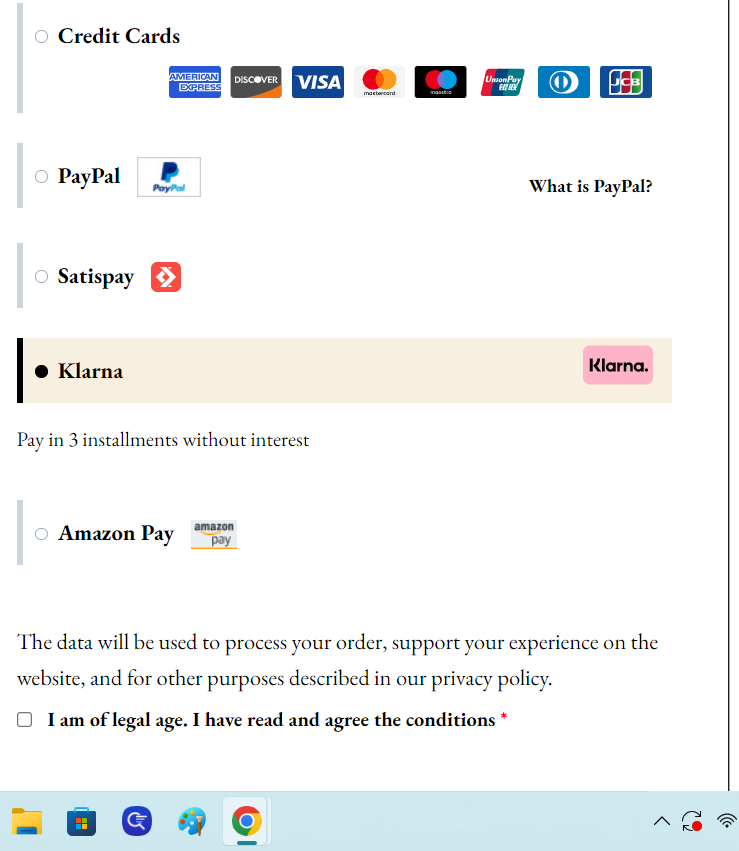
That’s not an error, that’s just styling. You can use the WordPress CSS customizer to make any styling changes you want.
The plugin comes with some default styling, but you can make it look however you want using CSS. Here is an example:
li.payment_method_stripe_klarna label > img{
    float: none !important;
}
Kind Regards,
Hi thanks for the reply. I have inserted the css provided but it has not changed. Can you tell me what to enter to see the icon on the left like the other payment methods?
@luigire You would need to provide a website link so I can give the exact CSS. That example was given so you had an idea of where to start.
ul.payment_methods li.payment_method_stripe_klarna label>img:first-of-type{
    float: none !important;
}
Hi, I entered the code but it doesn’t work. it stays on the right.
Hi @luigire
Then you need to make more specific CSS that overrides the default.
form.checkout ul.payment_methods li.payment_method_stripe_klarna label>img:first-of-type{
    float: none !important;
}
I highly recommend reading some articles on how to add CSS on your site. It will help you make style changes quickly to give the look and feel you are after.
Kind Regards,