Hello @zukenstein
My apologies for the delay in responding to your questions. I had not received the notification for your first entry. I’ve visited your page’s URL: https://propertyanalysistools.co.uk/test-page/, but it is displaying a 404 Error page not found.
Where can I see the form with the issue to check the styles on your page?
Best regards.
Sorry it was set to private try now
https://propertyanalysistools.co.uk/test-page/
Hello @zukenstein
The issue is not caused by our plugin. Your theme includes the following style definition:
#top .input-text,#top input[type="text"],#top input[type="input"],#top input[type="password"],#top input[type="email"],#top input[type="number"],#top input[type="url"],#top input[type="tel"],#top input[type="search"],#top textarea,#top select {
    -webkit-appearance: none;
    border: 1px solid #e1e1e1;
    padding: 8px 6px;
    outline: none;
    font: 1em "HelveticaNeue","Helvetica Neue",Helvetica,Arial,sans-serif;
    color: #777;
    margin: 0;
    width: 100%;
    display: block;
    margin-bottom: 20px;
    background: #fff;
    border-radius: 0px;
}
That applies the CSS rule display: block; to every input tag.
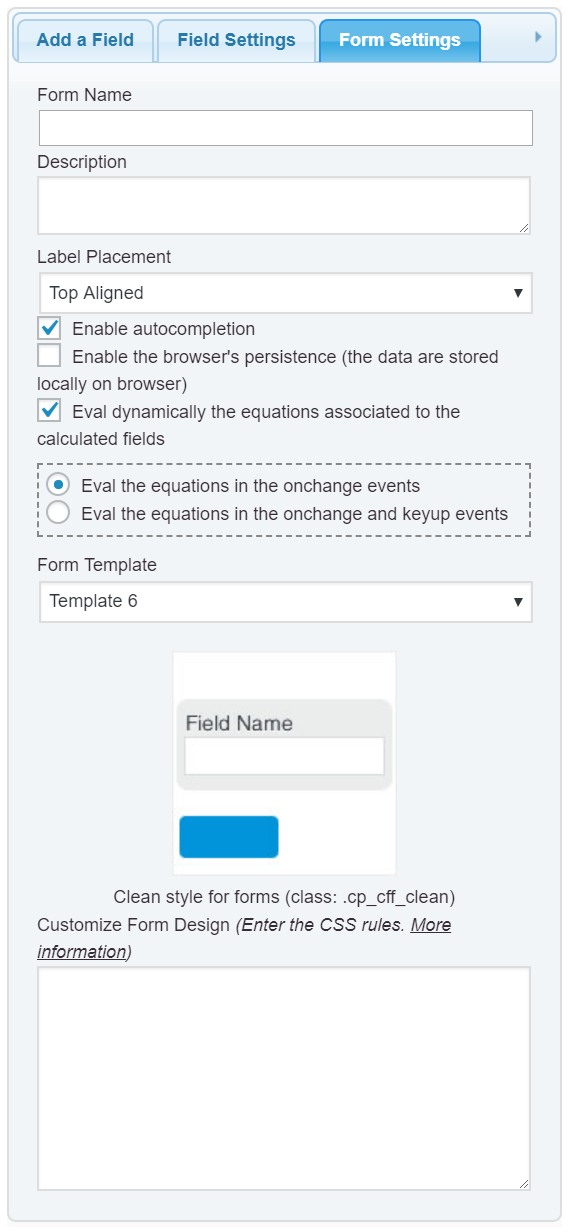
To prevent the styles defined by the theme affect your form, enter the style definition below through the “Customize Form Design” attribute in the ”Form Settings” tab (https://cff.dwbooster.com/images/documentation/form-settings-tab.png):
#fbuilder  input[type="text"],
#fbuilder  input[type="date"],
#fbuilder  input[type="datetime"],
#fbuilder  input[type="email"],
#fbuilder  input[type="password"],
#fbuilder  input[type="number"],
#fbuilder  input[type="search"],
#fbuilder  input[type="time"],
#fbuilder  input[type="url"],
#fbuilder  textarea,
#fbuilder  select {display:inline-block !important;}
Best regards.
Ok that worked thanks very much.
But I would like to understand this, you said it was not caused by your plugin but why did it not do it with the older version of your plugin but did it with the newer version? I changed nothing else.
I just want to understand to learn so I don’t come on here asking so many questions!
Once again thank you for supplying an answer, I love using your plugin.
Hello @zukenstein
We have modified the order in which the files are loaded to load the CSS files of our plugin as soon as possible.
Best regards.
Ok thats great thanks for the explanation