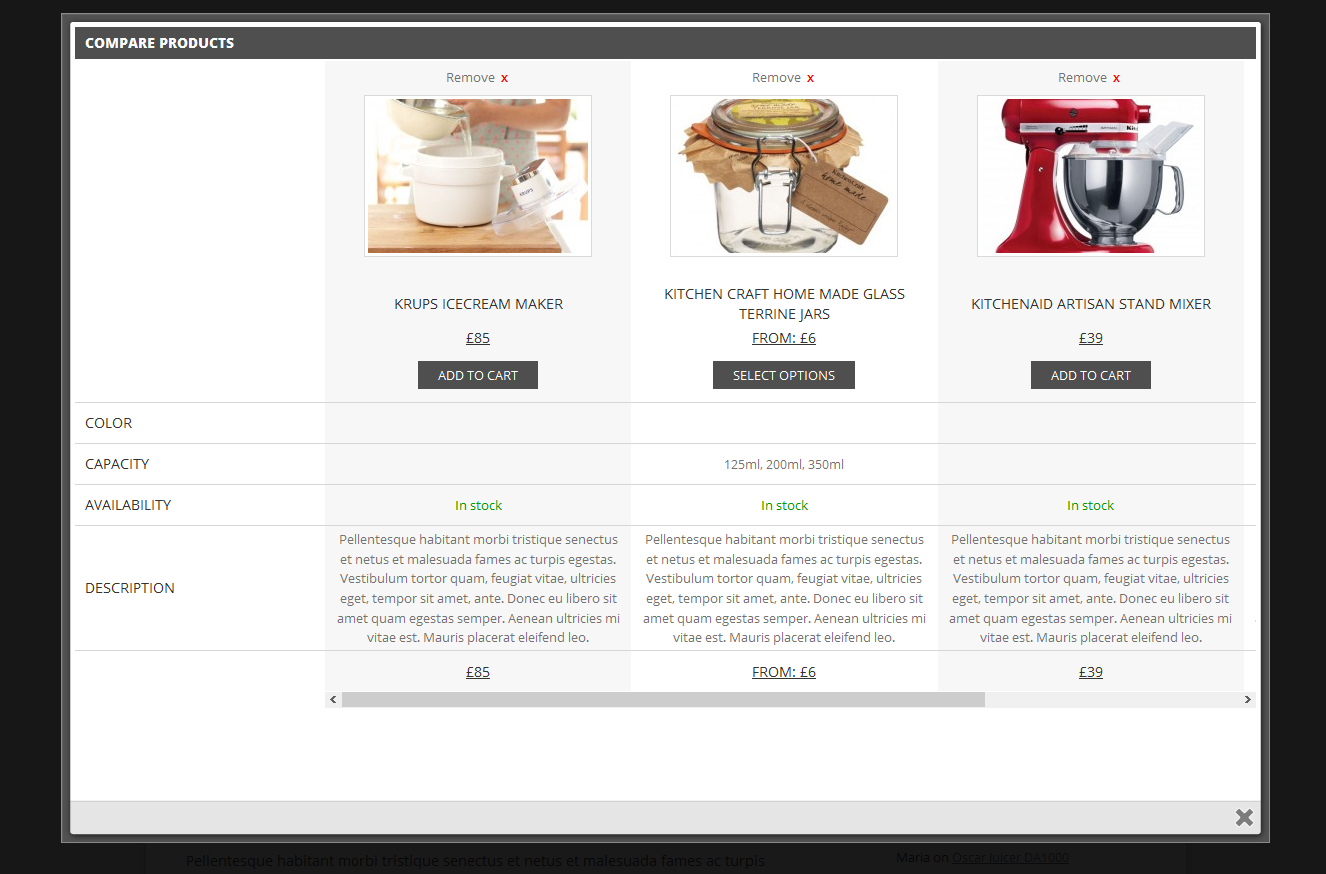
I am currently using the paid version of your plugin. Initially, I was using the free version, but I decided to upgrade to the premium membership specifically to use the Basic Overlay layout as shown in your official screenshot:
Deactivated all other plugins, keeping only WooCommerce and YITH Compare active.
Switched to the default Twenty Twenty-Five WordPress theme to avoid theme-related conflicts.
Despite these steps, the layout still appears differently than your demo. For example, the title appears within the table row <tr>, instead of being placed above the table, which prevents me from achieving the same design as shown in your screenshot.
I have already submitted a support ticket (ID: 307426), but I haven’t received any response yet. Unfortunately, this is delaying my work, which is why I’m reaching out here in hopes of a quicker resolution.
Issue Summary:
Need the title outside the table in full width — same as the demo image.
Require the full layout/design to match the screenshot provided above.
Your prompt support would be greatly appreciated. Thank you!
The page I need help with: [log in to see the link]
I understand that premium support is offered only via the support ticket system. However, I would like to emphasize that both the free and premium versions are developed and maintained by your team, and users rely on your documentation and guidance — regardless of the version in use.
Since the premium version did not meet my expectations, I requested refund. At this point, I am only using the free version of the YITH Compare plugin.
That said, I would sincerely appreciate your support in helping me achieve the basic overlay compare design as shown in your demo, using the free version. I’m not asking for premium features — only assistance with the layout that appears to be part of the default design in your screenshots.
Your help will not only assist me but may also benefit other users in the community.
I have now activated the free version of the plugin on my website, as requested. Kindly check again.
However, I would like to mention that it takes nearly two days to receive a reply, and the question I’ve asked is quite simple. I’m not sure why this is being stretched unnecessarily. I would really appreciate it if you could kindly provide a clear answer regarding the popup overlay/layout issue I mentioned earlier.
Thank you for your message. We are currently experiencing a high volume of requests, which has caused delays in response times. We greatly appreciate your patience and understanding as we work to assist everyone as quickly as possible.
Reviewing your comments, we would like to inform you that the screenshot in the free version corresponds to a previous version of the plugin. The current version (3.0 and later) has been updated and features a refreshed design, as shown on the premium version landing page. We apologize for the inconvenience. These images will be updated as soon as possible.
If you need the previous version’s design, I recommend using a rollback plugin such as WP Rollback.
We understand that the design has been updated in version 3.0 and onward. We prefer to use the latest version of the plugin — not the older one — but we would like to customize the compare table layout, specifically:
Display the title as full width, above the <table> tag (not inside it).
To achieve this, could you please guide us on the following:
Is it possible to edit the compare template to adjust the layout?
Can we override the template file in our theme (like WooCommerce does), or do we need to modify the plugin files directly?
Are there any available hooks or filters that we can use to change the placement of the title?
We’d really appreciate your help in pointing us in the right direction, so we can keep using the latest version with our required layout.