Hello @pvtsolver
Yes, of course. Please, follow the steps below:
1. Insert a div field in the form, and select the “3 Columns” option for its “Columns” attribute.
2. Drag and drop the other three fields inside the Div one inserted previously.
That’s all. Please, watch a video tutorial, visiting the following link:
https://wordpress.dwbooster.com/customdownloads/videos/video_columns_container.mp4
Best regards.
Got it. Thank you
Can I add gaps between columns (adjacent field boxes)?
Hello @pvtsolver
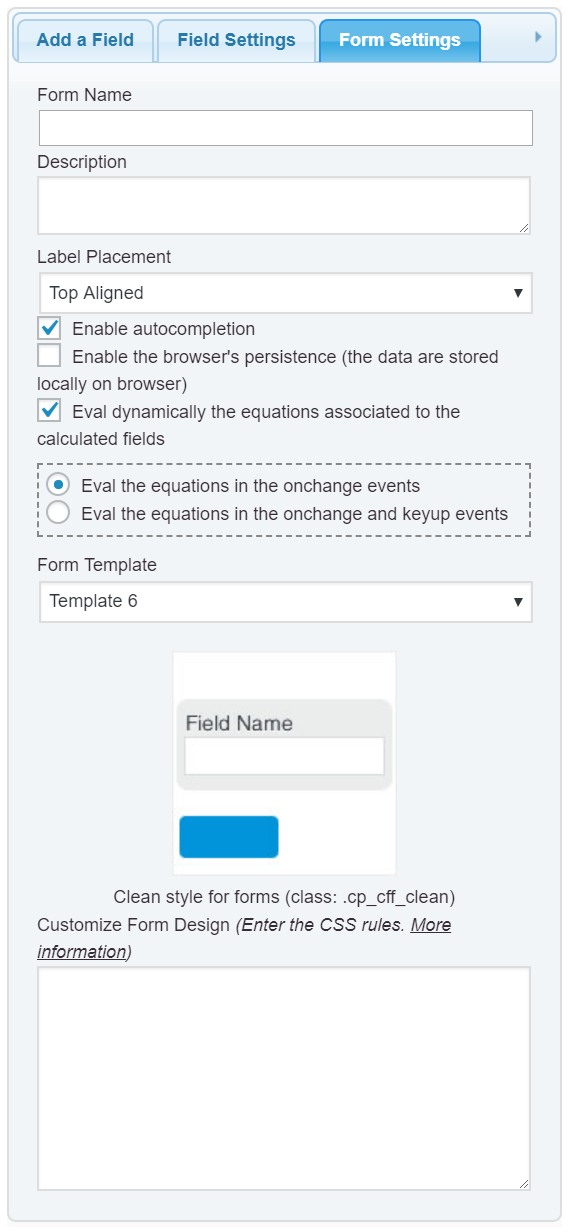
Yes, that’s possible. The simplest solution would be to enter the style definition below into the “Customize Form Design” attribute, in the “Form Settings” tab (https://cff.dwbooster.com/images/documentation/form-settings-tab.png)
#fbuilder .cff-container-field .column3:nth-child(3n+1){padding-right:10px;}
#fbuilder .cff-container-field .column3:nth-child(3n){padding-left:10px;}
#fbuilder .cff-container-field .column3:nth-child(3n+2){padding-left:5px;padding-right:5px;}
That’s all.
Best regards.
Got it. It works.
But I want the appearance in the mobile UI to keep in full-width.
Please advise.
Hello @pvtsolver
In this case, you should use the @media directive of CSS:
@media (min-width:640px)
{
#fbuilder .cff-container-field .column3:nth-child(3n+1){padding-right:10px;}
#fbuilder .cff-container-field .column3:nth-child(3n){padding-left:10px;}
#fbuilder .cff-container-field .column3:nth-child(3n+2){padding-left:5px;padding-right:5px;}
}
Best regards.