Matomo Analytics is not working
-
Hello,
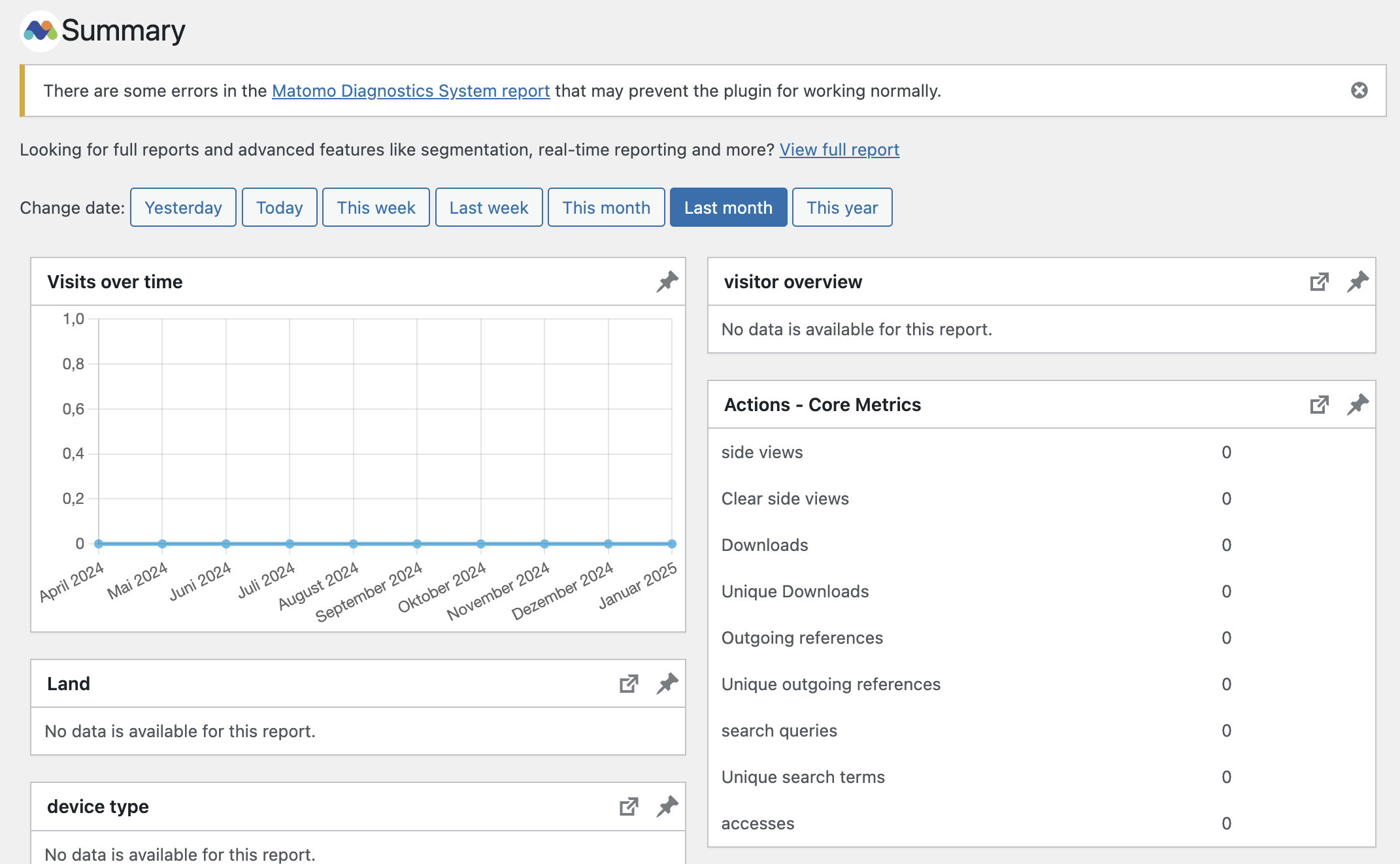
since I installed Matomo Analytics in November, it hasn’t been working: I don’t see any visitors.
That’s why I had also installed Matomo Connect so that I could see my visitors on the website. However, I prefer to have them displayed in WordPress.
Here are a screenshot and the system report. I hope you can help me.
(I only have Adobe Acrobat as a Chrome extension, but it was deactivated. So it shouldn’t have caused any problems).Best regards, Katrin
# Matomo- Matomo-Plugin-Version: 5.2.0
- Config existiert und ist schreibbar.: Ja (“$abs_path/wp-content/uploads/matomo/config/config.ini.php” )
- JS Tracker existiert und ist schreibbar.: Ja (“$abs_path/wp-content/uploads/matomo/matomo.js” )
- Plugin-Verzeichnisse: Yes ([{“pluginsPathAbsolute”:”$abs_path\/wp-content\/plugins\/matomo\/plugins”,”webrootDirRelativeToMatomo”:”..\/plugins”}])
- Tmp-Verzeichnis schreibbar: Yes ($abs_path/wp-content/cache/matomo)
- Matomo-Version: 5.2.1
- Matomo Blog idSite: 1
- Installierte Matomo-Version: 5.2.0 (Install date: 2025-01-14 09:46:37)
- Upgrades outstanding: No
- Upgrade in progress: No
Endpoints
- Matomo JavaScript Tracker URL: ($site_url/wp-content/uploads/matomo/matomo.js)
- Matomo JavaScript Tracker – WP Rest API: ($site_url/wp-json/matomo/v1/hit/)
- Matomo HTTP Tracking API: ($site_url/wp-content/plugins/matomo/app/matomo.php)
- Matomo HTTP Tracking API – WP Rest API: ($site_url/wp-json/matomo/v1/hit/)
Crons
- Server-Zeit: 2025-01-21 17:26:10
- Blog-Zeit: 2025-01-21 18:26:10 (Die nachfolgenden Daten werden in der Blog-Zeitzone angezeigt)
- Sync users & sites: Next run: 2025-01-22 11:55:52 (17 Stunden 29 Minuten) ( Last started: 2025-01-21 11:55:52 (-6 Stunden 30 Minuten). Last ended: 2025-01-21 11:55:52 (-6 Stunden 30 Minuten). Interval: daily)
- Archive: Next run: 2025-01-21 18:28:23 (2 Minuten 13s) ( Last started: 2025-01-21 17:28:21 (-57 Minuten 49s). Last ended: 2025-01-21 17:28:23 (-57 Minuten 47s). Interval: hourly)
- Update GeoIP DB: Next run: 2025-02-16 11:38:13 (25 Tage 17 Stunden) ( Last started: 2025-01-17 11:38:11 (-4 Tage 6 Stunden). Last ended: 2025-01-17 11:38:13 (-4 Tage 6 Stunden). Interval: matomo_monthly)
Vorgeschriebene Prüfungen
- PHP-Version >= 7.2.5: ok
- PDO Erweiterung: ok
- PDO\MYSQL Erweiterung: ok
- MYSQLI Erweiterung: ok
- Weitere erforderliche Anforderungen: ok
- Erforderliche Funktionen: ok
- Benötigte PHP Konfiguration (php.ini): ok
- Verzeichnisse mit Schreibzugriff: ok
- Verzeichnisse mit Schreibzugriff auf Tag Manager: ok
Optionale Prüfungen
- 64-bit PHP Binär: ok
- Tracker-Status: ok
- Speicherlimit: ok
- Zeitzone: ok
- Öffnen einer URL: ok
- GD > 2.x + FreeType (Grafiken): ok
- Andere Erweiterungen: ok
- Andere Funktionen: ok
- Dateisystem: ok
- Letzter erfolgreicher Abschluss der Archivierung: ok
- Datenbankfähigkeiten: ok
- Warning Maximale Packetgröße: warning (Es wird empfohlen die ‘max_allowed_packet‘ Größe in Ihrer MySQL Datenbank auf mindestens 64MB zu erhöhen. Aktuell ist 16MB eingestellt. )
- Standorterkennung: ok
- Update über HTTPS: ok
- Mobile Messaging SMS Provider: ok
- Supports Async Archiving: No
- Async Archiving Disabled in Setting: No
- Location provider ID: geoip2php
- Location provider available: Yes
- Location provider working: Yes
- Matomo URL: Yes (http://vom-traum-zum-haus.de/wp-content/plugins/matomo/app/)
Matomo Settings
- Track mode: default
- Track ecommerce: No
- Track codeposition: footer
- Track api endpoint: default
- Track js endpoint: default
- Version history: 5.2.0, 5.1.7, 5.1.6, 5.1.5
- Core version: 5.2.1
- Last tracking settings update: 1733830723
- Last settings update: 1737028019
- Track ecommerce: No
- Disable cookies: Yes
Logs
- Keine:
WordPress
- Home URL: $site_url
- Site URL: $site_url
- WordPress Version: 6.7.1
- Number of blogs: 1
- Multisite Enabled: No
- Network Enabled: No
- WP_DEBUG: Yes
- WP_DEBUG_DISPLAY: No
- WP_DEBUG_LOG: Yes
- DISABLE_WP_CRON: –
- FORCE_SSL_ADMIN: Yes
- WP_CACHE: No
- CONCATENATE_SCRIPTS: –
- COMPRESS_SCRIPTS: –
- COMPRESS_CSS: –
- ENFORCE_GZIP: –
- WP_LOCAL_DEV: –
- WP_CONTENT_URL: $site_url/wp-content
- WP_CONTENT_DIR: $abs_path/wp-content
- UPLOADS: –
- BLOGUPLOADDIR: –
- DIEONDBERROR: –
- WPLANG: –
- ALTERNATE_WP_CRON: –
- WP_CRON_LOCK_TIMEOUT: 60
- WP_DISABLE_FATAL_ERROR_HANDLER: –
- MATOMO_SUPPORT_ASYNC_ARCHIVING: –
- MATOMO_ENABLE_TAG_MANAGER: –
- MATOMO_SUPPRESS_DB_ERRORS: –
- MATOMO_ENABLE_AUTO_UPGRADE: –
- MATOMO_DEBUG: –
- MATOMO_SAFE_MODE: –
- MATOMO_GLOBAL_UPLOAD_DIR: –
- MATOMO_LOGIN_REDIRECT: –
- Permalink Structure: /%postname%/
- Possibly uses symlink: No
- Upload base url: $site_url/wp-content/uploads
- Upload base dir: $abs_path/wp-content/uploads
- Upload url: $site_url/wp-content/uploads/2025/01
- Custom upload_path: wp-content/uploads
- Custom upload_url_path:
- Warning Connect Matomo (WP-Matomo) activated: Yes (It is usually not recommended or needed to run Matomo for WordPress and Connect Matomo at the same time. To learn more about the differences between the two plugins view this URL)
- Connect Matomo mode: http (Connect Matomo is configured in “PHP mode”. This is known to cause issues with Matomo for WordPress. We recommend you either deactivate Connect Matomo or you go “Settings => Connect Matomo” and change the “Matomo Mode” in the “Connect to Matomo” section to “Self-hosted HTTP API”.)
- Compatible content directory: Yes
- WP_Filesystem Initialized: Yes
WordPress Plugins MU Plugins
- Object Cache Pro (MU): 1.21.2
- System Plugin: 4.157.0
Plugins
- Advanced Ads: 1.56.1
- Advanced Ads – Google AdSense In-feed Placement: 1.1.3
- Affiliate Link Marker: 1.0.9
- All in One SEO: 4.7.8
- Autoptimize: 3.1.13
- Broken Link Notifier: 1.1.4.1
- CoBlocks: 3.1.14
- Connect Matomo: 1.0.30
- Contact Form 7: 6.0.3
- Copy & Delete Posts: 1.4.9
- Email Encoder – Protect Email Addresses: 2.2.2
- Kadence Blocks – Gutenberg Blocks for Page Builder Features: 3.4.6
- MailPoet: 5.6.1
- Matomo Analytics – Ethical Stats. Powerful Insights.: 5.2.0
- Post Views Counter: 1.4.8
- Powerkit: 2.9.6
- Real Cookie Banner (Free): 5.0.7
- Shariff Wrapper: 4.6.15
- Sidebar Shortcode: 1.0.0
- Simple Author Box: 2.54
- Smash Balloon Instagram Feed: 6.6.1
- Starter Templates by Kadence WP: 2.1.9
- UpdraftPlus – Backup/Restore: 1.25.1
- WP-Sweep: 1.1.8
- WP Armour – Honeypot Anti Spam: 2.2.06
- WPCode Lite: 2.2.5
- WP File Manager: 8.0.1
- Active Plugins: 27 (advanced-ads-adsense-in-feed:1.1.3 advanced-ads:1.56.1 affiliate-link-marker:1.0.9 all-in-one-seo-pack:4.7.8 autoptimize:3.1.13 broken-link-notifier:1.1.4.1 coblocks:3.1.14 contact-form-7:6.0.3 copy-delete-posts:1.4.9 email-encoder-bundle:2.2.2 honeypot:2.2.06 insert-headers-and-footers:2.2.5 instagram-feed:6.6.1 kadence-blocks:3.4.6 kadence-starter-templates:2.1.9 mailpoet:5.6.1 matomo:5.2.0 post-views-counter:1.4.8 powerkit:2.9.6 real-cookie-banner:5.0.7 shariff:4.6.15 simple-author-box:2.54 thinker-sidebar-shortcode:1.0.0 updraftplus:1.25.1 wp-file-manager:8.0.1 wp-piwik:1.0.30 wp-sweep:1.1.8)
- Theme: kadence (every-morning)
Server
- Server Info: Apache
- Apache AddHandler support: Supported
- PHP OS: Linux
- PHP Version: 8.0.30.4
- PHP SAPI: cgi-fcgi
- PHP Binary Name: /opt/php/8.0/php-cgi
- PHP Maxmind DB extension: Not loaded
- PHP Error Reporting: 4437 After bootstrap: 4437
- Timezone: UTC
- WP timezone: +01:00
- Locale: de_DE
- User Locale: de_DE
- Memory Limit: 512M (At least 128MB recommended. Depending on your traffic 256MB or more may be needed.)
- WP Memory Limit: 40M
- WP Max Memory Limit: 512M
- Timezone version: 2022.6
- Time: 1737480371
- Max Execution Time: 300
- Max Post Size: 100M
- Max Upload Size: 104857600
- Max Input Vars: 10000
- Disabled PHP functions: No
- zlib.output_compression is off: Yes
- Curl Version: 8.9.1, OpenSSL/3.1.7
- Suhosin installed: No
PHP cli
- PHP CLI Version: (The detected PHP CLI version does not match the PHP web version. To avoid archiving errors, enable archiving via HTTP requests, or manually set the path to your PHP CLI executable to the one for PHP version 8.0.30.4.)
- MySQLi support: missing (Your PHP cli does not load the MySQLi extension. You might have archiving problems in Matomo but also others problems in your WordPress cron tasks. You should enable this extension)
Database
- MySQL Version: 8.0.33
- Mysqli Connect: Yes
- Force MySQL over Mysqli: No
- DB Prefix: wp_pz3bqkjdh9_
- DB CHARSET: utf8
- DB COLLATE:
- SHOW ERRORS: No
- SUPPRESS ERRORS: No
- Uses Socket: No
- Uses IPv6: No
- Matomo tables found: 87
- DB tables exist: Yes
- Matomo users found: 1
- Matomo sites found: 1
- Erforderliche Berechtigungen: OK
Browser
- Browser: (Mozilla/5.0 (Macintosh; Intel Mac OS X 10_15_7) AppleWebKit/537.36 (KHTML, like Gecko) Chrome/131.0.0.0 Safari/537.36)
- Language: de-de,de,en-us,en,fr
The page I need help with: [log in to see the link]

Viewing 9 replies - 1 through 9 (of 9 total)

Viewing 9 replies - 1 through 9 (of 9 total)
The topic ‘Matomo Analytics is not working’ is closed to new replies.