Hi @juulkoopman
I’ve right now tested the plugin https://ww.wp.xz.cn/plugins/mailchimp-for-wp/ with SCFM and had no problems. I see the option both on desktop and mobile.
But I’ve tested it with the default WordPress theme Twenty Seventeen and no other plugin, only SCFM, and Mailchimp For WP.
I’ve tried both with the shortcode in the footer widget area and directly with the widget provided by the plugin and had no problem.
I suggest you, switch to a default WordPress theme and keep active only SCFM and Mailchimp for WP.
If the problem is solved, perform another test this time with your theme. If you have again the problem, we will focus on the theme, if not so, go ahead enabling a plugin after the other until you don’t find the problem again.
Installing Freesoul Deactivate Plugins you can do it only in preview mode without really switching to the default theme and disabling the other plugins. So the live site will not be affected.
Here you have some explanations about how to do it: https://freesoul-deactivate-plugins.com/how-check-which-plugin-causes-issues/.
In your case, after loading the preview you should inspect elements, click on the mobile simulator, and refresh the page. Don’t wait too much before refreshing the page, in another case, it will load all plugins and the actual theme.
After the suggested tests we will know if your theme or one of your plugin is having a conflict with SCFM and I can focus on it.
I hope it’s clear, if not so let me know.
Thanks for the quick reply!!
I have the same plugins working on all pages and on all pages with the SCFM plugin, the forms aren’t working so it should be the SCFM plugin that it causing the problem. This website is scheduled to go live tomorrow so I unfortunately don’t have time to do the tests you suggested.
You sure there isn’t another solution to this problem?
I don’t say the problem is not caused by SCFM, but that another plugin or the theme is causing the problem together with SCFM. This is confirmed by my test with the default WordPress theme and no other plugins. I had no problem with MC4WP.
The tests I suggested require a few minutes.
The only other solution if you want to go live tomorrow is deactivating SCFM, I don’t see any other quick solutions.
Unfortunately, testing exactly the same plugin MC4WP on my installation, if I have no issues, I can’t imagine what’s causing the problem on your installation. You have another theme and other plugins.
Hi Jose,
Thank you.
I’ve tried testing it with Freesoul but with all my tests (deactivating plugins etc.) i see the MC4WP forms.
When I disable a plugin and check the page>inspect elements>change device to mobile I never see the pages that i’ve made with the SCFM plugin. It just shows how the normal page would look like when I don’t use the SCFM plugin (if you know what I mean).
Maybe i’m doing something wrong. Is it possible that you do a quick test with the Freesoul plugin? I can send the admin login. That’s the only way atm to get it working tomorrow I think.
Hope you can help me.
Thanks again!!
Hi @juulkoopman
after you click on the mobile simulator, you need to refresh the page, in another case you always see the desktop version.
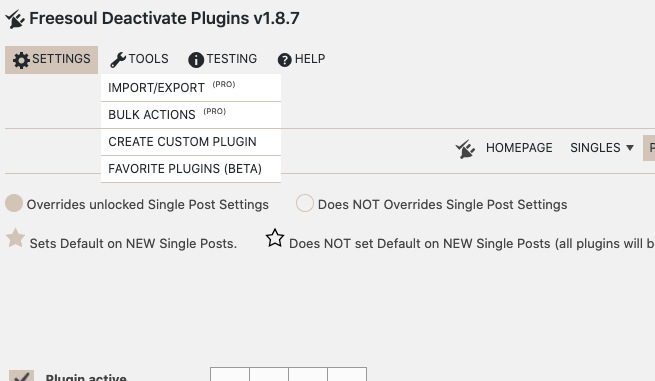
If you want you can go to Freesoul Deactivate Plugins => Tools => Favoriite Plugins => Export => click on “Export the list”
See the picture https://freesoul-deactivate-plugins.com/wp-content/uploads/2021/02/fdp-plugin-manager-export-plugins-list.png
If you provide me the list of plugins and the name of the theme, I can try to reproduce the problem on my installation.
For your information, I will have time to check it not before a couple of days.
Hi Jose,
Even when I immediately refresh the page it shows the desktop version. Strange. Do I maybe need to clear my cache?
Hi @juulkoopman
please go to Freesoul Deactivate Plugins => Tools => Favoriite Plugins => Export => click on “Export the list”
See the picture https://freesoul-deactivate-plugins.com/wp-content/uploads/2021/02/fdp-plugin-manager-export-plugins-list.png
Then please provide me the exported list of plugins and the name of the theme, so I can try to reproduce the problem on my installation.
Hi Jose,
https://we.tl/t-kqphui4O5T
Thats the link to the exported list
Thank you. Any idea when you can reproduce the problem?
Hi @juulkoopman
I’ve installed and tested all the plugins on your list excluding the following:
booked
cookie-law-info
envato-market
kau-boys-backend-localization
kioken-blocks
mc4wp-premium
mwt-addons
mwt-helpers
mwt-unyson-extensions
mwt-widgets
NKS-custom
redux-framework
wordpress-helpdesk
wp-user-avatar
yikes-inc-easy-mailchimp-extender
I had no problems displaying the newsletter opt-in in the footer on the mobile version, but probably one of the plugins above or your theme is giving the conflict.
I suspect about:
mc4wp-premium
redux-framework
yikes-inc-easy-mailchimp-extender
and about your theme DeepDigital
Sorry, but because they are premium products, and I don’t have them, unfortunately, I can’t test them. It’s not sustainable testing all premium plugins and themes.
If you want you can export the installation with All In One WP Migration, which is already installed, and provide me the link to the exported file-
Of course, not here, you can send it to [email protected]
I have no other suggestions. I will not log in to your backend because I don’t want to take any responsibility and it’s also against the guidelines of this forum.
If you can’t share the exported file, I totally understand. In this case, if you can, send me the theme, that I consider the most probable cause of the conflict.