Members and upload
-
I dont understand why only me can upload photos, not my WP members?

-
This is a duplicate of https://ww.wp.xz.cn/support/topic/wppa-8-upload-just-for-the-admins/
It is under investigation. There is a workaround:
Untick Advanced settings -> Users -> I: Item 5 Progression barUpdate to 8.0.02.010, and note the following from the updated changelog:
If frontend upload does not work properly when the progressbar (i.e. ajax upload) is on, try one of the alternate methods listed in Advanced settings -> Users -> I Item 5.1: Upload Ajax method
Download https://downloads.wp.xz.cn/plugin/wp-photo-album-plus.8.0.03.001.zip
Install as Plugins -> Add New -> Upload Plugin, and click the ‘Replace current with upload’ button.Changelog of 8.0.03.001 so far:
= 8.0.03 =
* Extended alternate ajax methods and fixed certain links.
If frontend ajax links do not work, you can select different ajax methods on Advanced settings -> System -> I Item 5: Ajax method. (‘Normal’ is default).
‘Classic’ is like pre ver 8 method ‘Ajax non admin’ ticked, ‘Backend’ method is like pre ver 8 ‘Ajax non admin’ unticked (uses admin-ajax).If frontend upload does not work (give errors) set Advanced settings -> Users -> I Item 5.1: Upload Ajax method to ‘extern’ (like ‘classic’) or to ‘backend’ (uses admin-ajax). (‘normal’ is default).
Note on upload. If you want users to upload to sites that have a site password, i.e. where users do not need to login with their name, treat them as non logged in.
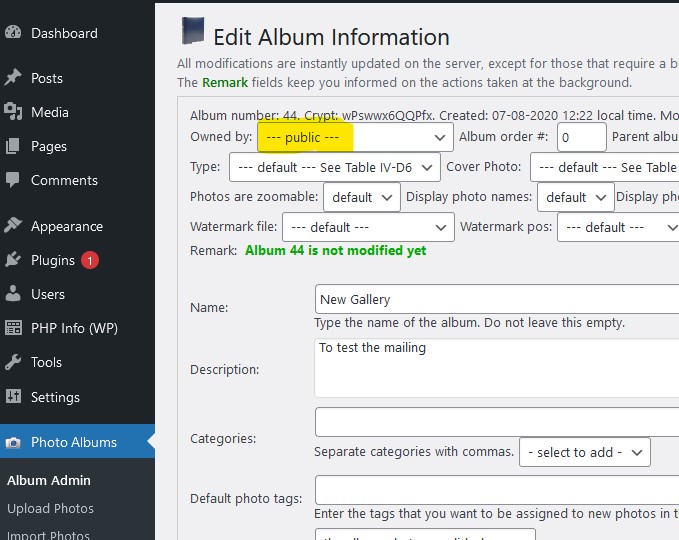
To allow uploads in this case: tick the box in Advanced settings -> Users -> I Item 32: Upload logout, and make sure the owners of the albums allowed to upload to are set to —public—.
If you do not use the widget or the upload shortcode but let them upload using the album cover link, make sure empty albums are not skipped, to allow for the first upload.
See Basic settings -> Albums -> II Item 7: Skip empty albums.Thank you very much your Hard work.
Dosnt work…
Are they logged-in? Does every member has his owm album and is the owner set to the member, or may they upload on different albums and have those albums sert the owner to —public—?
Are they logged out or just behind a general site password and is the box ‘Upload logout’ ticked in Advanced settings -> Users -> I Item 32?
Hi
I have only one album and always before everyone managed to add their picture there.
They are logged in just behind a general site password. Im not alouw non logged-in to upload photosI explained before what you should do in this case:
Note on upload. If you want users to upload to sites that have a site password, i.e. where users do not need to login with their name, treat them as non logged in.
To allow uploads in this case: tick the box in Advanced settings -> Users -> I Item 32: Upload logout, and make sure the owners of the albums allowed to upload to are set to —public—.Just supplying a site password is not what we call logged in.
They are my members, they have to log in/WP.
I cant found this: “and make sure the owners of the albums allowed to upload to are set to —public—.”
I have had wppa for 5 years and I don’t understand what has changed now
-
This reply was modified 4 years, 9 months ago by
areaano.
On the album admin -> edit album information screen.
See: https://wppa.nl/wp-content/wppa-pl/Screenshots/Album-owner-public.jpg -
This reply was modified 4 years, 9 months ago by

The topic ‘Members and upload’ is closed to new replies.