Menu pop up loading behind window.
-
Hello (please ignore the support email I sent I should have posted here).
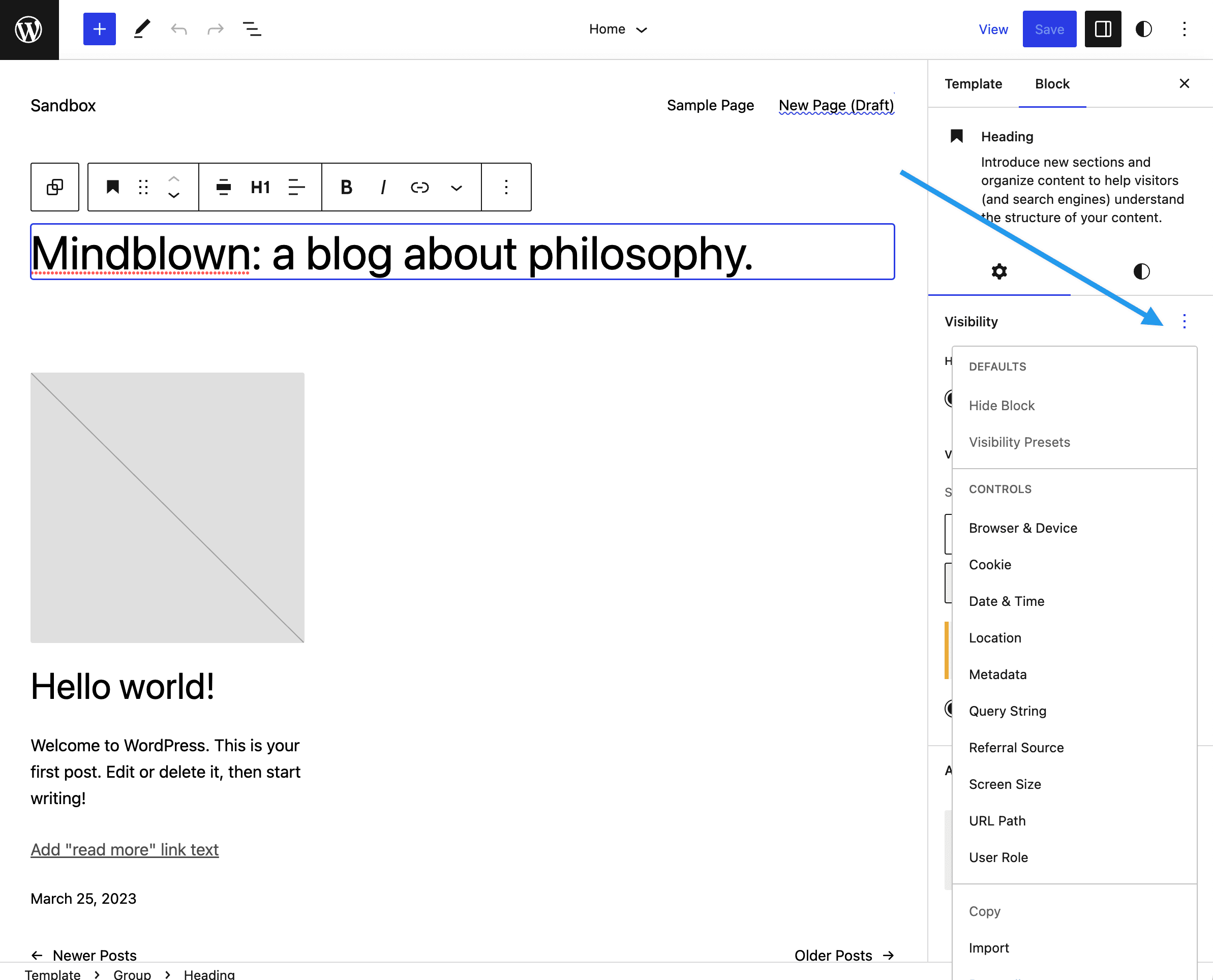
when using the BV presets window the pop ups seem to work fine on edit page/post screens but in the FSE (full site editor) the menus load behind the window and can not be used.
is this jus time and my site?

-
Hi @emburr,
Can you share your WordPress version and do you have Gutenberg installed? If so, what version of Gutenberg?
This sounds like a bug in Core the cropped up recently, but was fixed. Either way, definitely should not be happening!
I look forward to hearing from you.Best,
Nick-
This reply was modified 3 years, 2 months ago by
Nick Diego.
Hey Nick,
of course I should have mentioned it. 6.2 sir! No Gutenberg using the FSE twenty twenty three custom.
Hi. I have the same bug. WordPress 6.2., too.
Morning Nick,
For me I noticed it first on my Mac book using chrome. I actually thought the plug-in didn’t work for me at all as every time I clicked a button nothing happened. I tried again at work from my windows machine (2 big screens) running the latest windows and updated chrome.
So mac and windows both using newest version of chrome.
since I know you can’t replicate it I will try the other browsers and start killing plugins off to see what I can figure out.
Edit..
Same thing with MS Edge for me.
Deactivated all plug-ins and I get the same results. Menus hidden in FSE.
Nick,
just tried a fresh 6.2 install (localhost running in mamp server) with only this plugging running. I get the same results in FSE (hidden menu). Works on post edit screens.
Hmm, thanks for retesting. Definitely scratching my head on this one.
This is what I am seeing on 6.2, Twenty Twenty-Three, and only BV enabled. (Chrome, Safari)
https://d.pr/i/wCM4NC
I’ll keep testing, but this is a tricky one.Best,
NickSorry one more.. set up a local host test with 6.1 and the plug-in works as expected. Menu not hidden. So must be a change in 6.2.
Nick I think we are lookin g at different things. Picture attached.

-
This reply was modified 3 years, 2 months ago by
eMBurr.
I have not tested it with a virgin wordpress installation like @emburr but the hidden part is exactly at the same place on my other computer.
You click on “Visibility Presets”: https://prnt.sc/qpWmPR2OlqGU after that, you click on the edit icon: https://prnt.sc/wZQOKCHOtTK8
On my computer at work, I can not reproduce the hidden element. When I click on the edit icon, just nothing happens at all.
At home I tried:
– Newest Chrome (many plugins)
– Newest Chrome inkognito (no plugins, no cache)
– Newest Edge (no plugins)
– Newest Firefox (no plugins)
With none of these I was able to use the “edit” icon inside Visibility PresetsAh, thanks for these screenshots @jueluz and @emburr. I was looking in the wrong spot. 🤦♂️
I was able to replicate this issue in the Site Editor within the Visibility Presets modal. I’ll investigate further and work on a fix. It does appear to be something related to WordPress 6.2.
As a temporary solution, you could create your Visibility Presets from within the post/page Editor. Then apply them to blocks in the Site Editor.
Best,
Nick-
This reply was modified 3 years, 2 months ago by
Hi @emburr and @jueluz, thanks again for all your help is identifying this issue.
Upon further investigation, this is a regression in WordPress 6.2 caused by some errant CSS. The issue has been reported in #47614, and I am working on getting a fix included in WordPress 6.2.1, which will come out towards the end of April.
Unfortunately, there is nothing I can do on the Block Visibility side until Core is patched. I do expect a fix to come more quickly in Gutenberg. Therefore, I am going to close this issue out, but keep an eye on #47614.
You could create your Visibility Presets from within the post/page Editor as a temporary solution. Then apply them to blocks in the Site Editor.Best,
Nick -
This reply was modified 3 years, 2 months ago by


The topic ‘Menu pop up loading behind window.’ is closed to new replies.